Jammable (Audio)
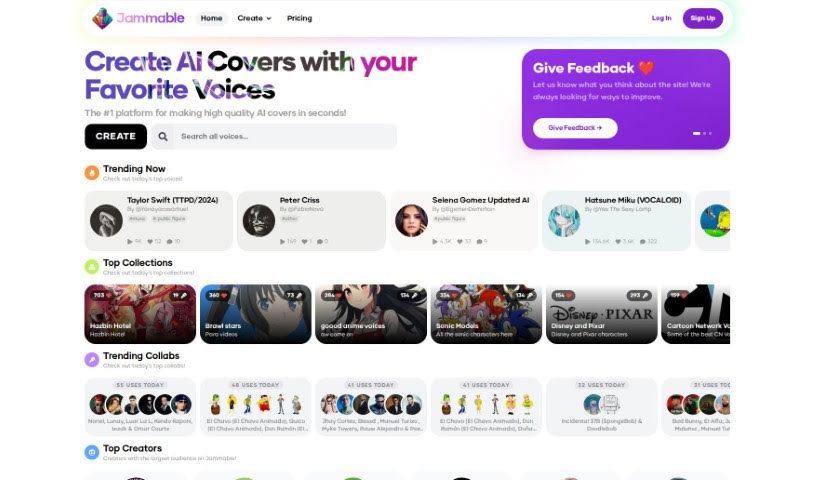
Screenshot of Jammable

Jammable

Discover what Jammable is, a platform for creating high-quality AI covers and custom voice experiences, formerly known as Voicify AI.

Screenshot

What is Jammable?

Jammable is the new name for Voicify AI — the platform has been rebranded, so Voicify AI has now become Jammable. It’s an AI voice and music tool best known for making high-quality AI covers in seconds.

What is Jammable used for?

Jammable supports a range of creative and practical uses:

  • Creating high-quality AI covers in seconds, including covers of artists like Park Chaeyoung (Rosé) from BLACKPINK
  • Creating unique branded voice apps
  • Developing voice-based games and quizzes
  • Crafting custom AI voice experiences for consumer apps
  • Building voice-activated virtual guides for products and services
  • Integrating voice technology into vehicles
  • Designing voice experiences for events and specific locations
  • Creating voice-assisted shopping experiences
  • Enhancing educational programs with voice technology
  • Practicing voice training
  • Sharing voice recordings publicly or keeping them private
  • Building voice assistant platforms and conversational AI applications

Who is Jammable for?

Jammable suits a wide range of users, including:

  • Voice actors
  • Content creators
  • Music artists, music producers, and songwriters
  • Sound designers and audio editors
  • Singers
  • Anime fans and gamers
  • Language learners
  • Impersonators
  • Anyone interested in music, cartoons, anime, or gaming

It’s also useful for people working with different languages, such as German, Korean, French, or Italian.

How to use Jammable?

Getting started is straightforward:

  1. Launch the Jammable platform and register for an account, or log in if you already have one.
  2. Explore the main dashboard to get familiar with the layout.
  3. Start a new project and choose what kind of project you want to make — music, a voice recording, or something else.
  4. Follow the on-screen instructions to set up your project with a title, description, and settings.
  5. Add audio tracks and use the built-in tools for editing and mixing.
  6. Save your progress as you go.
  7. When you’re done, export your project in the format you need, such as MP3 or WAV, to save or share it.

Related

Related AI Tools

Discover more tools in similar categories

New tools, in your inbox.

Weekly picks of the best AI tools we've researched and added — no spam, unsubscribe anytime.

Join 25,000+ AI enthusiasts. No spam, unsubscribe anytime.