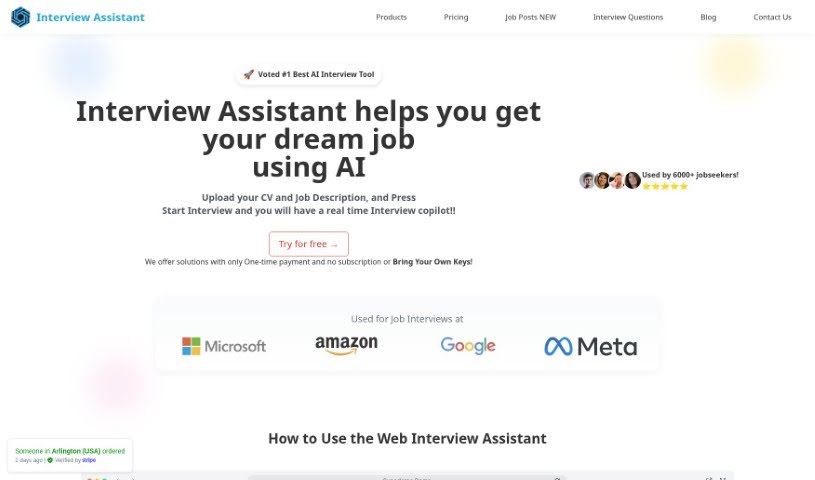
Screenshot of Interview Assistant AI

Interview Assistant AI

Discover what Interview Assistant AI is and learn how to use it effectively in 2025. We'll explore its key features and compare it to other resume builders.

Screenshot

What Exactly is Interview Assistant AI?

Interview Assistant AI is a smart tool built to help you get ready for interviews. It is your personal guide, offering helpful tips and suggestions right when you need them, so you can express your ideas more clearly. Many users have found it really boosts their interview skills. They particularly like the real-time advice and the fact that it keeps their conversations private. With Interview Assistant AI, you can get advice on how to answer common interview questions and even get help making your resume stronger for job applications. The main goal? To help you feel more confident and perform better when it counts.

Just so you know, you’ll need a ChatGPT Plus subscription to use it. This ensures everything runs smoothly and securely while you practice.

Who’s Behind Interview Assistant AI?

Interview Assistant was developed by a company called Deepgram. They launched it on October 20, 2023, with the aim of giving people AI support for interview prep. This includes those handy real-time suggestions and privacy features. The tool is designed to help you feel more confident, polish your interview answers, and get that extra edge when you’re looking for a job.

What Can You Do with Interview Assistant AI?

This tool is pretty versatile when it comes to interview prep. Here’s a breakdown of what it’s great for:

  • Crafting Great Answers: It helps you come up with effective responses to all sorts of potential interview questions.
  • Common Questions Covered: Get specific guidance on how to tackle those standard interview questions, like “Tell me about yourself.”
  • Mastering Interviews: Receive advice on how to handle interviews successfully from start to finish.
  • Resume Polish: It offers practical tips to make your resume stand out for job applications.
  • Confidence Boost: Helps job seekers feel more self-assured.
  • Competitive Edge: Refine your answers to give you an advantage in the job market.
  • Practice Scenarios: Creates an interactive environment to simulate real interview situations.
  • Frequent Questions: Offers advice on questions that often come up.
  • Articulate Your Expertise: Helps you explain what you know clearly and authentically, even when you’re under pressure.
  • Real-time Skill Enhancement: Provides suggestions as you practice to help you articulate your thoughts more clearly.
  • Beyond the Interview: It can even help with your job applications, not just the interview itself.
  • Coding Questions: If you’re in a tech role, it can help translate coding questions into different programming languages.
  • Personalized Coaching: Offers tailored coaching and tips to improve your overall interview game.
  • Privacy Assured: It makes sure your conversations are kept private and confidential.
  • Feedback for the Future: Gives you feedback and helpful tips for your next interview.
  • Secure Access: It’s an AI tool that requires a ChatGPT Plus subscription, giving you secure and monitored access.

Who Should Use Interview Assistant AI?

This tool is particularly helpful for:

  • Software Engineers
  • Data Analysts
  • ML Engineers

But really, anyone preparing for an interview can benefit!

How Do I Use Interview Assistant AI?

Getting started with Interview Assistant is straightforward. Just follow these steps:

  1. Log In and Verify:

    • First, log in using your email address. You’ll then receive a unique 6-digit code via email to confirm your identity and ensure security.
  2. Set Up Your Preferences:

    • Head over to the settings. Here, you can paste your OpenAI Key to keep your data confidential.
    • You’ll also need to choose a Transcription Model. You can select a model like GPT-4 or try out GPT-3.5.
    • Make sure to select your microphone and speakers so the tool can hear and speak to you.
  3. Begin Your Interview Practice:

    • Click on ”+ New” to start a new practice session. If you need a break, just hit the Pause button.
  4. See the AI’s Responses:

    • You’ll see the AI’s answers, usually from GPT-4, displayed on the right side of your screen, labeled as “AI.” The system sends requests about every 60 seconds.
  5. Get Your Feedback:

    • Once your practice conversation is done, click the “Evaluate” button. This will ask GPT-4 to give you a score and feedback.
  6. Explore Extra Features:

    • Remember, the tool offers real-time suggestions during your practice sessions, helping you articulate your thoughts more clearly.
    • It also provides tips to improve your resume and generally boost your interview skills.
    • You can even refine the AI’s performance by adding details about specific job applications or the programming languages you need to handle.

It’s worth noting that Interview Assistant AI isn’t just for tech pros. It’s designed to help all interviewees perform their best. Plus, it really focuses on keeping your conversations private and offers a personalized way to practice for real interview scenarios.

Related AI Tools

Discover more tools in similar categories that might interest you

Adaface AI Resume Parser

Human Resource Recruitment
Learn More

Stay Updated with AI Tools

Get weekly updates on the latest AI tools, trends, and insights delivered to your inbox

Join 25,000+ AI enthusiasts. No spam, unsubscribe anytime.