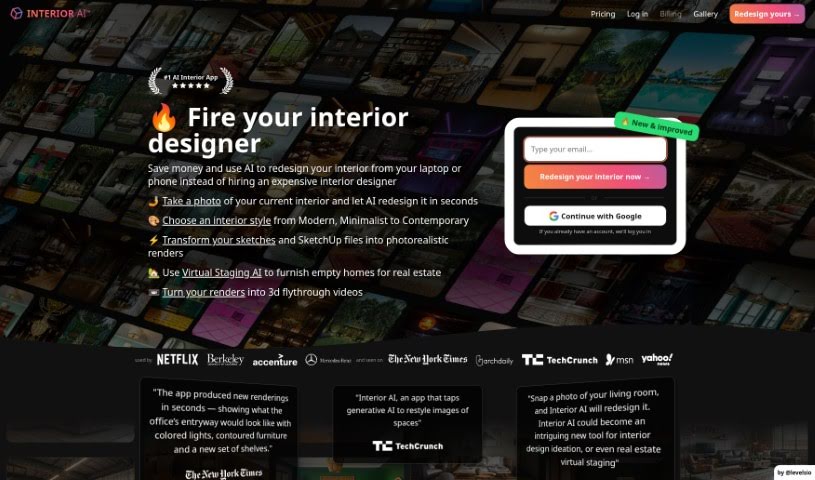
What is Interior AI?
Interior AI is a smart software that uses artificial intelligence to help with virtual staging, coming up with interior design ideas, and sparking inspiration. It lets you see how furniture and decor would look in your own space. You can try out different design styles and get realistic pictures of what your interiors could look like. It’s a really helpful tool if you’re thinking about redecorating your home or even just a single room. It opens up tons of design possibilities and gives you plenty of fresh ideas. With Interior AI, you can quickly find design inspiration and visualize all sorts of options for your living areas.
Who created Interior AI?
Pieter Levels, a Dutch entrepreneur known for projects like Nomad List, Remote OK, Photo AI, and Applicant AI, is the creator behind Interior AI. He’s the founder and the main force driving this software, which uses AI for virtual staging and interior design. The platform lets users see furniture and design concepts in their own spaces, offering lots of inspiration and ideas for decorating.
What is Interior AI used for?
Interior AI offers a variety of ways to help you design your space:
- Virtual Staging AI: This mode fills empty rooms with furniture, staging them realistically.
- Freestyle: Generate entirely new interior designs from scratch, just by picking a style and room type.
- Sketch2Image: Turn your own interior sketches into photorealistic renderings.
- SketchUp: Transform a screenshot from your SketchUp design into a photorealistic image.
- Interior Design with 3D Vision: Change the style of a room while keeping the existing interior layout intact.
- Interior Design (2D photo): Manipulate your space without being limited by existing 3D objects.
- Virtual Staging AI (again): This mode fills empty spaces with furniture, making sure to keep the building’s original construction details.
- AI Interior Design Renders: Create designs using photos you upload.
- Redesigning Interiors: Upload a photo of your current space, pick a new style, and get realistic renders of the redesigned interior.
In its studio, Interior AI gives you access to over 30 room types and more than 50 interior styles to play with.
- Virtual Staging AI: Fills empty spaces with furniture, preserving the building’s construction.
- Freestyle: Creates interior designs from scratch based on your chosen style and room type.
- Interior Design with 3D Vision: Lets you change a room’s style while keeping its current interior.
- Interior Design (2D photo): Offers more freedom to manipulate the space, not sticking to existing 3D objects.
- Virtual Staging AI: Fills empty spaces with furniture.
- Freestyle: Generates interior designs from scratch.
- Sketch2Image: Converts interior sketches into photorealistic renderings.
- SketchUp: Transforms a SketchUp design screenshot into a photorealistic render.
- Virtual Staging AI: Fills up empty spaces with furniture.
- Freestyle: Generates interior designs from scratch based on style and room type.
- Sketch2Image: Converts interior sketches into photorealistic renderings.
- SketchUp: Transforms a screenshot from a SketchUp design into a photorealistic render.
- Interior Design with 3D Vision: Maintains the room’s interior while changing its style.
- Interior Design (2D photo): Allows for more manipulation of the space, not sticking to existing 3D objects.
- Freestyle: Generates interior designs from scratch.
- SketchUp: Transforms a screenshot from a SketchUp design into a photorealistic render.
- Interior Design with 3D Vision: Focuses on maintaining the interior while changing the style.
- Interior Design (2D photo): Offers more freedom to manipulate the space.
- Virtual Staging AI: Fills empty spaces with furniture.
- Freestyle: Generates interior designs from scratch.
- Sketch2Image: Converts interior sketches into photorealistic renderings.
- SketchUp: Transforms a screenshot from a SketchUp design into a photorealistic render.
Plus, real estate agents can use the Virtual Staging AI for quick design concepts and styles. It’s great for exploring different furniture and home décor options and getting inspiration for your interior design projects.
Who is Interior AI for?
Interior AI is a fantastic tool for:
- Interior designers
- Real Estate Agents
- Interior Designers
- Real Estate Agents
How to use Interior AI?
Using Interior AI is pretty straightforward. Just follow these simple steps:
- Sign Up: First, create an account on the Interior AI website to get access to everything.
- Upload Photo: Take clear, well-lit photos of your space. Make sure they’re in JPG, PNG, WebP, or AVIF format for the best results, then upload them.
- Select Design Mode: Pick the mode that fits what you need. You’ve got options like Interior design with 3D Vision, 2D photo interior design, Virtual Staging AI, Freestyle, Sketch2Image, and SketchUp mode.
- Customize Design: Use the built-in tools to tailor your design. You can choose room types, interior styles, furniture, and decor.
- Generate Design: Let Interior AI do its thing! The platform will quickly create realistic renders of your redesigned interior based on what you’ve selected.
- Review and Edit: Take a look at the generated design for any AI quirks. Interior AI lets you manually brush away artifacts and regenerate specific parts if needed.
- Payment and Subscription: Check out the pricing. They offer annual subscriptions that save you money. Payments are secure and can be made using credit or debit cards.
- Feedback and Improvement: Interior AI is always working to make its AI models better, using user feedback to produce higher-quality renders. Your input really helps the platform improve.
By following these steps, you can easily use Interior AI’s features to visualize and redesign your space with a touch of innovation.