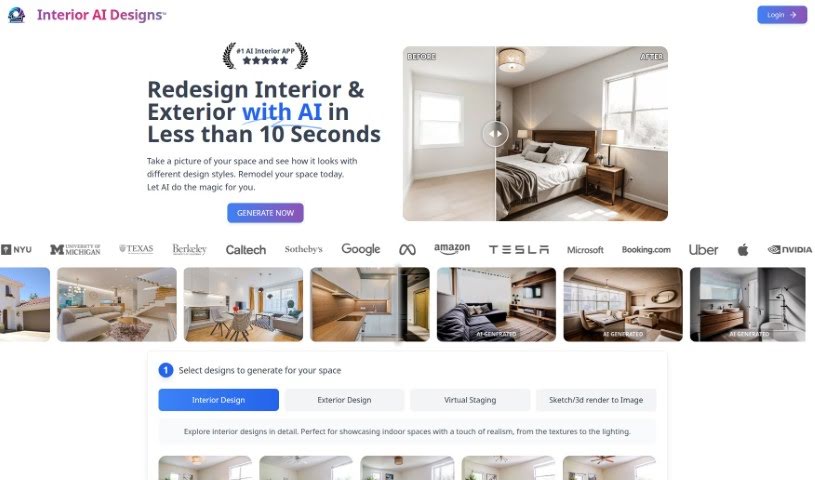
Screenshot of Interior AI Designs

Interior AI Designs

Discover what Interior AI Designs is and how to use it effectively in 2025. We'll explore its features and see how it stacks up against other interior design tools.

Screenshot

What is Interior AI Designs?

Interior AI Designs is a smart tool that helps you redesign rooms and homes. It lets you pick your favorite styles and then transforms your living spaces to match. It is a super-efficient way to quickly reimagine and refine your interiors exactly how you like them. You can easily try out different styles for your rooms, find furniture you might want to buy, and even remove unwanted objects from your pictures.

Beyond just redesigns, this tool also offers services like creating photorealistic 3D images, virtually staging empty spaces with furniture to help you visualize them, and turning your own sketches into detailed, high-resolution pictures. They have pricing plans that start with a basic package and go up to enterprise-level options, offering things like high-quality photos, quick turnaround times, and custom models. What’s great is that it’s designed to be simple, offers a wide range of styles, and is much more affordable than traditional photoshoots.

Who created Interior AI Designs?

Laurel is the team behind Interior AI Designs. They’ve built a really practical tool that uses artificial intelligence to help with room and home redesigns. It makes it simple for you to reimagine and refine your interior spaces based on what you prefer. The tool lets you redesign rooms in various styles, helps you pick out furniture, and can even remove objects from your photos.

What is Interior AI Designs used for?

  • Virtual staging: Make empty spaces look like cozy, furnished homes.
  • Elevate 3D models: Turn your 3D designs into realistic images, perfect for architects, game developers, and CGI artists.
  • Visualize spaces: Help interior designers, real estate agents, and home renovators see how rooms will look with furniture.
  • Get professional photos: Receive high-quality images for a fraction of the cost of a traditional photoshoot.
  • Redesign rooms: Easily try out different styles for your space.
  • Find furniture: Get help finding furniture you might want to buy.
  • Remove objects: Clean up your room photos by removing unwanted items.
  • Transform sketches: Turn your drawings into detailed, vivid images.
  • Create virtual staging: Make empty rooms feel lived-in and inviting.
  • Get photos fast: Receive high-quality professional photos in just seconds.
  • Enterprise features: Access things like API integration, branded pages, and custom models.
  • 3D Render to Image: Turn your 3D models into stunning images.
  • Redesign your room: Give your room any style you can imagine.
  • Remove anything: Easily take objects out of your room pictures.

Who is Interior AI Designs for?

  • Architects
  • Game developers
  • CGI artists
  • Interior designers
  • Real Estate Agents
  • Home renovators

How to use Interior AI Designs?

Using Interior AI Designs is pretty straightforward. Here’s how you can get started:

  1. Snap a photo: Take a picture of your space. This lets you see how different styles, like Modern, Tropical, Rustic, Coastal, Scandinavian, and Industrial, would look.
  2. Explore designs: Dive into the interior designs to pick the perfect style for your room.
  3. Sketch to Image: Use this feature to turn your sketches into detailed, high-resolution images.
  4. 3D Render to Image: This service creates photorealistic images from your 3D models.
  5. Virtual Staging: Try this tool to transform empty spaces into rooms filled with furniture, helping you visualize the possibilities.
  6. Choose a plan: Pick the pricing plan that fits your needs – Starter, Basic, Premium, or Enterprise for extra features.
  7. Data Security: Rest assured, your data is stored securely on private servers with advanced protection measures.
  8. File Formats: You can upload files in JPG, PNG, WebP, HEIC, and AVIF formats.
  9. Refunds: Because creating AI designs involves significant costs, refunds aren’t possible.
  10. Processing Time: Designs usually take less than a minute, though in rare cases, it might take up to 5 minutes.

Basically, Interior AI Designs makes interior design much simpler. It offers personalized, efficient, and realistic transformations for your living spaces. Plus, you get high-quality professional photos quickly and affordably, making it a really useful tool for interior designers, real estate agents, and home renovators.

Related AI Tools

Discover more tools in similar categories that might interest you

123RF AI Image Generator

Creative Image Generation
Learn More

Stay Updated with AI Tools

Get weekly updates on the latest AI tools, trends, and insights delivered to your inbox

Join 25,000+ AI enthusiasts. No spam, unsubscribe anytime.