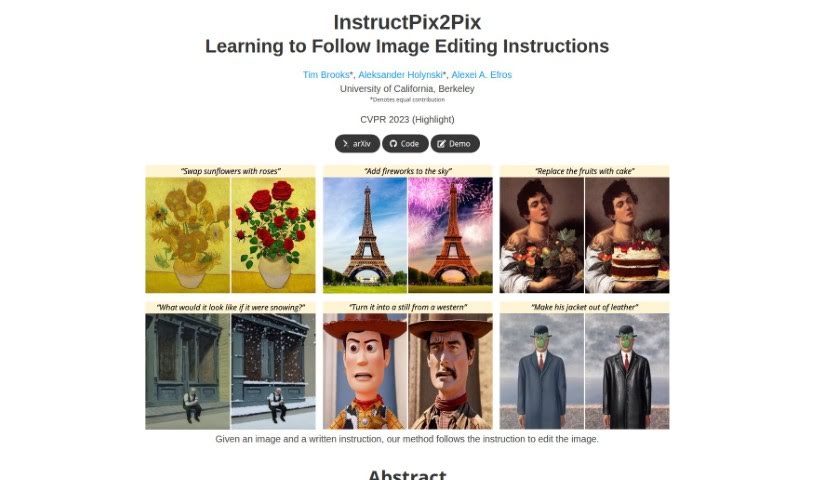
Screenshot of Instructpix2Pix

Instructpix2Pix

Discover InstructPix2Pix in 2025! Learn what it is, how to use it for quick image editing with written instructions, and compare its features to other photo editors.

Screenshot

What is InstructPix2Pix?

InstructPix2Pix is a really neat model designed specifically for editing images based on what you tell it to do. It is an AI assistant that understands your written instructions and applies them to your photos. What’s cool is that it can make these edits quickly without needing to be specially trained for each new photo or requiring a complex setup process. It handles all the adjustments right as it’s processing the image. This means you get effective edits on all sorts of photos, no matter what you ask it to do.

Who created InstructPix2Pix?

This innovative tool was created by Tim Brooks, working alongside Aleksander Holynski and Alexei A. Efros. Tim Brooks is supported by an NSF Graduate Research Fellowship, with additional backing from SAP and a generous gift from Google. Together, they developed InstructPix2Pix as a powerful model for image editing, making it possible to achieve fast and impressive results with just written commands for a wide range of images.

What is InstructPix2Pix used for?

InstructPix2Pix is incredibly versatile. You can use it for:

  • Editing images based on your written instructions: Just tell it what you want, and it makes the changes.
  • Generating training data for image editing: It helps create more examples for training other AI models.
  • Quick image editing: You can make edits in seconds, without needing to fine-tune or invert anything.
  • Transforming images: It can change photos based on specific text commands.
  • Creating diverse edits: Get multiple different edits for the same photo and instruction by simply changing the initial random settings (latent noise).
  • Compounded edits: Apply multiple instructions one after another to build up complex changes.
  • Isolating objects: It can help focus on specific parts of an image.
  • Artistic transformations: Turn famous artworks into different styles or mediums, like changing the Mona Lisa into a different style or making the Beatles’ Abbey Road cover look like a Van Gogh painting.
  • Changing the time of day: Easily adjust cityscape photos to show morning, noon, or night.
  • Editing real photos: It works well with actual images and your own written instructions.

However, it’s worth noting some limitations. Sometimes, the model might struggle with changing the viewpoint of an image or isolating specific objects precisely. It can also sometimes make changes that are a bit too drastic or reorganize objects in ways you didn’t intend. Additionally, like many AI models, it can reflect biases present in the data it was trained on, such as correlations between professions and gender.

Who is Instructpix2Pix for?

This tool is perfect for anyone who works with images and wants a more intuitive editing process:

  • Photo Editors
  • Graphic Designers
  • Digital Artists
  • Artists
  • Content Creators
  • Photographers
  • Image Editors

How to use InstructPix2Pix?

Using InstructPix2Pix is pretty straightforward. Here’s how you do it:

  1. Provide Your Image and Instruction: First, you’ll need an image you want to edit. Then, write a clear instruction describing the exact changes you want to make.
  2. Let the Model Work: InstructPix2Pix uses a special technique called a conditional diffusion approach. It takes your image and your instruction, and then it works its magic to edit the photo based on your text.
  3. How it’s Trained: The model learned by being trained on a huge dataset. This dataset was put together by combining a language model (like GPT-3) with a text-to-image model (like Stable Diffusion). This process generated tons of examples of image editing based on instructions.
  4. Real-World Use: When you use it, InstructPix2Pix is really good at understanding real photos and the instructions you write. It can make edits very quickly, often in just seconds, without needing any special setup for each new photo.
  5. Great Editing Results: You’ll find that the model delivers effective edits across all sorts of different photos and instructions, showing just how flexible and capable it is for image editing tasks.

Basically, InstructPix2Pix makes editing images much easier because you can just tell it what to do. It’s a fast and efficient way to transform your photos exactly how you envision them.

Related AI Tools

Discover more tools in similar categories that might interest you

123RF AI Image Generator

Creative Image Generation
Learn More
Stay Updated with AI Tools

Get weekly updates on the latest AI tools, trends, and insights delivered to your inbox

Join 25,000+ AI enthusiasts. No spam, unsubscribe anytime.