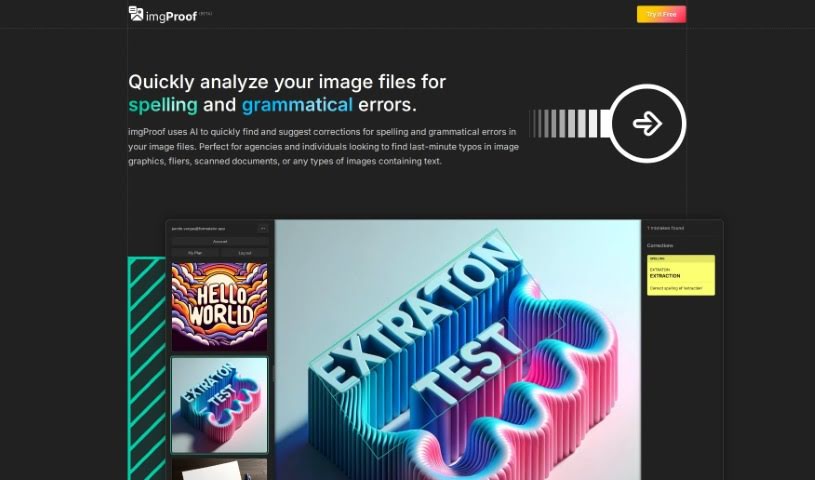
Screenshot of imgProof

imgProof

Discover what imgProof is and how to use it in 2025. We'll explore its features, compare it to other grammar checkers, and show you how it streamlines image proofreading.

Screenshot

What is imgProof?

ImgProof is a smart tool that uses AI to quickly spot and suggest fixes for spelling and grammar mistakes right within your image files. It is a super-fast proofreader for anything with text in it – whether it’s a graphic, a flyer, a scanned document, or any image you’ve got. It’s really handy for agencies and individuals who need to catch those last-minute typos. The tool works with common image formats like JPEG, PNG, and WEBP. Plus, it’s pretty clever with languages, using Optical Character Recognition (OCR) to understand text in many different ones. You can even use sticky notes to explain each correction, making it easy to keep track of what needs fixing. Essentially, imgProof aims to make proofreading images much smoother and more efficient, thanks to its easy-to-use design and specific suggestions.

Who created imgProof?

imgProof was developed by a company focused on making image file uploads for proofreading easier. They built an AI tool using Vite, Svelte, and TypeScript to achieve this. This tool helps users quickly find and correct spelling and grammar errors in all sorts of images – graphics, flyers, scanned documents, you name it. It handles various image formats like JPEG, PNG, and WEBP, and supports multiple languages too. The company really prioritizes making things convenient and efficient for users, offering a simple, user-friendly interface for a smooth proofreading experience with image files. While the exact launch date and founder aren’t mentioned, the focus is clearly on user convenience and efficiency.

What is imgProof used for?

  • Supports many languages: You can proofread text in a variety of languages.
  • Quick Image Analysis: It rapidly checks image files for spelling and grammar mistakes.
  • Digitizes Proofreading: It brings the proofreading process into the digital age for images.
  • Handles Multiple Formats: Works with common image types like JPEG, PNG, and WEBP.
  • Multilingual Proofreading: Offers proofreading support across different languages.
  • Advanced Character Recognition: Uses OCR technology to accurately identify text, even in images with unique styles.
  • Easy Correction Tracking: Digitize your proofreading with sticky notes to explain each correction.
  • Streamlined Process: Makes image proofreading more efficient for both agencies and individuals.
  • Catches Typos: Helps you efficiently find those last-minute typos in image graphics.
  • Targeted Suggestions: You’ll get specific advice on how to improve spelling and grammar.
  • Identifies Unique Text: It can recognize letters, words, and paragraphs even when they have unique styles.
  • Boosts Convenience & Efficiency: Enhances the user experience by making proofreading image files easier and faster.
  • Supports Key Formats: Works with JPEG, PNG, and WEBP images.
  • Advanced Character Recognition: Leverages OCR for accurate text identification.

Who is imgProof for?

  • Agencies
  • Individuals

How to use imgProof?

Using imgProof for image proofreading is straightforward. Just follow these simple steps:

  1. Upload Your Image: Start by selecting and uploading the image file that contains the text you need to check. It supports common formats like JPEG, PNG, or WEBP.
  2. AI Does the Work: The tool’s AI then gets to work, identifying any spelling or grammatical errors present in the text within your image.
  3. Get Smart Suggestions: You’ll quickly receive specific, targeted suggestions on how to fix spelling mistakes and improve the grammar in your image text.
  4. Track Mistakes Easily: Keep a clear record of each error with handy sticky notes that explain the mistake and why the correction is needed.
  5. Works in Many Languages: imgProof is designed to automatically detect the language of the text, so it can help you proofread in various languages.
  6. Accurate Text Recognition: Thanks to Optical Character Recognition, the tool accurately identifies letters, words, and even entire paragraphs, even if the text has unique styles or effects.

By following these steps, you can efficiently proofread text within your images using imgProof, ensuring your visual content is accurate and error-free.

Related AI Tools

Discover more tools in similar categories that might interest you

Academic Help Free Essay Generator

Education Academic Writing
Learn More

Stay Updated with AI Tools

Get weekly updates on the latest AI tools, trends, and insights delivered to your inbox

Join 25,000+ AI enthusiasts. No spam, unsubscribe anytime.