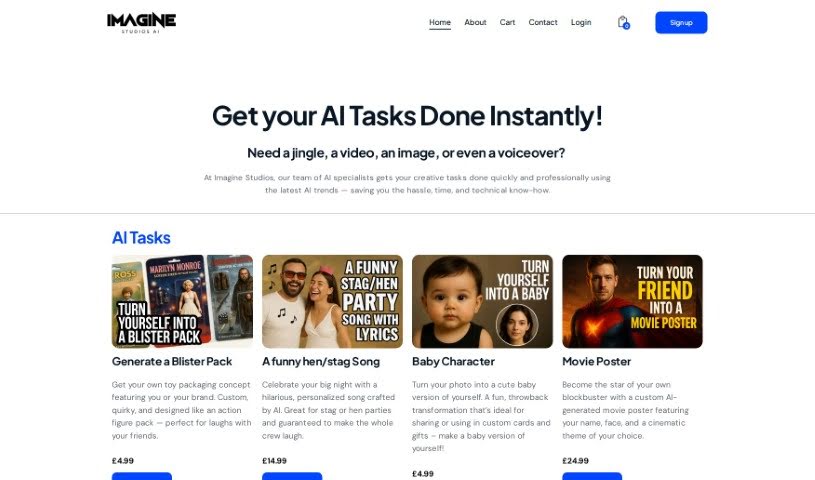
Screenshot of IMAGINE Studios AI

IMAGINE Studios AI

Curious about IMAGINE Studios AI? This guide explains what it is, how to use its powerful features for writing, images, video, and music, and how it stacks up against other AI image generators in 2025.

Screenshot

What is IMAGINE Studios AI?

IMAGINE Studios AI, brought to you by Imagine Studios AIs, is a really comprehensive suite of AI tools designed to boost your creativity across all sorts of content creation. Think writing, designing images, making videos, and even composing music – it’s all here! This studio offers a smooth creative experience, all in one place. You can find services like an AI Image Creator, an AI Content & Assistant, AI Speech Synthesizers, AI Music Creators, AI Video Makers, and AI Sound Effects. The main idea is to help you unleash your creativity with advanced AI tools, offering a wide range of solutions specifically made for different needs. Plus, Imagine Studios AIs also provides white-label options, letting businesses brand and use these cutting-edge AI tools as their own.

Who created IMAGINE Studios AI?

IMAGINE Studios AI was founded by John Lewis, who is the company’s Game Developer. The team also includes Angie Foster as the Graphic Designer, Kate Barnes handling Web Design, Daisy Roberts as the AI Artist, Lucy Gilmore serving as Project Manager, and Evan Erickson as the Web Engineer. This studio really focuses on AI tools for various creative projects, offering services like AI Speech Synthesizers, AI Music Creators, and AI Video Makers, among others. They also provide custom AI solutions and white-label choices for businesses wanting to integrate AI tools into their operations.

What is IMAGINE Studios AI used for?

This platform is incredibly versatile! You can use it to:

  • Write: Generate engaging blog posts, craft articles and scripts, and create persuasive copy.
  • Create Images: Produce impressive images, design visuals, and bring conceptual ideas to life with AI Image Generators.
  • Make Videos: Produce stunning videos, create compelling narratives, promotional content, or educational material.
  • Compose Music: Compose music, create original soundtracks, jingles, and soundscapes.
  • Enhance Audio: Generate realistic and engaging vocal renditions with AI Speech Synthesizers, perfect for podcasts and content creators. You can even create AI Sound Effects to speed up audio production.
  • Assist You: Use the AI Life Assistant for visual search, document translation, solving formulas, and even creating blog posts. It can also help you converse and connect.
  • Business Solutions: They offer Custom AI Solutions tailored to your business needs, and White Label Solutions so you can brand and deploy AI tools as your own. Plus, AI Custom Campaigns let you use special prompts and algorithms for unique digital campaigns.

Essentially, it’s a powerful toolkit for anyone looking to create content more efficiently and effectively, whether you’re a podcaster, filmmaker, graphic designer, musician, or just someone looking to bring ideas to life with AI.

Who is IMAGINE Studios AI for?

IMAGINE Studios AI is a fantastic resource for a wide range of creative professionals and businesses. If you’re a:

  • Podcaster
  • Filmmaker
  • Content creator
  • Graphic designer
  • Artist
  • Web designer
  • Game developer
  • Music composer
  • Video creator
  • Web Developer
  • AI artist
  • Project manager
  • Sound designer
  • Web Engineer

…then you’ll likely find something incredibly useful here. It’s designed to help anyone looking to enhance their creative output.

How to use IMAGINE Studios AI?

Getting started with IMAGINE Studios AI is pretty straightforward. Here’s a simple breakdown:

  1. Visit the Website: Head over to the Imagine Studios website. You’ll find different subscription plans available, with the Ultimate AI Package starting at £40 per month.
  2. Explore the Tools: Once you’re in, take a look around at all the different tools they offer. This includes things like the AI Life Assistant, AI Image Generator, AI Music Creator, AI Video Maker, and AI Sound Effects.
  3. Choose Your Tools: You can pick the specific tool you need and subscribe for £9.99 per month for each one. Or, if you want everything, the complete package is the way to go.
  4. Start Creating: You can access Imagine Studios on your desktop or through their app platforms. From there, you can dive right into creating with the help of AI.
  5. Customize Your Workflow: Make the most of the AI tools by customizing your experience. This means generating images and videos, composing music, and using speech synthesis just the way you like.
  6. Try it Free: They offer a free trial, which is a great way to experience everything Imagine Studios has to offer without needing to provide your credit card details upfront.
  7. Need Something Special? If you’re looking for custom AI solutions or want to explore white-label options for your business, don’t hesitate to contact Imagine Studios. They can create tailored services to fit your specific business needs.

Basically, Imagine Studios wants you to embrace the future of creativity. They aim to help you unleash your creative potential with these powerful AI tools right at your fingertips. You can transform your ideas into reality easily and affordably.

Just a note: This guide is based on the information provided in the Imagine Studios PDF file.

Related AI Tools

Discover more tools in similar categories that might interest you

123RF AI Image Generator

Creative Image Generation
Learn More
Stay Updated with AI Tools

Get weekly updates on the latest AI tools, trends, and insights delivered to your inbox

Join 25,000+ AI enthusiasts. No spam, unsubscribe anytime.