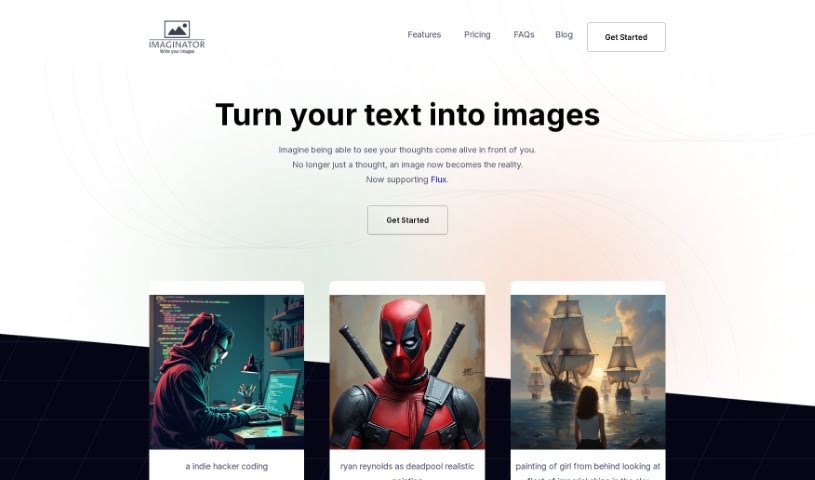
Screenshot of Imaginator

Imaginator

Discover what Imaginator is and how to use it effectively in 2025. We'll explore its features and compare it to other Text-to-Image tools.

Screenshot

What is Imaginator?

Imaginator is a tool that uses AI to turn your text descriptions into incredibly detailed and realistic images. It is a digital artist powered by machine learning. You can use it to create all sorts of visuals, from portraits of characters to complex scenes. The tool works on a credit system – each credit you use lets you generate one image. Imaginator offers different pricing plans, and the best part? You own all the images you create, whether you plan to use them for business or just for fun.

Basically, Imaginator takes what you write and translates it into visuals, with the AI interpreting your words. The more detail you give it in your text, the better the image will turn out. Imaginator also aims to guarantee image quality by using advanced AI algorithms. They’re even planning to add features soon that will let you edit your images and create different versions, giving you even more control. So, to get the best results, be sure to describe things in detail. And with the upcoming ‘Image Variations’ feature, you’ll be able to generate several different takes on the same image from just one text prompt. If you run out of credits, don’t worry – you can easily buy more. Plus, their website has helpful guides to get you started.

Who created Imaginator?

John Yagiz is the creator behind Imaginator. He launched it on June 14, 2024. As we’ve mentioned, Imaginator is an AI tool that turns text into detailed, realistic images. The way it works is pretty straightforward: you buy credits, and each credit lets you create one image. They have various pricing tiers available. Importantly, once you create an image, you own it outright and can use it however you like, for commercial projects or personal ones.

What is Imaginator used for?

Imaginator is incredibly versatile! You can use it for:

  • Creating content for blogs, social media, or websites.
  • Designing unique digital art pieces.
  • Generating images you have full ownership of.
  • Crafting intricate portraits of people or characters.
  • Experimenting with different creative ideas.
  • Producing images with various lighting effects.
  • Developing surreal or abstract art.
  • Creating easily replaceable image templates for projects.
  • Generating a wide range of creative options for any concept.
  • Designing detailed visuals for presentations or marketing.
  • It’s portable, meaning you can use it on any device with internet access.
  • Producing detailed visuals for a variety of applications.
  • Generating intricate portraits to capture specific looks.
  • Creating surreal art that pushes creative boundaries.
  • Exploring a broad spectrum of creative options.
  • Producing detailed visuals that meet specific project needs.
  • Designing digital art that stands out.
  • Ensuring you have individual ownership of your creations.
  • Generating diverse creative options to choose from.
  • Producing highly detailed images that impress.
  • Supporting creative experimentation and exploration.
  • Producing visuals with varied lighting to set the mood.
  • Generating surreal art that sparks imagination.
  • Creating intricate portraits with lifelike detail.

Who is Imaginator for?

Imaginator is a great tool for:

  • Illustration Artists
  • 3D Model Designers
  • Motion Graphics Designers
  • Anyone working with Motion Graphics

How to use Imaginator?

Here’s a simple guide to using Imaginator effectively:

  1. Get to Know Imaginator: First off, remember that Imaginator is an AI tool. It uses machine learning algorithms to turn your text descriptions into detailed images.
  2. Start Creating Images: The key is to input detailed text descriptions into Imaginator. The more specific you are, the better the quality of the visuals you’ll get.
  3. Understand the Credit System: Imaginator operates on credits. Each credit you use generates one image. You can easily buy more credits whenever you need them.
  4. Pick Your Package: Think about how many images you’ll need. Imaginator offers packages like Basic (15 images), Premium (35 images), and Ultimate (65 images).
  5. Image Editing (Coming Soon!): While you can’t edit images directly within the tool right now, they’re planning a feature that will let you customize images using masking templates.
  6. Image Variations (Coming Soon!): Another exciting update is on the way: ‘Image Variations.’ This will let you generate multiple different versions of a single image from just one text prompt.
  7. Your Image Ownership: You own all the images you create with Imaginator. This means you’re free to use them for any commercial projects or for your personal enjoyment.
  8. Quality is Key: Imaginator uses advanced AI algorithms to ensure good image quality. Remember, the detail in your text input also plays a big role in how good the final image looks.
  9. Keep Your Credits Flowing: If you find yourself running low on credits, it’s easy to purchase more so you can keep creating.
  10. Find Helpful Resources: For more tips on writing detailed descriptions or to stay updated on new features, be sure to check out Imaginator’s website.

By following these steps, you’ll be able to use Imaginator efficiently to create the custom, detailed images you need for whatever you’re working on.

Related AI Tools

Discover more tools in similar categories that might interest you

123RF AI Image Generator

Creative Image Generation
Learn More

Stay Updated with AI Tools

Get weekly updates on the latest AI tools, trends, and insights delivered to your inbox

Join 25,000+ AI enthusiasts. No spam, unsubscribe anytime.