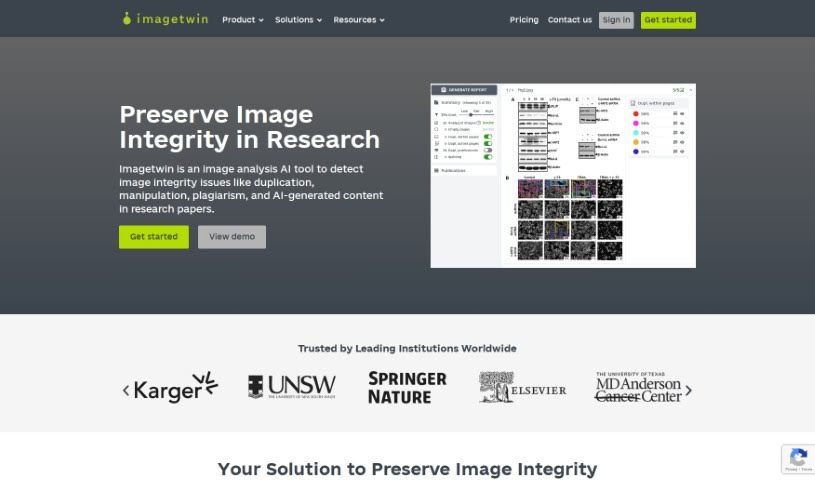
Screenshot of Imagetwin

Imagetwin

Discover what Imagetwin is and how to use it effectively in 2025. We'll explore its features and see how it stacks up against other academic research tools.

Screenshot

What is Imagetwin?

Imagetwin is a sophisticated AI-powered software designed to improve the quality and trustworthiness of scientific research. It does this by spotting integrity issues within figures from life science articles. It is a helpful assistant for researchers, peer reviewers, and publishers, flagging inappropriate manipulations and duplicated images across various types of figures, like western blots, microscopy images, and general photography. Imagetwin uses powerful algorithms to quickly scan documents or image files, revealing potential integrity problems. You’ll see the results presented clearly on an easy-to-use web interface, which helps academic and research institutions maintain the high standards and credibility of their scholarly articles. Some of Imagetwin’s standout features include automated plagiarism detection, the ability to spot manipulations, impressive efficiency and accuracy, and a strong commitment to privacy and security – it doesn’t store your uploaded content and all server communication is encrypted.

Who created Imagetwin?

Imagetwin was founded by Markus Zlabinger, who is the CTO, and Patrick Starke, the CEO. Markus, who holds a Ph.D. in computer science, leads the technology and product development, bringing his expertise in image processing and machine learning to the table. Patrick, a graduate of Vienna University of Economics and Business, handles cooperations and business development. The company, ImageTwin AI GmbH, is based in Vienna, Austria, and has received funding from Seedfinancing of the BMDW, managed by aws. Imagetwin’s specialty is creating AI-based software that boosts the quality and trust in scientific research by finding integrity issues in figures from life science articles. Key features include automated plagiarism detection and manipulation identification.

What is Imagetwin used for?

  • User-Friendly Interface: It’s easy to navigate and understand.
  • Automated Plagiarism Detection: This feature checks your figures against a massive database of over 50 million images, helping to find if content has been reused across different articles.
  • Manipulation Detection: It can identify duplicates and potential data fabrication within articles.
  • Efficiency & Accuracy: Imagetwin detects integrity issues quickly and with a high degree of precision.
  • Privacy & Security: Your uploaded content isn’t stored, and all server communication is encrypted, ensuring your data is safe.
  • Detecting Figure Reuse: It specifically looks for instances where figures are reused across various articles.
  • Enhancing Research Quality: Ultimately, it helps improve the overall quality and trustworthiness of scientific research.
  • Supporting the Academic Community: It’s a valuable tool for researchers, peer reviewers, and publishers alike.
  • Maintaining Credibility: It aids in upholding the rigor and credibility of scholarly articles.

Who is Imagetwin for?

  • Data Scientists
  • Annotation Experts
  • Business Development Managers
  • Software Developers

How to use Imagetwin?

Using Imagetwin is straightforward. Just follow these simple steps:

  1. Upload Your Content: You can upload a PDF file or several image files, including common formats like JPG, PNG, and GIF.
  2. Start the Scan: A single button press initiates the scan, where the AI-based algorithm gets to work on your selected content.
  3. Check the Results: In just a few seconds, you’ll see the findings presented clearly on the web interface for you to review.

Imagetwin comes with several essential features:

  • Plagiarism Detection: It scans figures against a huge database to find any reused content.
  • Manipulation Detection: This helps identify duplicates and instances of data fabrication.
  • Efficiency & Accuracy: The tool is designed to detect integrity issues quickly and with high precision.
  • User-Friendly Interface: The results are presented on a web interface that’s easy to navigate.
  • Privacy & Security: Your data is protected because the system doesn’t store uploaded content, and all communication is encrypted.

Experts in research integrity have praised Imagetwin for its effectiveness. They note its ability to promptly and accurately detect issues in scientific papers, which significantly improves the publication integrity workflow. The tool has been instrumental in uncovering duplicated photo panels, spotting duplicates that might have been missed otherwise, and generally supporting the reviewing process in scholarly publishing.

Related AI Tools

Discover more tools in similar categories that might interest you

Academic Help Free Essay Generator

Education Academic Writing
Learn More

Stay Updated with AI Tools

Get weekly updates on the latest AI tools, trends, and insights delivered to your inbox

Join 25,000+ AI enthusiasts. No spam, unsubscribe anytime.