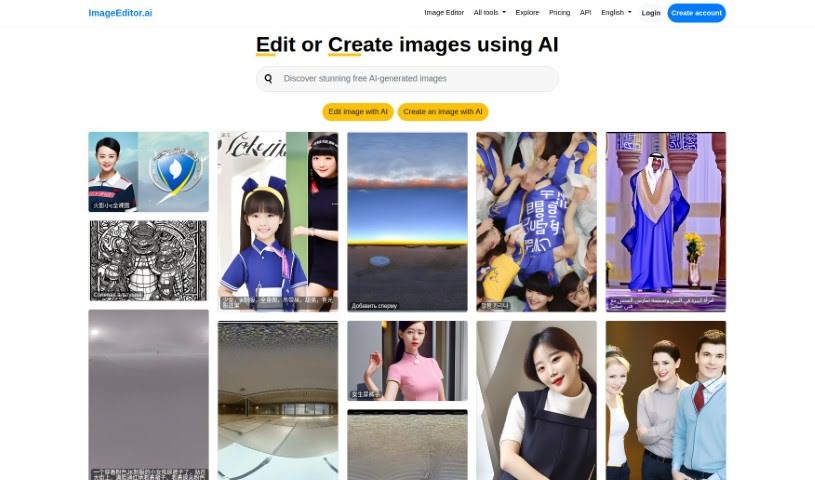
Screenshot of Image Editor Ai

Image Editor Ai

Curious about Image Editor AI? Let's dive into what this powerful tool is, how you can use it effectively in 2025, explore its features, and see how it stacks up against other AI image generators.

Screenshot

What is Image Editor AI?

ImageEditor.AI is a really smart platform that uses artificial intelligence to make editing images much simpler and better. It’s designed with an easy-to-use interface, so whether you’re just tweaking a photo or creating something entirely new, it’s straightforward. You can either edit existing pictures or tell the AI what you want to see, and it’ll generate it for you – a huge time-saver! Plus, it brings together a bunch of other handy AI tools like Video Editor AI, Remove Background AI, Interior Decorator AI, Wallpapers AI, and Image Upscaler AI. This makes it a go-to spot for anyone working with images, from individuals to professionals. It even speaks many languages, offers API access for developers who want to build with it, and lets you log in to your account for a more personalized experience.

Who created Image Editor AI?

Lou is the person behind ImageEditor.ai, as you can find out on their website. Lou, who founded the company, built the website using Django and powered the AI platform with a special version of imaginAIry. The company itself is called VPS.org LLC, and they’re really pushing the envelope with innovative AI tools for advanced image editing.

What is Image Editor AI used for?

  • Edit Images: You can use AI to easily edit and improve your photos just by giving it simple instructions.
  • Create Images: Got an idea? Just describe it to the AI, and it’ll generate brand-new images based on your vision.
  • AI Tool Integration: It’s a hub for various AI tools, including ones for video editing and removing backgrounds.
  • Multilanguage Support: The platform works in many different languages, showing its commitment to reaching users worldwide.
  • API Access: If you’re a developer, you can use the ImageEditor.AI API to add its powerful features to your own services.
  • Edit Images: You can use AI to easily edit and improve your photos just by giving it simple instructions.
  • Create Images: Got an idea? Just describe it to the AI, and it’ll generate brand-new images based on your vision.
  • AI Tool Integration: It’s a hub for various AI tools, including ones for video editing and removing backgrounds.
  • Multilanguage Support: The platform works in many different languages, showing its commitment to reaching users worldwide.
  • API Access: If you’re a developer, you can use the ImageEditor.AI API to add its powerful features to your own services.

Who is Image Editor AI for?

  • Photographers
  • Graphic designers
  • Marketing professionals
  • Developers
  • Video editors
  • Web Developers
  • Videographers
  • Artists
  • Web designers
  • Digital artists
  • Content creators

How to use Image Editor Ai?

Here’s a simple guide to getting the most out of ImageEditor.AI:

  1. Get to ImageEditor.AI: Head over to the ImageEditor.AI website. You can log in if you already have an account, or sign up for one to get that personalized experience.
  2. Pick Your Editing Path: Decide what you want to do – are you making simple tweaks to an existing photo, or do you want to create something completely new?
  3. Use the AI Tools: Just tell the AI what you need. You’ve got options like Video Editor AI, Remove Background AI, Interior Decorator AI, Wallpapers AI, and Image Upscaler AI, depending on the task.
  4. Edit Your Images: Use the AI to make your photos look better. Simply describe the changes you’re looking for.
  5. Create New Images: Describe your vision to the AI. It’s pretty amazing how it can generate images that match exactly what you’re imagining.
  6. Language Options: Remember, ImageEditor.AI supports lots of languages, so it’s accessible for people all over the world.
  7. API for Developers: If you’re a developer, you can connect your services to ImageEditor.AI using its API.
  8. Check Out Pricing and Features: Take a look at the different pricing plans to find the one that best fits what you need.
  9. Customize Your Experience: You can ask for extra conversion tools, get faster and higher-quality image processing, edit an unlimited number of images, and create without worrying about prompt limits.

Following these steps should help you use ImageEditor.AI smoothly for all your image editing and creation needs.

Related AI Tools

Discover more tools in similar categories that might interest you

123RF AI Image Generator

Creative Image Generation
Learn More

Stay Updated with AI Tools

Get weekly updates on the latest AI tools, trends, and insights delivered to your inbox

Join 25,000+ AI enthusiasts. No spam, unsubscribe anytime.