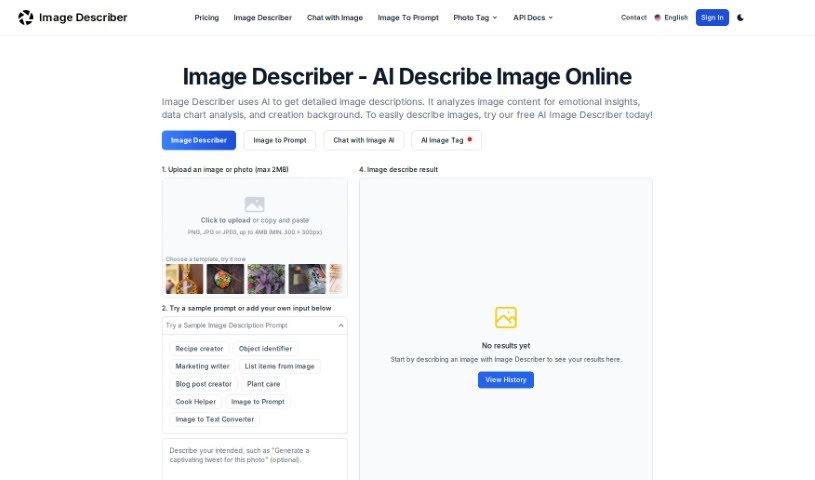
Screenshot of Image Description Generator

Image Description Generator

Discover what an Image Description Generator is and how to use it effectively in 2025. We'll explore its features and compare it to other AI image tools.

Screenshot

What is an Image Description Generator?

An Image Description Generator, sometimes called an “Image Describer,” is a handy tool built for creatives like artists and designers, as well as researchers or anyone curious about what’s inside an image. It goes beyond just identifying objects; it can uncover emotional insights, help with data analysis, and even assist in creating backgrounds for your projects. It is a way to get new perspectives and work more efficiently. It does this by creating detailed text descriptions of images, generating prompts for AI image creators, offering quick summaries of what’s in a picture, translating text found within images, and even pulling data from tables shown in images. Essentially, this tool helps you explore the hidden potential within your visuals and boosts your productivity in today’s AI-driven world.

Who Created the Image Description Generator?

The founder developed the Image Description Generator. They were inspired by cherished old photographs, which sparked the idea to create a tool that could offer deeper, more emotional interpretations of images. The tool is designed to provide creative descriptions, really highlighting the stories behind photos. It includes features like AI-generated descriptions, the ability to upload your own images, and an “Explore” section where users can share images and their interpretations.

What Can You Use an Image Description Generator For?

This tool is incredibly versatile! Here’s a look at what it can do:

  • Detailed Descriptions: Get a thorough textual description of any image.
  • AI Prompt Creation: Generate prompts that AI image generators can use, based on your image.
  • Quick Summaries: Receive a brief overview of an image’s main elements and themes.
  • Object Identification: Easily identify and list all objects, features, and details within an image.
  • Title Generation: Create relevant and engaging titles for your images.
  • Text Translation: Translate any text found within an image directly into English.
  • Data Extraction: Interpret and structure data from tables that appear in images.
  • Code Generation: Convert image content into executable code (this is a more complex task).
  • Social Media Ready: Compose attention-grabbing tweets for your photos.
  • Fresh Perspectives: Reinterpret old photos and artworks to see them in a new light.
  • Enhanced Searching: Identify key elements in photos, making them faster and easier to search.
  • Data Analysis: Analyze complex charts for research, finance, and business needs.

Who Should Use the Image Description Generator?

This tool is a great asset for:

  • Artists
  • Designers
  • Researchers

How Do I Use the Image Description Generator?

Using the Image Description Generator is straightforward. Just follow these simple steps:

  1. Upload or Paste Your Image: Click the upload button or paste your image directly into the tool. It works best with PNG, JPG, or JPEG files that are at least 300 x 300 pixels.
  2. Ask Questions (Optional): If you have specific questions about the image, you can type them into the “ASK QUESTIONS (OPTIONAL)” box. This helps tailor the analysis.
  3. Generate the Description: Hit the “Description Generation” button. The AI will then analyze your image and provide a detailed description, covering its content, any emotions it evokes, and its background.
  4. Explore More Features: Beyond descriptions, you can also create AI image prompts, get summaries, list elements, translate text, or extract data from tables, all based on the image you’ve uploaded.
  5. Privacy First: Your privacy is important. The tool doesn’t record personal information without your clear consent. Image interpretations are only shared in the case library if you give permission.
  6. Need Help? If you have any questions or need assistance, don’t hesitate to reach out to the customer support team.

By following these steps, you can effectively use the Image Description Generator to analyze and understand your images with the help of AI.

Related AI Tools

Discover more tools in similar categories that might interest you

123RF AI Image Generator

Creative Image Generation
Learn More

Stay Updated with AI Tools

Get weekly updates on the latest AI tools, trends, and insights delivered to your inbox

Join 25,000+ AI enthusiasts. No spam, unsubscribe anytime.