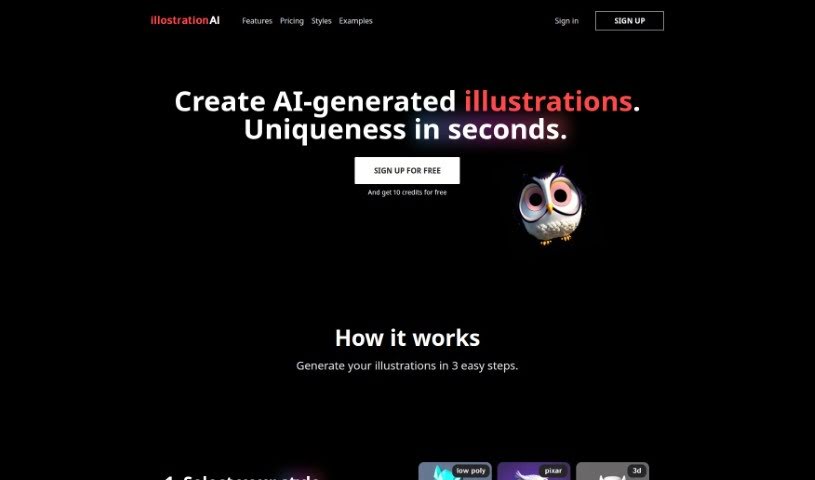
Screenshot of Illostrationai

Illostrationai

Discover what Illostrationai is and how to use it effectively in 2025. We'll explore its features and see how it stacks up against other Image Generators.

Screenshot

What is Illostrationai?

IllustrationAI is a sophisticated artificial intelligence tool built to help you create personalized, eye-catching illustrations. It’s designed to be quick and easy to use, offering a variety of popular styles like 3D renders, vector art, low poly, Pixar style, icons, and pixel art. You can simply describe the image you want, and then fine-tune the results using AI upscaling. Beyond that, IllustrationAI lets you remove backgrounds from your illustrations, add your own custom backgrounds, create multiple illustrations at once by uploading CSV files, and even convert vector illustrations into SVG files. The AI upscaling feature is particularly good at making your visuals sharper, and there’s also a handy Figma plugin for smooth integration right into your design workflow.

Who created Illostrationai?

IllustrationAI was developed by a team of founders. While their specific names aren’t detailed in the available information, the platform officially launched on June 17, 2024. It’s an advanced AI tool focused on making it simple and fast to create custom illustrations in many different styles – think 3D renders, vectors, low poly, Pixar style, icons, and pixel art. You can improve your illustrations with AI upscaling, remove backgrounds, and even create batches of illustrations. Plus, there’s a Figma plugin for easier use. The platform is currently in public beta, and you can sign up to start exploring its features.

What is Illostrationai used for?

  • Creating unique and beautiful artworks: You can tap into a wide range of styles and the AI’s creativity to make something truly special.
  • Refining results with AI upscaling: This feature helps improve the resolution and overall quality of your images.
  • Adding custom backgrounds: Personalize your illustrations further by adding your own backgrounds.
  • Bulk illustration creation: Need many illustrations? Just upload a CSV file listing the objects you want illustrated.
  • Converting vector illustrations to SVG: This allows your vector art to scale perfectly while keeping its high-quality resolution.
  • Using the IllustrationAI plugin for Figma: Create illustrations directly within your design tool for a seamless workflow.
  • Joining the public beta: You can sign up on the website to get access to the IllustrationAI public beta.
  • Describing objects to illustrate: Simply enter character names or brief descriptions of what you want to create.
  • Sharing your creations: Show off what you’ve made with IllustrationAI to inspire others and build a community.
  • Getting started with a free trial: Sign up to receive 10 free credits, giving you a chance to try out the platform.

Who is Illostrationai for?

  • Illustrators
  • Designers
  • Artists
  • Creatives of all kinds
  • Graphic designers
  • UI/UX Designers
  • Content creators

How to use Illostrationai?

Using IllustrationAI is pretty straightforward. Here’s a simple breakdown:

  1. Choose Your Style: Pick from the wide variety of styles available, such as 3D renders, vector, low poly, Pixar style, icon, and pixel art.
  2. Describe What You Want: Tell the AI what object you’d like to illustrate. You can do this by entering a character name or a short explanation.
  3. Boost with AI Upscaling: Make your result even better by using the AI upscaling feature. It helps refine the design for higher resolution and a sharper visual quality.

IllustrationAI offers several great benefits, including the ability to create unique designs, the effectiveness of its AI upscaling, easy sharing options, and overall user-friendliness. You can also get a free trial with 10 credits when you sign up, or choose from subscription plans for more monthly credits. Plus, remember you can add custom backgrounds, create illustrations in bulk using CSV files, convert vector illustrations to SVG, and use the Figma plugin for a smooth integration. Getting into the public beta is as easy as signing up on the IllustrationAI website. Ultimately, this platform really helps artists generate beautiful and unique artworks thanks to its broad range of styles and powerful AI capabilities.

Related AI Tools

Discover more tools in similar categories that might interest you

123RF AI Image Generator

Creative Image Generation
Learn More

Stay Updated with AI Tools

Get weekly updates on the latest AI tools, trends, and insights delivered to your inbox

Join 25,000+ AI enthusiasts. No spam, unsubscribe anytime.