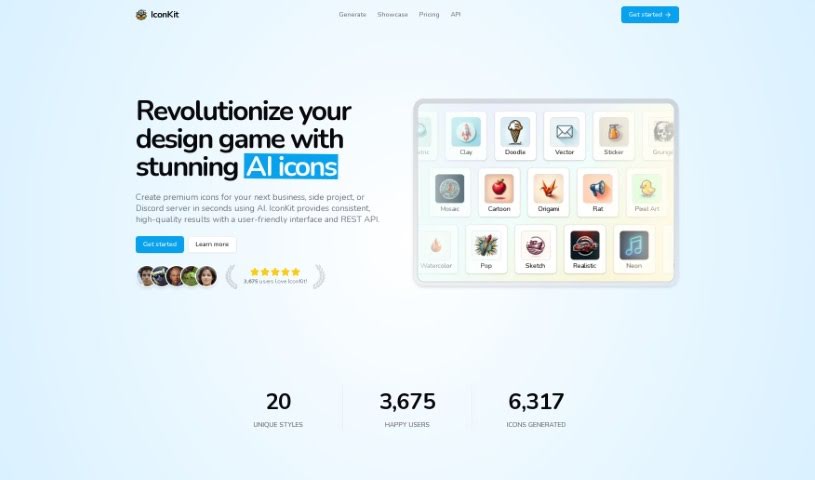
Screenshot of Iconkit

Iconkit

Discover Iconkit, an AI-powered tool for creating unique icons. Learn its features, pricing, and how to use it for business apps, Discord, and more, comparing it to other image generators.

Screenshot

What is Iconkit?

IconKit is an AI tool that makes creating icons for all sorts of projects super easy. Whether you need them for business applications or your Discord server, IconKit can whip up unique, customizable icons in just a few clicks. You can go for a sleek, modern look or something more playful and whimsical – it handles a wide range of styles.

What’s great about it is the user-friendly interface. You get lots of options to customize colors and styles, icons are generated super fast, and the credits you buy never expire. Plus, they offer a satisfaction guarantee: if you’re not happy with an icon, you can get a refund or generate another one within an hour.

IconKit uses a credit system for pricing. You can get 50 credits for $5.99, or 200 credits for $17.99. They aim to provide high-quality icons without breaking the bank. You’ll find unique styles, an easy-to-use interface, plenty of customization, quick results, and rights to use them commercially.

With IconKit, you can really dial in the colors and styles to match your brand perfectly. The whole process is quick, and you’re covered by that satisfaction guarantee. You can use the icons you create for commercial projects without any worries. Thanks to its AI capabilities, IconKit offers a huge variety of styles, from clean and modern to fun and quirky.

Who created Iconkit?

We’re not sure exactly who created Iconkit, as the founder or team behind it hasn’t been disclosed. It first launched on January 7, 2024. The goal was to really change how people design icons, offering premium AI-generated options for all sorts of uses – think business apps, Discord servers, or just general projects. The tool itself is designed to be user-friendly, letting you customize colors and styles, generate icons quickly, and use lifetime credits. They also guarantee satisfaction and allow commercial use without limits.

What is Iconkit used for?

  • Creating icons for business applications
  • Designing icons for Discord servers
  • Making icons for all sorts of other projects
  • Getting icons made really fast
  • Achieving modern and sleek designs
  • Exploring playful and whimsical styles
  • Ensuring icons match your brand perfectly
  • Generating icons in less than a minute
  • Using the icons for free in commercial projects
  • Fine-tuning colors and styles to get just the right look

How to use Iconkit?

Using IconKit is pretty straightforward. Here’s a quick rundown:

  1. Describe Your Icon: Start by telling IconKit what object you want for your icon. Be sure to mention the color, the style you’re going for, and how many you need.
  2. Customize Colors and Styles: Once you have a draft, you can tweak the colors and styles to make sure they fit your brand or project perfectly.
  3. Generate Icons: Then, just let IconKit do its thing! It’ll create unique icons tailored to what you described, all in a few clicks.
  4. Explore Different Styles: Don’t be afraid to browse through the various styles available. Whether you prefer sleek and modern or fun and whimsical, you’ll find something that fits your design vision.
  5. Utilize User-Friendly Interface: The interface is designed to be easy to navigate, which really helps speed up the whole icon creation process.
  6. Credit System: It’s good to know how the credits work. You use them to generate icons or run transformations, and the best part is, they never expire!
  7. Quick Turnaround: You’ll be impressed by how fast you get your icons – usually in under a minute. It’s a great way to meet your design needs efficiently.
  8. Satisfaction Guarantee: If you’re not happy with the first icon you get, don’t worry. You can either generate another one or ask for a refund within an hour of buying credits. They really want to make sure you’re satisfied.
  9. Commercial Use: Feel free to use the icons you create for any commercial projects. There are no restrictions, making them super versatile.

Overall, IconKit offers a really smooth experience. Its powerful AI, all the customization options, and the quick turnaround time make it a genuinely useful tool for anyone needing unique and professional-looking icons for their projects.

Related AI Tools

Discover more tools in similar categories that might interest you

123RF AI Image Generator

Creative Image Generation
Learn More

Stay Updated with AI Tools

Get weekly updates on the latest AI tools, trends, and insights delivered to your inbox

Join 25,000+ AI enthusiasts. No spam, unsubscribe anytime.