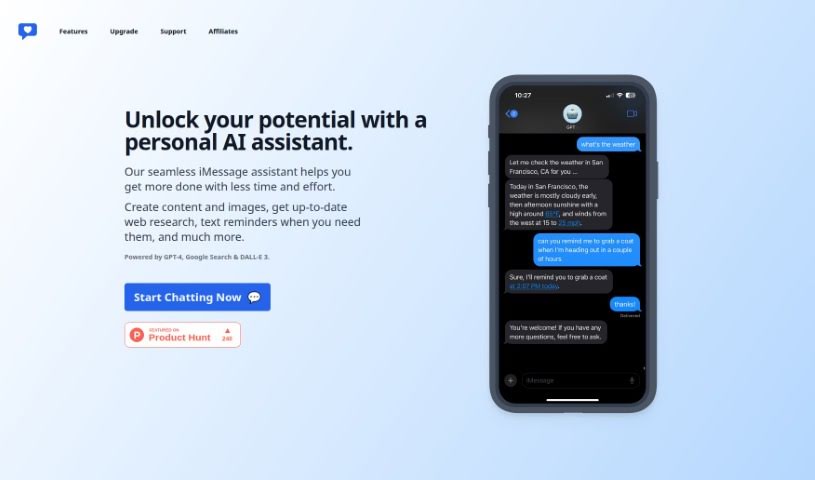
Screenshot of iChatWithGPT

iChatWithGPT

Discover iChatWithGPT, your personalized AI assistant for iPhone and Mac. Learn how to use its features for content creation, image generation, research, and reminders, and see how it stacks up against other content writing tools in 2025.

Screenshot

What is iChatWithGPT?

IChatWithGPT is a really neat platform that brings together the latest from GPT-4, Google Search, and DALL-E 3. It is your own personalized AI assistant, right on your iPhone or Mac. It’s designed to help you create engaging content, whip up images, do quick web research, and even set text reminders to keep you on track. It fits right into your iMessage, making it super easy to use for everything from writing to research to visual creativity, all while boosting your efficiency.

Who created iChatWithGPT?

While the specific founder hasn’t been named in the details we have, iChatWithGPT is described as an innovative platform. It cleverly combines GPT-4, Google Search, and DALL-E 3 to offer personalized help. You can use it for creating content, generating images, and researching the web, all directly from your iPhone or Mac. The platform is built for seamless integration, offering features like content generation, AI-powered research, visual creativity, and a handy reminder system.

Who is iChatWithGPT for?

  • Content creators looking to speed up their writing process.
  • Artists who want to generate unique visuals.
  • Researchers needing quick access to information and summaries.
  • Professionals who need help with text reminders or tracking tasks.
  • Visual designers seeking inspiration or quick image mockups.

How to use iChatWithGPT?

Getting started with iChatWithGPT is pretty straightforward. Here’s a quick rundown:

  1. Access the Service:
    • Just head over to iChatWithGPT.com on your iPhone or Mac. That’s your main gateway to the platform.
  2. Integrate with iMessage:
    • You can use the assistant directly within iMessage. It’s designed for a really smooth experience, so it feels natural.
  3. Generate Content:
    • Need to write something? GPT-4 powers the content generation, making it easy to create engaging text.
  4. AI-Powered Research:
    • Get instant web research results. Whether you need recommendations, summaries, or even forecasts, it’s there to help.
  5. Visual Creativity:
    • Bring your ideas to life visually! DALL-E 3 is used here to generate images based on your prompts.
  6. Reminder System:
    • Never miss a beat. Set text reminders for tasks, habits, or anything you need to remember.
  7. Voice Activation:
    • Want hands-free? Save the assistant as a contact and use voice commands to send messages or get help.
  8. Accessibility:
    • iChatWithGPT is super accessible. You can use it on your iPhone, Apple Watch, MacBook, even in your car with CarPlay, and through Siri.

Basically, iChatWithGPT is all about boosting your productivity and making tasks simpler. It cleverly combines the power of GPT-4 and DALL-E 3 to give you a personalized AI assistant experience. You can create content, generate images, do research, set reminders, and so much more, all from your iMessage app or web browser. It’s modern AI assistance, made convenient and accessible right at your fingertips.

Related AI Tools

Discover more tools in similar categories that might interest you

Stay Updated with AI Tools

Get weekly updates on the latest AI tools, trends, and insights delivered to your inbox

Join 25,000+ AI enthusiasts. No spam, unsubscribe anytime.