What is IACrea?
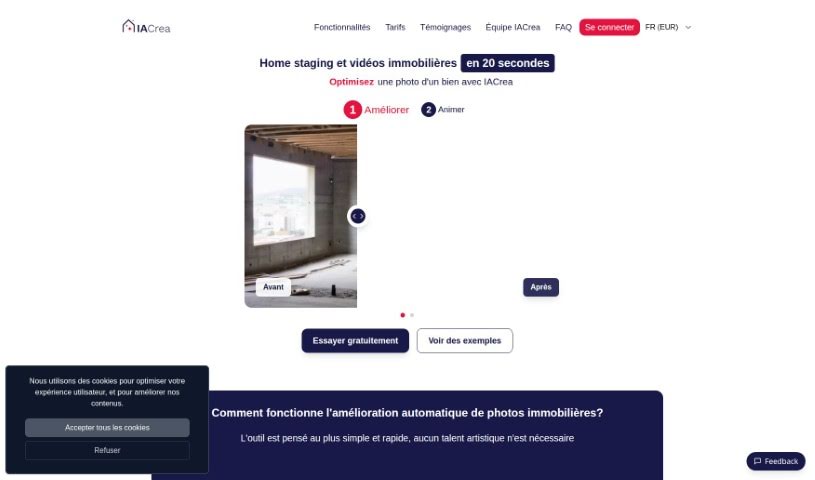
IACrea is a really neat AI tool that makes redecorating your living spaces super quick and easy. You just upload a photo of your place, pick a style you like – maybe modern, Scandinavian, industrial, or minimalist – and BAM! You get a brand new design idea in seconds. It’s fantastic for anyone who loves interior design, is trying to sell or buy a home, or just wants to play around with different looks for a room. Plus, if you’re a developer, IACrea offers API access, and it even works with 360-degree photos, which is great for virtual tours.
Who created IACrea?
Constance Laborie and Pauline Clavelloux, two talented female engineers, launched IACrea on March 30, 2023. They started the company because they noticed a big problem: most people (like 8 out of 10!) have trouble picturing how a space could look different. So, they created IACrea to solve that. It’s a tool that uses AI to let you quickly and easily redecorate your living spaces. You can try out different styles, from modern to minimalist, and see how different room designs might look without actually changing anything. It’s also super handy for virtual estate tours, especially since it supports 360-degree photos.
What is IACrea used for?
IACrea is incredibly versatile! Here’s a rundown of what you can do with it:
- Quick Room Redecoration: Give a room a fresh look in a flash.
- Visualize Changes: See what a new design looks like before you commit to any actual changes.
- Selective Area Redecoration: Focus on just one part of a room if you don’t want to change the whole thing.
- Virtual Furniture Placement: See how new furniture would fit and look in your space.
- 360-Degree Photos Support: Great for immersive virtual tours.
- Room Functionality Change: Imagine how a room could serve a different purpose.
- Real Estate Enhancement: Make properties look more appealing for listings.
- Handles Empty Room Furnishing: Easily visualize how to furnish a blank space.
- Cost-Effective Design Visualization: Get design ideas without expensive consultations or materials.
- Rapid Use Instance: Quickly generate multiple design concepts.
- Multiple Design Styles: Explore a wide range of aesthetic options.
- De-cluttering Functionality: See how a tidier space might look.
- Virtual Renovation from Photo: Transform a room’s appearance using just a picture.
- Supports Rapid Prototyping During Visits: Quickly show clients different options on the spot.
- Visual Projection from 3D Plan: See how a 3D design translates to a real-world photo.
- 360-Degree Photos for Virtual Tours: Offer potential buyers or renters an immersive experience.
- Optimized for Both Sellers and Buyers: Helps sellers showcase properties and buyers visualize their future home.
- Visualizing Different Design Options for Rooms: Explore various styles and layouts.
- Selecting Specific Areas of a Room to Redecorate: Make targeted design changes.
- Restyling an Empty Room: Bring life to vacant spaces.
- Providing an API for Developers: Integrate IACrea’s capabilities into other applications.
- Improving Design Proposals by Retrying or Changing Photo Angles: Refine AI-generated designs for better results.
- Creating Images for Commercial Purposes: Generate marketing visuals for real estate or design.
- Enhancing Real Estate Photos: Make property images more attractive.
- Renovating Rooms Virtually: Preview renovation projects.
- Decluttering Spaces: Visualize the impact of a cleaner, more organized room.
Who is IACrea for?
IACrea is a fantastic tool for several groups:
- Real estate professionals: To stage properties virtually and attract more buyers.
- Homeowners: To get inspiration and visualize renovations or redecorating projects.
- Interior designers: To quickly generate design concepts and present ideas to clients.
- Developers: To visualize different property layouts and finishes.
How to use IACrea?
Using IACrea is pretty straightforward. Here’s how you can get started:
- Upload a Photo: First, head over to the platform online and upload a picture of the room you’re thinking of redesigning. Make sure it’s a clear shot!
- Select a Design Style: Next, you’ll get to pick from a variety of design styles. Whether you’re into modern, Scandinavian, industrial, or minimalist looks, there’s something for everyone.
- Generate Design Proposal: Once you’ve chosen your style, the AI gets to work. It’ll analyze your room and the style you picked to create a brand-new design proposal. You can even choose to restyle just specific parts of the room or furnish an empty space if that’s what you need.
- View Results: After a moment, you’ll see the design proposal. It’s a great way to visualize the changes without having to lift a finger or spend any money on actual alterations.
- Improving Results: If the first design isn’t quite what you had in mind, don’t worry! You can always retry the design proposal. Taking photos from slightly different angles can also help the AI understand your room better and give you even more accurate results.
- Utilize for Commercial Use: The images you create with IACrea are super useful. You can use them for commercial purposes, like in marketing materials, property listings, or even for selling design concepts.
Basically, IACrea is perfect if you’re interested in interior design, need to stage a property, or just want to quickly redecorate a room without making any real changes. It’s especially helpful for showing off different design possibilities and really impressing potential buyers or sellers with a vision of what a space could become.