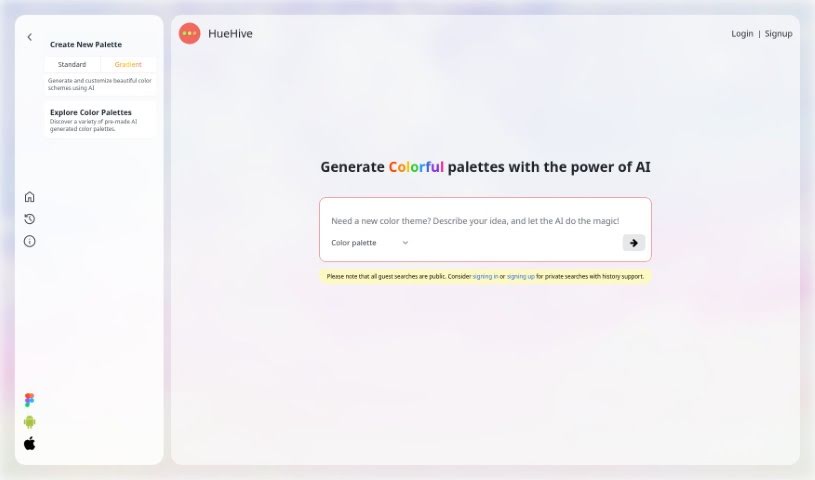
Screenshot of HueHive

HueHive

Discover HueHive in 2025! Learn what this AI-powered tool is, how to use its features like the Figma plugin and text-based generator, and see how it stacks up against other design generators.

Screenshot

What is HueHive?

HueHive is a smart AI tool that makes creating beautiful color palettes super easy. It is your personal AI assistant for all things color. It’s designed to help you generate stunning color combinations for pretty much any design project you’re working on. What’s really neat is that it has a Figma plugin. This means you can use HueHive’s palettes directly inside Figma, which is a huge time-saver for designers. Plus, there’s a palette generator that uses Chat GPT technology. You just type in a theme – like ‘cosmetic,’ ‘Indian recipes,’ ‘futuristic,’ ‘Makoto Shinkai,’ or ‘dark fantasy’ – and it whips up a color palette for you. You’ll see the colors clearly laid out, each with its own name. HueHive also offers other resources, like apps for Android and iOS, a web version called Croma, and even a Github repository where you can check out palettes that have already been made. Connecting with HueHive on social media is a great way to keep up with updates and get fresh inspiration for your color choices. It’s a really handy resource for anyone in design or creative fields who wants to make great color palettes with a little help from AI.

Who created HueHive?

HueHive, the AI tool that helps you create fantastic color palettes, first appeared on July 30, 2024. While the specific founder isn’t mentioned in the details I have, HueHive itself is known as an AI-powered tool that helps users generate eye-catching color combinations for their design work. It’s got some cool features, like a Figma plugin that fits right into your design software, making it easy to use palettes as you work. It also has a palette generator that uses Chat GPT to create colors based on what you type. Essentially, HueHive is a valuable resource for designers and creatives looking to easily generate high-quality color palettes with the help of AI.

What is HueHive used for?

HueHive is incredibly useful for a variety of design tasks:

  • Generating Color Palettes: It helps you create visually appealing color combinations for all sorts of design projects.
  • Figma Integration: The Figma plugin allows for smooth integration, so you can use palettes directly within your design workflow.
  • Text-Based Generation: You can use Chat GPT technology to generate palettes based on text input, which is great for matching specific themes.
  • Themed Palettes: It’s perfect for aligning palettes with specific concepts like ‘cosmetic,’ ‘Indian recipes,’ ‘futuristic,’ ‘Makoto Shinkai,’ and ‘dark fantasy.’
  • Clear Color Display: All generated colors are shown clearly, along with their names.
  • Access to Resources: You can explore pre-made palettes and find helpful resources like Android and iOS apps, Croma web, and the Github repository.
  • Inspiration and Updates: Connecting on social media keeps you updated and provides inspiration for your color palette creation.
  • Effortless Creation: It offers designers and creatives a valuable way to effortlessly generate high-quality color palettes using AI.
  • Visual Appeal: It’s all about creating those beautiful color combinations for your designs.
  • Workflow Enhancement: The Figma plugin makes sure your workflow is smooth.
  • Concept Alignment: You can easily match palettes to your project’s theme.
  • Palette Discovery: It’s a great place to explore and find new palettes.
  • Resource Hub: Access to apps, web tools, and code repositories is readily available.
  • Community Connection: Social media links help you stay connected for inspiration and news.
  • AI-Powered Quality: It’s a top resource for generating great palettes with AI.

Who is HueHive for?

HueHive is primarily for:

  • Designers
  • Creatives

How to use HueHive?

HueHive is an AI-powered tool designed to help you effortlessly create high-quality color palettes for your design projects. Here’s a simple way to get started:

  1. Access HueHive: You can either go to the HueHive website or download the app for Android or iOS if you prefer generating palettes on the go.
  2. Generate Your Palette: Use the palette generator. Just type in keywords related to your theme – think ‘cosmetic,’ ‘futuristic,’ or ‘dark fantasy’ – and HueHive will create a color palette based on your input.
  3. Integrate with Design Software: If you use Figma, the plugin is a game-changer. It connects directly with the software, letting you access and use the color palettes you create right within your design workflow.
  4. Explore Resources: Take some time to browse the pre-generated palettes available on the website. You’ll also find links to the mobile apps, Croma web, and the Github repository, which are all useful resources.
  5. Stay Connected: Follow HueHive on social media. It’s a great way to get updates and find new inspiration for your color palette creation process.

By following these steps, you can easily use HueHive’s AI capabilities to generate beautiful color combinations for all your design needs.

Related AI Tools

Discover more tools in similar categories that might interest you

123RF AI Image Generator

Creative Image Generation
Learn More

Stay Updated with AI Tools

Get weekly updates on the latest AI tools, trends, and insights delivered to your inbox

Join 25,000+ AI enthusiasts. No spam, unsubscribe anytime.