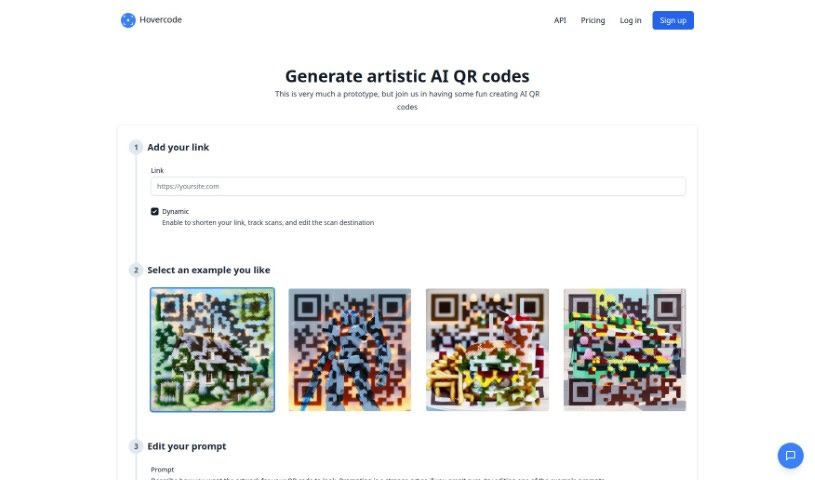
Screenshot of Hovercode AI QR Code Generator

Hovercode AI QR Code Generator

Discover what Hovercode AI QR Code Generator is and how to use it effectively in 2025. We'll explore its features and see how it stacks up against other Digital Marketing Tools.

Screenshot

What is Hovercode AI QR Code Generator?

Hovercode AI QR Code Generator is a really neat tool that lets you create unique, artistic QR codes. It’s pretty straightforward: you just describe the artwork you want for your QR code, and the AI system turns those descriptions into visually distinct codes. You can generate QR codes easily, customize their look, track scans, and even use dynamic QR codes, which means you can change where they link to later without making a new code. While Hovercode is still in its early stages and has some limitations – like the artwork quality can vary, and there isn’t a mobile app or specific security features yet – it offers a lot of useful functions for making branded and custom QR codes.

Who created Hovercode AI QR Code Generator?

Hovercode was developed by a company that specializes in unique artistic QR designs. They offer an easy process for generating QR codes, along with URL shortening, scan tracking, and features to match your branding. This company is still in its prototype phase, but they provide tools for creating artistic QR codes using an AI generator, allowing for custom shapes and the ability to update links dynamically. You can find updates on their services on the company blog. Hovercode officially launched on June 27, 2023. Unfortunately, the specific founder isn’t mentioned in the information available.

What is Hovercode AI QR Code Generator used for?

Here’s a rundown of what you can do with Hovercode:

  • Create round QR codes.
  • Use the dynamic link function to update destinations.
  • Modify example prompts to get the artwork you want.
  • Access the AI QR code generator via an API.
  • Keep up with Hovercode’s news and articles.
  • Generate PDF QR codes.
  • Customize the artwork on your QR codes.
  • Track how many scans your QR codes get.
  • Edit your QR codes after they’re created.
  • Generate QR codes in bulk.
  • Match your QR code’s design to your brand’s look.
  • Use AI to generate QR codes with features like custom domains, round designs, dynamic updates, scan tracking and analytics, bulk generation, PDF codes, and developer APIs.

Who is Hovercode AI QR Code Generator for?

This tool is great for:

  • Marketing professionals
  • Graphic designers
  • API Developers
  • Artists
  • Branding experts
  • Web Developers
  • Brand managers
  • Business owners
  • Marketers
  • Designers
  • Developers
  • Anyone using APIs

How to use Hovercode AI QR Code Generator?

Using Hovercode is pretty simple. Just follow these steps:

  1. First, enter the link you want your QR code to point to.
  2. Next, pick or tweak an artistic prompt to customize how the QR code looks. You could describe something like a painting of a cottage or birds flying, for instance.
  3. Then, generate the QR code using your custom artwork description.
  4. If you need to change where the QR code links later, use the dynamic QR code feature. This lets you update the destination URL without having to create a whole new QR code.
  5. Keep an eye on how well your QR codes are performing using the scan tracking feature.
  6. You can also take advantage of other handy features like generating QR codes in bulk, options for branded QR codes, custom domains, round QR code designs, and generating PDF QR codes.
  7. To stay in the loop with the latest news and articles from Hovercode, check out the ‘Articles’ section or the company’s blog on their website.
  8. If you’re a developer, there’s an API available that you can use to integrate the AI QR code generator tool into your own applications.

Related AI Tools

Discover more tools in similar categories that might interest you

Stay Updated with AI Tools

Get weekly updates on the latest AI tools, trends, and insights delivered to your inbox

Join 25,000+ AI enthusiasts. No spam, unsubscribe anytime.