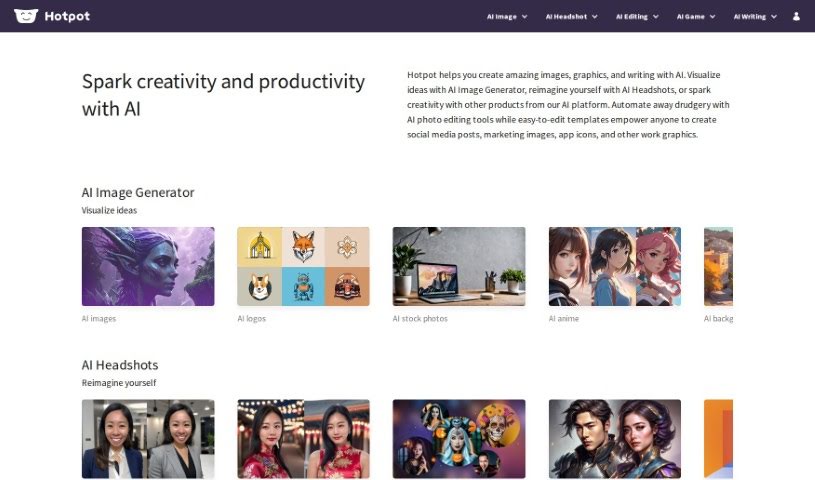
Screenshot of Hotpot

Hotpot

Discover what Hotpot.ai is and how you can use its AI-powered tools effectively in 2025. We'll explore its features, compare it to other image generators, and guide you through its capabilities.

Screenshot

What is Hotpot?

Hotpot.ai is a really handy platform that uses AI to give you a bunch of different tools and templates for making graphics, pictures, and even text. It is your go-to spot for creative tasks. It’s packed with features like an AI Art Generator, an AI Headshot Generator, an AI Photo Upscaler, an AI Object Remover, a Background Remover, an AI Color Generator, a Face Enhancer, and an AI Copywriter. Basically, it can help with everything from whipping up social media posts to automating tricky image editing tasks.

The AI Art Generator, for instance, is pretty neat. It takes your text descriptions and turns them into art images automatically. This is super useful if you’re looking to create unique NFT art, personalize your own art pieces, or just generate something gallery-worthy without needing to be a master artist yourself.

And if you need professional-looking headshots, Hotpot.ai’s AI Headshot Generator is designed just for that. It lets you create custom headshots and glamour shots, offering a wide range of intricate styles and looks that AI can achieve.

Need to boost the quality of your photos? The AI Photo Upscaler feature uses AI to increase photo resolution. This means your images will look much better, whether they’re for people, products, art, or even game assets.

Plus, if there’s something in your photo you don’t want, the AI Object Remover functionality makes it a breeze to get rid of it. It uses AI technology to clean up your images, making it a perfect tool for editing selfies, portraits, or any photo where you need to remove distractions.

Ultimately, Hotpot.ai’s goal is to make graphic design, image editing, and media creation much faster and more affordable for everyone. They really want to spark your creativity and take care of those tedious tasks for professionals, while keeping content creation simple and accessible for casual users. Their whole approach is built around making things easy to use and readily available.

Who created Hotpot?

Hotpot was actually created by a team that’s really passionate about changing how we create content using AI. They launched the platform back on September 13, 2020, with a clear mission: to offer fast and affordable solutions for graphic design. The company’s core philosophy really centers on making content creation simpler. They offer a variety of AI-driven tools, like the AI Art Generator, AI Headshot Generator, and AI Photo Upscaler, which are great for everything from making social media posts to improving your images.

What is Hotpot used for?

Hotpot is incredibly versatile! Here are some of the main things people use it for:

  • Creating eye-catching content for social media.
  • Making images look much better by upscaling them 10x or even more.
  • Easily removing unwanted objects from photos, or even replacing them with AI.
  • Editing specific objects within your images using AI.
  • Getting rid of backgrounds with AI, leaving just your subject.
  • Adding color to black and white photos with AI.
  • Restyling your images or personalizing art with AI.
  • Restoring old or damaged photos.
  • Enhancing faces in pictures to make them look their best.
  • Creating graphics for apps and other content.
  • Removing objects from photos using AI.

Who is Hotpot for?

Hotpot’s tools are designed to help a wide range of people and professions:

  • Logo Designers
  • Stock Photographers
  • Digital artists
  • Content creators
  • Social media managers
  • Marketing professionals
  • App developers
  • Real Estate Agents
  • Medical professionals
  • Graphic designers
  • Game developers
  • Photographers
  • Artists
  • Content writers
  • Marketers
  • Writers
  • Developers
  • Copywriters
  • Product Writers
  • Designers

How to use Hotpot?

Using Hotpot.ai effectively is pretty straightforward. Just follow these steps:

  1. Get Started with Hotpot.ai:
    • First, head over to the Hotpot.ai website. Once you’re there, take some time to look around at all the different tools and features they offer.
  2. Pick a Template:
    • Decide what kind of graphic you need to create. Hotpot has templates for social media posts, app graphics, game assets, logo designs, and lots of other work-related graphics.
  3. Create Your Design:
    • Once you’ve chosen a template, you can easily customize it using their user-friendly interface. Add your own content, images, and text to make it yours.
  4. Explore the AI Tools:
    • Don’t forget to check out the various AI tools available. You can use things like the AI Game Tools, AI Color Generator, AI Copywriter, AI Object Remover, and many more to really boost your designs.
  5. Understand Cost and Pricing:
    • Hotpot.ai lets you create designs for free, or you can get them for a very small cost, usually around $1 per graphic. Think about your budget and what you need for your designs.
  6. Look into Advanced Settings:
    • If you plan to use the graphics for commercial purposes or need more advanced options, you might need credits. If you’re looking for team plans, high-volume usage, or even self-hosted options, it’s best to reach out to Hotpot.ai directly to discuss pricing.
  7. Consider Collaborations:
    • Are you an educator, an influencer, or perhaps work for Google Cloud? If so, get in touch with them! They might have special collaboration opportunities or discounted credits available.
  8. Weigh the Pros and Cons:
    • It’s always good to know the advantages, like the huge range of templates, how affordable it is, and all the cool AI features, plus their helpful blog. But also be aware of limitations, such as how much you can customize templates and the export options.
  9. Discover Additional Features:
    • There are plenty of other useful features to explore, like restoring old pictures, removing backgrounds, getting help with product writing, and using AI for personalized art and photos.
  10. Improve Your Images:
    • Take advantage of tools like the AI Photo Upscaler, AI Color Generator, Face Enhancer, Picture Restorer, and other AI functions. They’re all designed to make your images look better and higher quality.

By following these steps, you’ll be able to make the most of Hotpot.ai’s many features and templates, creating really captivating graphics, photos, and text that perfectly fit what you need.

Related AI Tools

Discover more tools in similar categories that might interest you

123RF AI Image Generator

Creative Image Generation
Learn More

Stay Updated with AI Tools

Get weekly updates on the latest AI tools, trends, and insights delivered to your inbox

Join 25,000+ AI enthusiasts. No spam, unsubscribe anytime.