What is HeardThat?
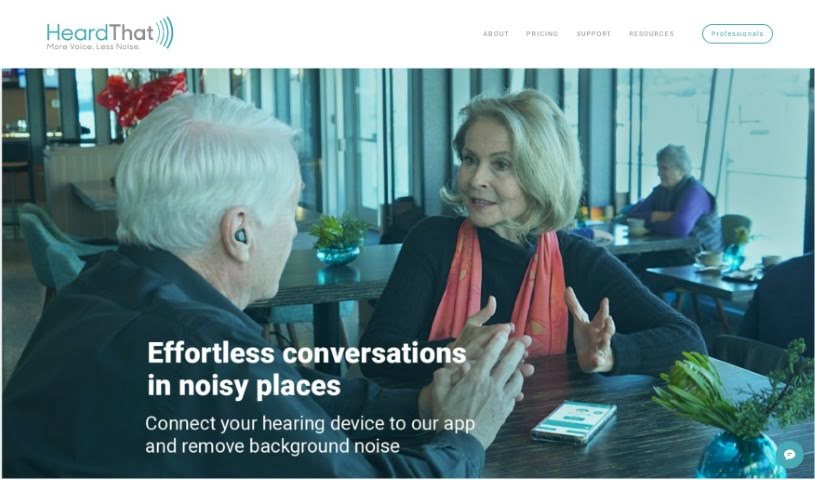
HeardThat is a really smart smartphone app from Singular Software. Its main goal is to help people hear better, especially when they’re in noisy places. It uses artificial intelligence and clever algorithms to pick out speech from all the background racket, making conversations much clearer. The best part? You don’t need any special hearing devices. You can just connect the app to your regular Bluetooth earbuds or hearing aids. HeardThat works offline, so you don’t need an internet connection, and it’s designed to be super easy to use. Plus, it’s quite affordable. Essentially, it makes social interactions a lot smoother by helping you follow conversations more easily, even when it’s loud.
Who created HeardThat?
Dr. Bruce Sharpe, the founder and CEO, is the mind behind HeardThat. The app officially launched on June 18, 2024. HeardThat is actually part of Singular Software, which is based in Vancouver, British Columbia, Canada. Dr. Sharpe got the idea for HeardThat from seeing a family member struggle to hear in noisy social settings because of hearing loss. His company focuses on machine learning, audio, and speech processing to create innovative products like HeardThat. This app uses your smartphone as a hearing aid, boosting speech clarity in noisy environments.
What is HeardThat used for?
- It makes understanding speech much easier, even when there’s a lot of background noise.
- It helps people carry on conversations more comfortably in loud places.
- It cuts down on the frustration and tiredness that comes from struggling to hear.
- By making communication easier in noisy spots, it helps prevent people from feeling left out socially.
- It cleverly turns your smartphone into a tool that assists with hearing, all thanks to AI.
- It’s great at separating speech from background noise, leading to clearer communication.
- You can adjust the ambient sound levels to get the best conversation experience.
- It works with the Bluetooth earbuds or hearing aids you already own – no need to buy anything new!
- It genuinely improves your hearing ability without requiring any new hardware.
- It makes speech clearer in noisy environments through a simple, four-step process.
- It really helps you hear conversations better when it’s noisy.
- It makes social interactions smoother and more enjoyable.
- It significantly reduces the strain of trying to follow conversations.
- It supports your independence and ability to communicate.
- It’s a tool that promotes better accessibility for everyone.
- It can be a valuable addition to audiology practices.
- It’s designed to work seamlessly with your existing hearing devices.
- It effectively transforms your smartphone into a helpful hearing tool.
- You can use it without needing an internet connection.
- It’s both convenient and budget-friendly.
- It boosts your ability to understand speech, especially in noisy situations.
- It’s incredibly easy to use, often just needing a single button press.
- It’s a great example of supporting digital health.
- It offers a cost-effective way to improve how you hear.
- You can even gift HeardThat to someone else who might benefit.
- It turns your smartphone into a sophisticated device that helps with hearing.
- It brings conversations to the forefront, even in busy social settings.
- It expertly separates and filters out background noise.
- It’s all about making speech clearer in noisy environments.
- It focuses on separating speech from distracting background noise.
- It aims to improve how well you understand speech.
- It’s a cost-effective solution for anyone looking to enhance their hearing.
- It’s super convenient for use in all sorts of different places.
- It’s compatible with your Bluetooth earphones and hearing aids.
- It makes social interactions much better, especially in noisy environments.
- It’s designed to be user-friendly and straightforward to operate.
- It provides auditory enhancement, particularly when you’re in noisy settings.
- It enhances speech clarity in noisy environments by effectively separating speech from background noise.
- It improves social interactions by helping individuals communicate more effectively in loud settings.
- It aids people with hearing difficulties in following and participating in conversations.
- It’s a cost-effective solution for enhancing hearing without the need to purchase new devices.
- It facilitates clearer auditory experiences when used with Bluetooth-enabled hearing aids or earphones.
- It empowers users to manage ambient sound levels while using the app.
- It helps reduce conversation strain and promotes greater accessibility.
- It supports user autonomy and digital health through its user-friendly interface.
- It’s conveniently accessible offline, meaning you don’t need an internet connection to use it.
- It transforms your smartphone into a powerful tool that assists with hearing.
Who is HeardThat for?
- Healthcare professionals
- Audiologists
- Individuals who find it difficult to hear in noisy environments
- Speech Therapists
- Healthcare professionals who specialize in audiology and speech
- People experiencing hearing difficulties in noisy settings
- Hearing aid specialists
- Speech pathologists
- Healthcare professionals who work with individuals facing hearing challenges
- Speech-Language Pathologists
- Those in the entertainment industry
- Teachers
- Students
- Media professionals
- Law enforcement officers
- Professionals who do a lot of public speaking
How to use HeardThat?
Using HeardThat is pretty straightforward. Just follow these simple steps:
- Download the App: First things first, download the HeardThat app. You can get it from the official website. It’s free to download, and you won’t need a credit card for this part.
- Connect Your Bluetooth Device: HeardThat works with your existing Bluetooth-enabled devices, like earphones or hearing aids. You don’t need any extra hardware, which makes setup really convenient.
- Activation: Getting it started is as easy as touching a button. Just tap “start,” and HeardThat will immediately filter out noise from your conversations, making speech much clearer.
- Enjoy Clear Speech: Once it’s active, you can just relax and enjoy clear conversations without having to strain to hear. HeardThat also lets you adjust the ambient sound level, so you can personalize your conversation experience.
By following these steps, you can really make the most of HeardThat to improve how you hear and make conversations, especially in noisy places, much more comfortable.