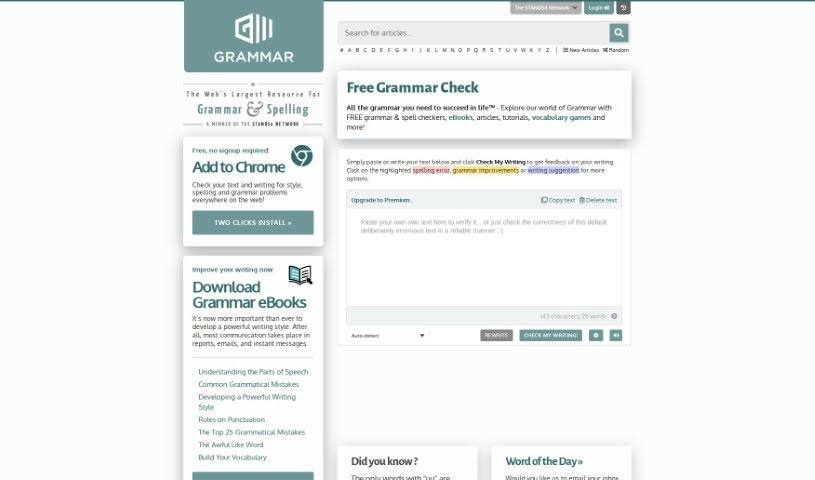
Screenshot of Grammar.com

Grammar.com

Discover what Grammar.com offers and how to use its features effectively in 2025. We'll explore its tools, compare it to other grammar checkers, and show you exactly how to improve your writing.

Screenshot

What Exactly is Grammar.com?

Grammar.com is your go-to spot online for everything grammar-related. It’s a really comprehensive platform packed with tools and resources, perfect for anyone who loves language or just wants to polish their writing. When you visit, you can grab free grammar and spell checkers, dive into eBooks and articles, follow tutorials, or even play vocabulary games. The whole idea behind Grammar.com is to be that one essential place for all the grammar help you might need, whether for school, work, or just everyday communication. It’s super simple to use: just pop your text into the box on the site and hit the “Check My Writing” button. You’ll get helpful feedback, pointing out any spelling mistakes, suggesting grammar tweaks, and offering ways to make your writing even better. Honestly, it’s a fantastic resource if you’re looking to boost your grammar skills and really nail your writing.

Who’s Behind Grammar.com?

Grammar.com was actually created by Brian Wasko. He’s a real expert when it comes to English grammar and writing, so you know the advice and tools on the site are solid. The platform offers services for checking your grammar, alongside educational materials designed to help you improve your writing. Essentially, Grammar.com is all about giving you the tools and knowledge you need to get better at English.

How Can You Use Grammar.com?

Using Grammar.com to check your writing is pretty straightforward. Here’s a quick rundown:

  1. First off, head over to Grammar.com and find the “Free Grammar Check” section. It’s usually easy to spot.
  2. Next, just paste or type whatever text you want checked right into the text box they provide.
  3. Once your text is in, click that “Check My Writing” button to get the process started.
  4. The tool will then go through your writing, showing you where there are spelling errors, suggesting grammar fixes, and offering other writing improvements.
  5. See something highlighted? Click on it! You’ll get more detailed feedback and specific suggestions for that particular spot.
  6. After you’ve reviewed the feedback, you can easily copy your corrected text to use elsewhere or clear it out if you’re done.
  7. If you find yourself needing more advanced features or more powerful grammar tools, they do offer a Premium version on the site that you might want to check out.

By following these simple steps, you can really make the most of Grammar.com’s grammar checking tool. It’s a great way to boost your writing skills and make sure your work is accurate and polished.

Related AI Tools

Discover more tools in similar categories that might interest you

Academic Help Free Essay Generator

Education Academic Writing
Learn More

Stay Updated with AI Tools

Get weekly updates on the latest AI tools, trends, and insights delivered to your inbox

Join 25,000+ AI enthusiasts. No spam, unsubscribe anytime.