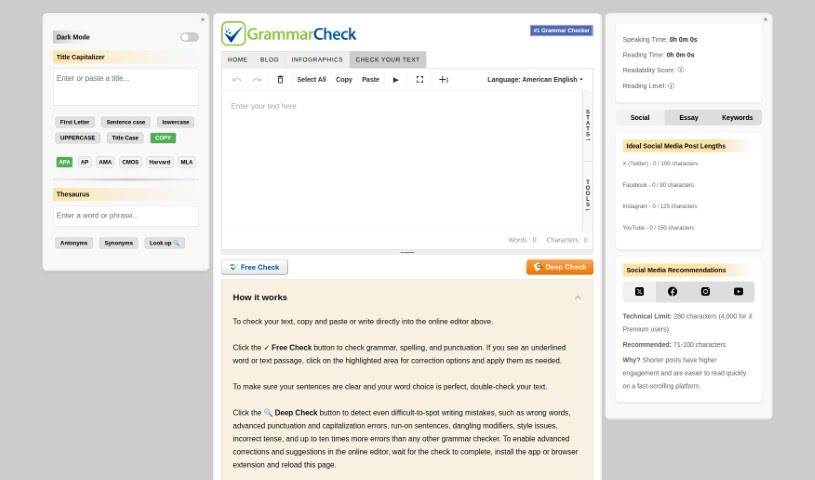
Screenshot of GrammarCheck

GrammarCheck

Discover what GrammarCheck is and how to use it effectively in 2025. We'll explore its features and see how it stacks up against other grammar checkers.

Screenshot

What is GrammarCheck?

GrammarCheck is a really helpful tool for anyone who writes. It’s designed to help you polish your writing by spotting and fixing mistakes in grammar, punctuation, and spelling. It is your personal editor, making your sentences clearer and your overall writing much better. It’s especially great if you want to make sure your work is perfect before you share it. The interface is super easy to use, and it gives you feedback right away, which makes it a convenient way to improve the accuracy and professionalism of anything you write.

Who created GrammarCheck?

GrammarCheck actually got its start way back in the late 1990s, making it the internet’s very first online grammar checker. While the exact person or team behind it remains a bit of a mystery, the company has definitely evolved. They’ve made privacy a priority, which is great – they don’t store your texts on their servers. Instead, they keep them temporarily in your web browser’s cache. What people really like about GrammarCheck is how fast and simple it is to use. Plus, it does more than just check grammar; it also looks at spelling, punctuation, your word choices, and even your writing style.

How to use GrammarCheck?

Using GrammarCheck is pretty straightforward. Here’s how you can get started:

  1. Paste or Type Your Text: Just copy your text and paste it into the online editor, or you can type it directly there.
  2. Hit ‘Free Check’: Click the “Free Check” button. This will quickly scan for common grammar, spelling, and punctuation errors.
  3. Try ‘Deep Check’: For a more thorough review, go for the “Deep Check.” This feature is designed to catch trickier mistakes, like using the wrong words, punctuation slips, sentences that run on too long, and style issues.
  4. Unlock Advanced Help: If you want to see more advanced suggestions, you’ll need to install the GrammarCheck app or a browser extension. Once that’s done, just reload the page.
  5. Review and Apply: You’ll see underlined words or phrases where GrammarCheck has found something. Click on them to see suggested corrections and then apply the ones you like.
  6. Refine Your Writing: Take a look at the suggestions to make sure your sentences are clear and that you’re using the best words for what you want to say. GrammarCheck helps with all of this.

GrammarCheck isn’t just about grammar, though. It also checks your spelling, punctuation, word choice, and even your writing style. It’s a fantastic tool for pretty much anyone – students, professionals, teachers, language learners, and proofreaders – looking to make their English writing shine. Honestly, even native English speakers can find it super helpful for catching those little mistakes that sometimes slip through the cracks.

Related AI Tools

Discover more tools in similar categories that might interest you

Academic Help Free Essay Generator

Education Academic Writing
Learn More

Stay Updated with AI Tools

Get weekly updates on the latest AI tools, trends, and insights delivered to your inbox

Join 25,000+ AI enthusiasts. No spam, unsubscribe anytime.