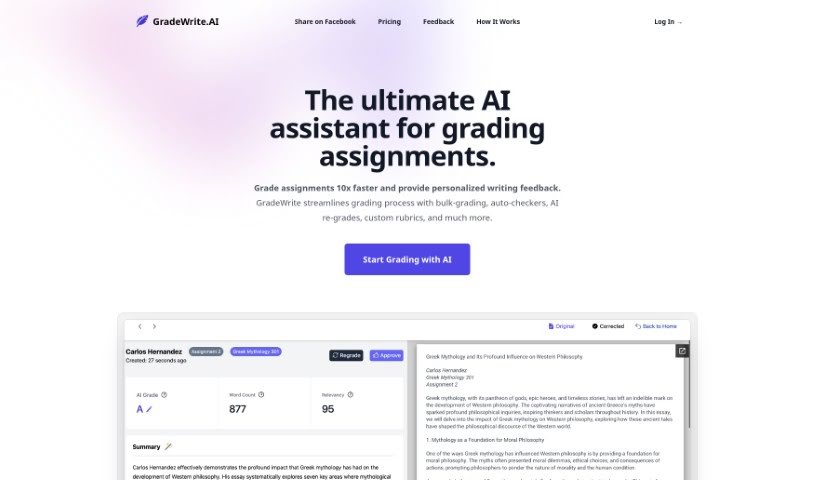
Screenshot of Gradewrite

Gradewrite

Discover what Gradewrite is and how to use it effectively in 2025. We'll explore its features and see how it stacks up against other teacher tools.

Screenshot

What is Gradewrite?

Gradewrite is a smart tool designed to help teachers grade assignments much faster. It is your AI assistant for grading. It can handle a lot of assignments at once, automatically check for things like word count and plagiarism, and even help you write personalized feedback for students. You can also create your own grading rubrics, and the tool lets you see the original student work right next to the AI’s feedback. This makes the whole grading process smoother and more effective.

Who created Gradewrite?

NextWord is the company behind Gradewrite. They launched it on January 8, 2024. NextWord offers different pricing plans, whether you’re a single teacher, part of a school district, or even a college. The tool itself is packed with features to save you time, like uploading multiple assignments at once, automatically checking for common issues such as word count and plagiarism, generating personalized feedback, and letting you build custom rubrics.

What is Gradewrite used for?

Gradewrite helps with a bunch of things to make grading easier:

  • Plagiarism detection: It checks if student work has been copied.
  • Bulk assignment uploads: You can upload many assignments all at once.
  • Quick processing of submissions: Get through your grading pile faster.
  • Auto-checkers for potential issues: It flags things like word count or rubric compliance.
  • Word count compliance: Ensures students meet the required length.
  • Rubric compliance detection: Checks if submissions follow your grading criteria.
  • Plagiarism detection feature: A dedicated tool to catch copied work.
  • Interactive grading experience: A smooth way to review and edit feedback.
  • Manual edit capability: You can tweak the AI’s suggestions.
  • Personalized feedback: Get tailored comments for each student.
  • Customizable rubrics: Build your own grading scales.
  • Automated grammar and spelling checks: Catches common writing errors.
  • Custom rubrics: Create rubrics that fit your specific needs.
  • Personalized feedback generation: AI helps craft individual student comments.
  • Side-by-side viewing: Compare the original submission with the AI’s feedback easily.
  • Automated assignment summary: Get a quick overview of each paper.
  • Artificial content detection: Checks if content might have been AI-generated.
  • Analyzing uploaded student work: The AI reviews what students have submitted.
  • Generating automated feedback: The system creates draft feedback for you.
  • Allowing for an initial review of AI suggestions: You can look over the AI’s feedback before finalizing.
  • Bulk upload for assignments: Uploading many papers at once is simple.
  • Auto-checkers for potential issues like word count and plagiarism: It automatically looks for common problems.
  • Creating custom rubrics: Design rubrics that match your grading style.
  • Side-by-side viewing of original submission and AI-generated feedback: See the student’s work and the AI’s comments together.
  • Automated grammar and spelling check: Helps clean up student writing.

Who is Gradewrite for?

Gradewrite is a great tool for:

  • Educators
  • Teachers
  • School Districts
  • Colleges
  • Anyone in a school district or college setting

How to use Gradewrite?

Here’s a simple guide to using Gradewrite effectively:

  1. Upload Assignments: Start by uploading your students’ assignments in bulk. This makes processing them much quicker.
  2. Use Auto-Checkers: Let the auto-checkers do their job. They’ll flag potential issues like word count, rubric compliance, and plagiarism.
  3. Review and Edit: Take advantage of the interactive grading. You can review the AI-generated feedback and make any manual edits you think are necessary.
  4. Benefit from Personalized Feedback: Gradewrite’s AI can help craft constructive suggestions for each student, offering personalized advice for improvement.
  5. Create Custom Rubrics: Make sure your grading is accurate and consistent by creating custom rubrics that match your specific standards.
  6. Side-by-Side Comparison: View the original student submission right next to the AI-generated feedback. This really helps streamline the grading process.
  7. Approve AI Suggestions: After a quick review, you can approve the AI’s suggestions, refining and finalizing the feedback for each assignment.
  8. Leverage Plagiarism Detection: Save time by using Gradewrite’s built-in plagiarism detection feature to quickly identify any potential issues.
  9. Boost Efficiency: Make grading even more efficient with auto-summaries of assignments and automated grammar and spelling checks.
  10. Ensure Consistency: Keep your grading consistent by using the AI for personalized feedback and making sure the review process flows smoothly.

By following these steps, you can really make the most of Gradewrite’s features to speed up your grading and give students helpful, constructive feedback.

Related AI Tools

Discover more tools in similar categories that might interest you

Academic Help Free Essay Generator

Education Academic Writing
Learn More

Stay Updated with AI Tools

Get weekly updates on the latest AI tools, trends, and insights delivered to your inbox

Join 25,000+ AI enthusiasts. No spam, unsubscribe anytime.