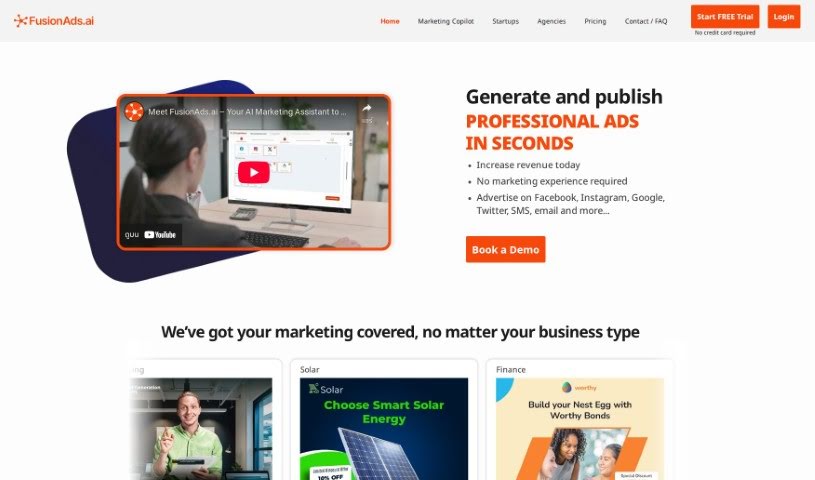
Screenshot of Fusionos

Fusionos

Discover what FusionOS is and how to use it effectively in 2025. We'll explore its features and see how it stacks up against other marketing tools.

Screenshot

What is FusionOS?

FusionOS is a platform built to help marketers and creators work smarter and get more done. It’s packed with features designed to streamline your workflow. Think of tools like FusionCopy, which helps you write marketing copy, FusionImage for quickly creating image files, and FusionInsights, which gives you the analytics you need to really understand your customers. If you’re an eCommerce seller, FusionOS is a great fit. You can launch campaigns the very same day, and you’ll get AI-powered ad creatives and analytics to back you up. It can even generate ready-to-go live ads. Plus, it supports multiple clients with separate workspaces and offers real-time ad generation, complete with custom marketing copy and creatives. For those who use Adobe Photoshop, FusionOS can generate editable graphics in that format, really boosting your productivity. It helps with managing tasks, allows for real-time collaboration, offers one-click integrations, and has dedicated modules for copywriting and image generation.

Who created FusionOS?

FusionOS was developed by a company called GGNY. They launched the platform on March 31, 2024. It’s designed to make marketing tasks easier by offering features like AI-assisted copy and image generation, real-time collaboration, and integrations with various marketing tools. The goal is to boost productivity and simplify how marketing campaigns are run.

What is FusionOS used for?

FusionOS can help you with a lot of different marketing tasks:

  • Testing different versions of your content (A/B testing).
  • Publishing ads directly to platforms like Facebook, Instagram, Google, Twitter, and even through SMS and push notifications.
  • Creating content of all sizes for various marketing channels.
  • Building apps that you can then sell to users.
  • Automating complex tasks by bundling them together.
  • Connecting to other tools through its open API for more functionality.
  • Linking up with different marketing tools to make your work smoother.
  • Getting started with new AI and marketing tools with just one click.
  • Generating marketing copy that’s specifically written for your needs.
  • Making it easier for your team to work together.

Who is FusionOS for?

FusionOS is particularly useful for:

  • Ecommerce sellers
  • Direct-to-consumer (DTC) Brands
  • Marketing Agencies

How to use FusionOS?

Here’s a straightforward guide to using FusionOS effectively:

  1. Crafting Tailored Marketing Copy:

    • Dive into FusionCopy to generate marketing copy that’s perfect for different channels. You can create briefs, ad headers, taglines, and product descriptions that really hit the mark.
  2. Creating Visuals Instantly:

    • Use FusionImage to quickly generate image files in various sizes. You can even get editable Adobe Photoshop files, complete with layered text, backgrounds, and high-resolution product images.
  3. Working Better Together:

    • FusionOS makes team collaboration a breeze. You can manage all your tasks in one place, promoting a smoother workflow and enabling real-time collaboration across your teams.
  4. Connecting Your Marketing Tools:

    • Easily link your existing marketing tools with FusionOS. The one-click integrations simplify your work processes and boost overall productivity.
  5. Exploring Specialized Modules:

    • Take advantage of key features like FusionCopy for writing, FusionImage for visuals, and FusionInsights for analytics. These modules help you understand your customers better.
  6. Boosting eCommerce and DTC Brands:

    • If you’re in eCommerce or run a DTC brand, FusionOS is a great asset. It offers AI-powered ad creatives, analytics, reporting, and helps you launch campaigns much faster.
  7. Generating Ads in Real-Time:

    • You can instantly generate marketing copy and adaptable creatives. This means you can get live ads and editable Photoshop files ready for quick creation and deployment.
  8. Customizing for Efficiency:

    • Make your creatives fit any channel, size, or format you need. This really boosts the efficiency of your marketing campaigns, cutting down the time from when you first have an idea to when it’s actually running.

By following these tips, you can really make the most of FusionOS for your marketing efforts, collaboration, and campaign optimization.

Related AI Tools

Discover more tools in similar categories that might interest you

Stay Updated with AI Tools

Get weekly updates on the latest AI tools, trends, and insights delivered to your inbox

Join 25,000+ AI enthusiasts. No spam, unsubscribe anytime.