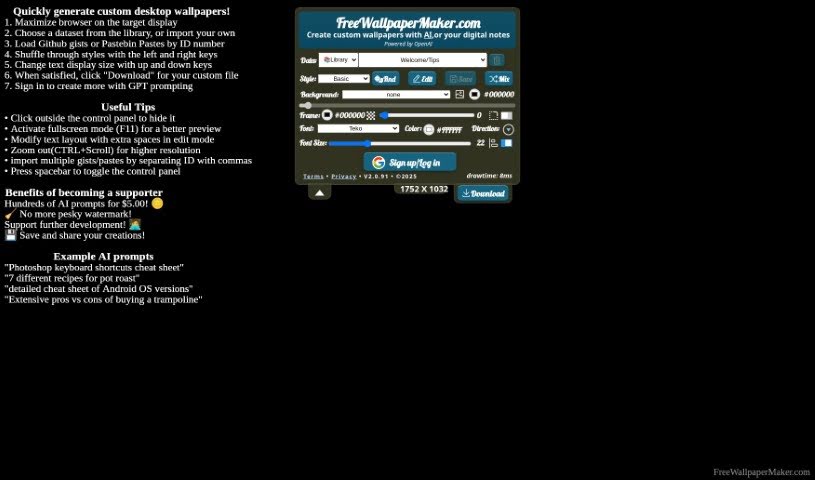
Screenshot of Freewallpapermaker

Freewallpapermaker

Discover what Freewallpapermaker is and how to use it effectively in 2025. We'll explore its features and see how it stacks up against other AI image generators.

Screenshot

What is Freewallpapermaker?

Free Wallpaper Maker is a neat AI tool that lets you create custom wallpapers for your desktop or phone. It uses artificial intelligence to help you personalize your backgrounds. You can add your own text, gists, or even JSON data to make wallpapers that really fit your style or creative needs. The platform offers a bunch of different themes, font choices, and color selections. Plus, there’s a cool feature for mixing and blending designs. They also care about your privacy, with clear terms and privacy agreements available on their site.

Who created Freewallpapermaker?

Dara J. Frink and their team are behind Free Wallpaper Maker. They launched it on March 29, 2023. This AI-powered tool is all about helping you generate custom wallpapers for your desktop and mobile screens. You’ll find a variety of design themes, plenty of font and color options, and a strong emphasis on user privacy. The company focuses on making the tool both useful and good-looking, with a great user interface and solid graphic design capabilities.

What is Freewallpapermaker used for?

  • Custom Wallpapers: Create personalized wallpapers for your desktop or mobile screens.
  • Personalization: Easily add your own text, gists, or JSONs to make your wallpapers unique.
  • Thematic Designs: Explore and create themes like White Marble, Blue Abstract, Starry Nebula, and many more.
  • Design Blending: Use the RndEditSaveMix feature to combine and blend different designs.
  • Privacy Focused: The platform prioritizes user privacy, with clear terms and privacy agreements available.
  • Study Aid: Incorporate educational content, like keyboard shortcuts or command line commands, into your wallpapers to help you study.
  • Platform Flexibility: Design wallpapers for both desktop and mobile devices.
  • Convention Choice: Select between Metric or Imperial conventions for your designs.
  • Visual Appeal: Create visually engaging backgrounds and fully customize your wallpapers.
  • Advanced Input: Incorporate keyboard shortcuts, command line commands, and JSON data directly.

Who is Freewallpapermaker for?

  • Graphic designers
  • Web Developers
  • Students
  • Creative professionals
  • Artists

How to use Freewallpapermaker?

Using Free Wallpaper Maker is pretty straightforward. Here’s a simple guide:

  1. Pick a Theme: Start by choosing a theme you like from the wide selection. Options include White Marble, Dark Circuit, or Violet Clouds, among others.
  2. Personalize Your Design: Now, add your own text, gists, or JSONs to really make the wallpaper your own.
  3. Choose Fonts and Colors: Dive into the diverse font options like Teko, Arial, or Lobster. You can also pick color schemes that suit your style or mood.
  4. Mix and Match Designs: Get creative with the RndEditSaveMix feature. It lets you blend different designs until you get that perfect look.
  5. Review Privacy: Remember, Free Wallpaper Maker really cares about user privacy. They have terms and privacy agreements on their website to ensure your data is secure.
  6. Use for Studying: If you’re a student, you can even add educational content like command line commands or study guides to your wallpapers.
  7. Works Everywhere: The tool supports both desktop and mobile platforms, so you have flexibility in where you use your creations.
  8. Metric or Imperial: You can choose whether to use Metric or Imperial conventions for your design, depending on what you prefer.
  9. Save Your Masterpiece: Once you’re happy with your custom wallpaper, just save the design directly from Free Wallpaper Maker.
  10. Explore More: Check out the graphic design capabilities, keyboard shortcuts, command line commands, JSON incorporation, and all the diverse background options available.

All in all, Free Wallpaper Maker is an AI tool that makes creating personalized wallpapers super easy. It balances usefulness with good looks, all while keeping your privacy in mind and offering lots of customization.

Related AI Tools

Discover more tools in similar categories that might interest you

123RF AI Image Generator

Creative Image Generation
Learn More

Stay Updated with AI Tools

Get weekly updates on the latest AI tools, trends, and insights delivered to your inbox

Join 25,000+ AI enthusiasts. No spam, unsubscribe anytime.