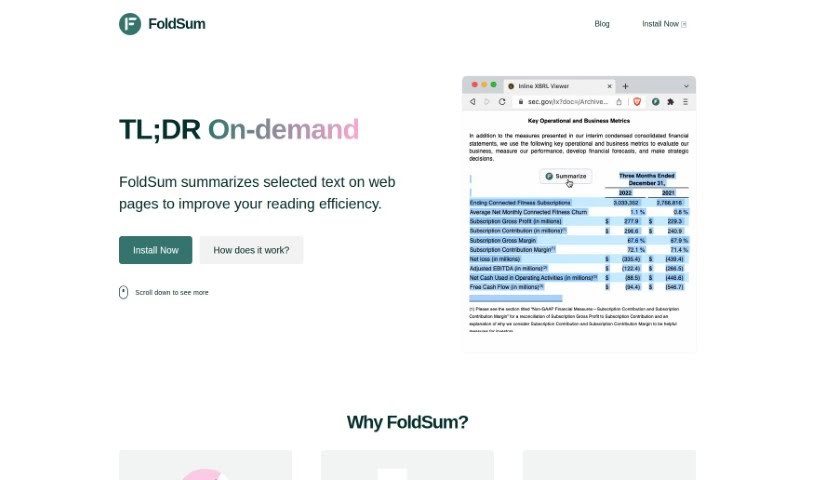
Screenshot of Foldsum

Foldsum

Discover Foldsum, a handy Chrome extension for 2025 that summarizes web text. Learn its features, compare it to other summarizers, and see how to use it effectively.

Screenshot

What is Foldsum?

FoldSum is a neat Chrome extension designed to make reading on the web much faster. It lets you highlight text on any webpage and then summarizes it for you, right there on the page. Pretty cool, huh? What’s even better is that it can summarize and translate text into different languages all in one go. It uses your existing ChatGPT or POE account to do the heavy lifting, so you don’t have to worry about extra costs or tokens. To get started, you just download and install the extension. Then, open a page where you’re logged into ChatGPT or POE. Head over to another webpage, select the text you’re interested in, and hit the ‘Summarize’ button. FoldSum will then swap out your selected text with the summary it creates. It’s completely free to use and works with most Chrome-based browsers. Plus, you can customize it by turning off the floating summary button, choosing your preferred translation language, and even handling nested summaries. Importantly, FoldSum is designed with your privacy in mind – it doesn’t collect any of your information and won’t mess with how you normally use ChatGPT or POE.

Who created Foldsum?

FoldSum was launched on June 1, 2023, by an anonymous founder. It’s a Chrome extension built to boost your reading efficiency by letting you summarize text directly on web pages, powered by the ChatGPT model. The company behind it hasn’t shared its name, but the tool itself is free to use, meaning no extra token costs for summarization or translation.

What is Foldsum used for?

Foldsum is really handy for a bunch of things:

  • Summarizing text: It helps you quickly get the gist of selected text on web pages, making reading much more efficient.
  • Inline replacement: You can choose specific text and have it replaced directly on the webpage with its summary.
  • Multilingual support: It handles both summarization and translation in multiple languages, all in a single step.
  • Cost-effective: It uses your existing web-based ChatGPT or POE engine, so there are no extra token costs for these features.
  • Easy installation: You can download and install it as a browser extension.
  • Customization: You have options like turning off the floating summary button and customizing the translation language.
  • Nested summaries: It even supports summarizing summaries.
  • Privacy-focused: Foldsum doesn’t collect your user information and doesn’t interfere with your regular use of ChatGPT or POE pages.
  • Browser compatibility: It works with Chrome, Brave, Arc, and other Chrome-based browsers.

Who is Foldsum for?

Foldsum is a great tool for anyone who works with text and wants to save time. This includes:

  • Professionals who regularly use summarization and translation services.
  • Students needing to quickly grasp information from online resources.
  • Researchers and Academics who sift through a lot of material.
  • Business professionals who need to stay on top of industry news and reports.
  • Content writers and Journalists looking for efficient ways to gather information.
  • Bloggers who want to quickly understand topics they’re writing about.
  • And really, any general user who wants to read more efficiently online.

How to use Foldsum?

Using FoldSum to summarize and translate text on web pages is pretty straightforward. Here’s how you do it:

  1. First, you’ll need to download and install the FoldSum browser extension. It’s available for Chrome, Brave, Arc, and other browsers that use Chrome’s engine. You can find it via this link.
  2. Next, open a page where you’re already logged into ChatGPT or POE in your browser.
  3. Now, switch to the webpage containing the text you want to summarize. Select that text, and then simply click the “Summarize” button that appears.
  4. Voila! The text you selected will be replaced right there on the page with the summary FoldSum generated.
  5. Remember, FoldSum can handle summarization and translation in multiple languages all at once, which really speeds things up. And the best part? It doesn’t cost you any extra tokens.
  6. You can also tweak the settings. For instance, you can turn off the floating summary button if you prefer, customize the language for translations, and even use it for nested summaries.
  7. Just a reminder, FoldSum is designed to protect your privacy. It doesn’t collect any user information and won’t interfere with your normal use of ChatGPT or POE pages.

Basically, FoldSum is all about making it easier and faster to summarize text online, improving your reading experience and overall efficiency.

Related AI Tools

Discover more tools in similar categories that might interest you

Academic Help Free Essay Generator

Education Academic Writing
Learn More

Stay Updated with AI Tools

Get weekly updates on the latest AI tools, trends, and insights delivered to your inbox

Join 25,000+ AI enthusiasts. No spam, unsubscribe anytime.