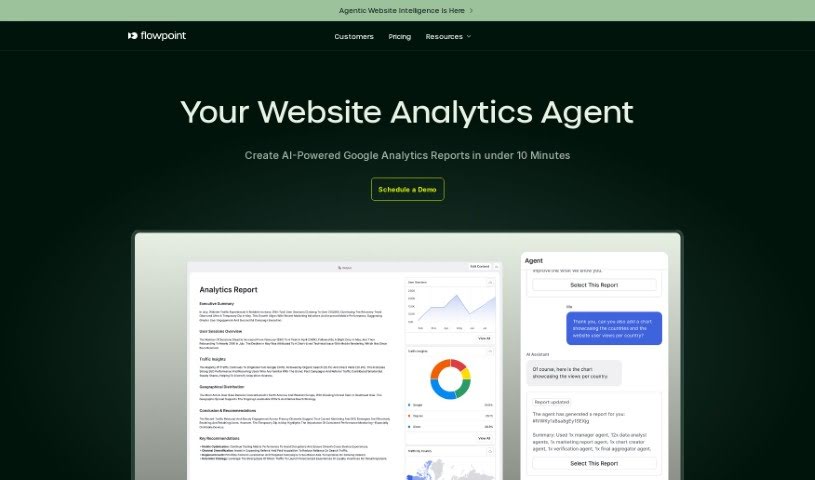
Screenshot of Flowpoint.ai

Flowpoint.ai

Discover what Flowpoint.ai is and how to use it effectively in 2025. We'll explore its features and how it stacks up against other digital marketing tools.

Screenshot

What is Flowpoint.ai?

Flowpoint.ai is a software service designed to help businesses improve their websites and, in turn, make more money. What sets it apart from other web analytics tools is that it doesn’t just track what users do; it also pinpoints the problems they run into and offers clear, actionable advice on how to fix them. The tool focuses on understanding how users behave and feel on websites, spotting technical glitches, and connecting different data points to boost website performance. Flowpoint uses AI to quickly tackle website issues on a large scale, providing automated fixes for problems with technical aspects, user interface (UI), user experience (UX), and content. It fine-tunes user journeys based on their potential return on investment and improves website performance through features like tracking across multiple domains, in-depth analytics, and AI-driven suggestions. Plus, Flowpoint gives you insights into user flows, helps with conversion rate optimization, and offers tools like funnel analytics and an AI-powered website audit.

Who created Flowpoint.ai?

Flowpoint.ai was started by a team of enthusiastic software engineers in London, UK, who are really passionate about data. Before creating Flowpoint in 2022, they built custom software solutions. They developed Flowpoint to tackle the challenge of understanding user behavior, which is key for improving products and increasing revenue. The company uses AI to find website issues and offers automated solutions to make user journeys smoother and improve how the website performs overall.

What is Flowpoint.ai used for?

  • Boosting conversion rates
  • Analyzing user funnels
  • Conducting AI-powered website audits
  • Optimizing conversion rates (yes, again – it’s that important!)
  • Getting insights into technical aspects, UI/UX, and content
  • Technical insights
  • UI/UX insights
  • Content insights
  • Tracking across different domains
  • Capturing user events
  • Analyzing user behavior
  • Optimizing website performance
  • Capturing both standard and advanced events
  • Using a lightweight script that’s optimized for performance
  • Being ready for GDPR & CCPA regulations

Who is Flowpoint.ai for?

  • Business owners
  • Marketing professionals

How to use Flowpoint.ai?

Flowpoint.ai is a powerful tool that uses AI to help website owners understand how users behave, make their websites better, and ultimately earn more revenue. Here’s a step-by-step guide to using Flowpoint.ai effectively:

  1. Sign Up and Set Up:
    • Head over to the Flowpoint.ai website and create an account.
    • Once you sign up, you’ll get access to a workspace designed to offer actionable insights that can be applied broadly.
  2. Analyze Your Website:
    • Use the Funnel Analytics feature to follow user journeys and understand where visitors come from and where they navigate on your site.
    • Take advantage of AI-driven recommendations to improve conversion rates, SEO, UX/UI, and how users engage with your content.
    • Employ Conversion Rate Optimization tools to find data-backed suggestions for increasing sales or other crucial actions.
  3. Capture User Events:
    • Flowpoint automatically records user actions like clicks, scrolls, how long they spend on certain sections, and more.
    • You can use both standard and advanced event capturing features, plus cross-domain tracking for a complete picture.
  4. Interpret Insights:
    • Get a bird’s-eye view of your website traffic and spot common user paths to better understand user behavior.
    • Act on what you find, like fixing text with low contrast that hurts readability or addressing technical issues such as Javascript errors.
  5. Utilize Recommendations:
    • Put recommendations into practice, such as fixing website problems, optimizing scripts, speeding up loading times, and improving call-to-action buttons based on the data insights you receive.
  6. Engage with Ava AI Assistant:
    • Chat with Ava, the AI Assistant powered by ChatGPT, to dive deeper into your Flowpoint insights and get advice on potential improvements that could lead to better conversions.
  7. Learn from Testimonials:
    • Hear from successful users, like business owners and marketing professionals, who have already boosted their website performance and conversions with Flowpoint.ai.

By following these steps, you can effectively use Flowpoint.ai to fine-tune your website, improve the user experience, and drive business growth, all thanks to data-driven insights and AI-powered suggestions.

Related AI Tools

Discover more tools in similar categories that might interest you

Stay Updated with AI Tools

Get weekly updates on the latest AI tools, trends, and insights delivered to your inbox

Join 25,000+ AI enthusiasts. No spam, unsubscribe anytime.