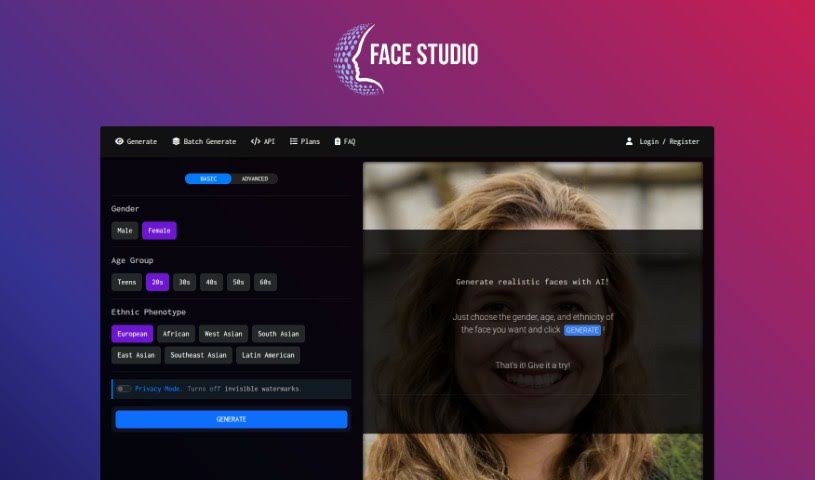
What is Face Studio?
Face Studio is a neat online tool that uses AI to help you quickly create realistic human face avatars for all sorts of creative projects. You can tell it the gender, age group, and even the ethnic background you’re looking for, and it whips up a lifelike photo in no time. It’s free to use, and you can sign up for a free account if you want faster results. Plus, it offers handy features like API access, batch face generation, and ways to customize face properties, all wrapped up in an easy-to-use interface that works for both AI pros and beginners. Bluereach.ai, an AI company, backs this tool. Face Studio’s AI technology means it can generate all sorts of unique faces without needing to pull from existing image libraries, so you always get something fresh.
Who created Face Studio?
Face Studio comes from bluereach.ai, a company that really knows its AI technology. They launched this online tool on March 5, 2023. It’s designed to let people quickly generate realistic human face avatars for their creative work. You just pick the gender, age group, and ethnic background you want, and the AI handles the rest, creating the images efficiently.
What is Face Studio used for?
- Game Design & Art: It’s perfect for game designers, artists, and anyone wanting unique avatars for websites or social media.
- Research & Studies: Researchers and scientists can use it to generate faces matching specific demographics, helping them get representative samples for experiments.
- Avoiding Licensing Issues: Since Face Studio creates original AI-generated faces, you don’t have to worry about licensing stock photos of real people.
- Diverse Representation: It generates faces that reflect a wide range of ages, genders, and ethnicities, drawing from a diverse pool of people.
- Efficient & Fast Image Generation: You get unique faces on demand, created in real-time without relying on pre-existing image databases.
- Batch Face Generation: Need lots of faces? This tool lets you generate multiple avatars at once, which is great for projects needing variety.
- Application Integration: With API access, you can easily plug Face Studio’s capabilities into your own applications.
- User-Friendly Interface: It’s designed to be simple and efficient, letting you generate faces with just a few clicks.
- Customization Options: You can specify gender, age group, and ethnic phenotype to get exactly the faces you need.
- Free to Use: Face Studio is a free tool, and you can even create a free account for quicker response times.
Essentially, it helps you:
- Create unique avatars for websites or social media profiles.
- Generate diverse faces based on gender, age, and ethnicity.
- Easily complete projects that need multiple face images.
- Use it in research to ensure demographics are represented accurately.
- Quickly generate realistic human faces for game designers and artists.
- Avoid licensing fees by creating original faces.
- Tailor faces to specific preferences like gender, age, and ethnicity.
- Integrate Face Studio’s features into your own applications.
- Effortlessly create photorealistic faces without needing pre-existing image databases.
- Improve understanding of human behavior with accurate face representations.
It’s really about helping game designers and artists create unique avatars, assisting researchers in getting accurate demographic representations for studies, and avoiding licensing costs by generating original faces. You can also easily create multiple face avatars at once, integrate the functionality into your own apps via the API, and generate diverse faces reflecting real-world demographics. It’s a fast, effortless way to get realistic faces online, allowing you to specify gender, age, and ethnicity. The user-friendly interface makes it simple and efficient, and you can even manage your API keys and update your account details. Plus, there’s an FAQ section for common questions, and links to terms and privacy policies.
Who is Face Studio for?
- Game Designers
- Artists
- Researchers
- Scientists
How to use Face Studio?
Using Face Studio is pretty straightforward. Here’s how:
- First, head over to the Face Studio website and find the tool itself.
- Next, you’ll pick the gender, age group, and ethnic phenotype for the face you want.
- Just hit the “GENERATE” button, and the tool will create the face based on what you selected.
- If you need to create several faces at once, there’s a handy batch generate option.
- Want faster results? Consider signing up for a free account to speed things up.
- For those who like to dive deeper, the Alpha 6 update offers API access, letting you integrate Face Studio’s capabilities right into your own applications.
- You can manage your API keys directly within Face Studio.
- Need to update your account info, like your email or password? You can do that in the user account section.
- Got questions? Check out the FAQ section on the website. You can also review the terms and privacy policy links for more detailed information.
Face Studio is really designed to be user-friendly. It lets you generate realistic faces quickly and easily, all thanks to AI technology. It’s a great tool whether you’re an AI expert or just starting out, offering plenty of customization and fast response times. Bluereach.ai, a well-respected AI firm, supports it.