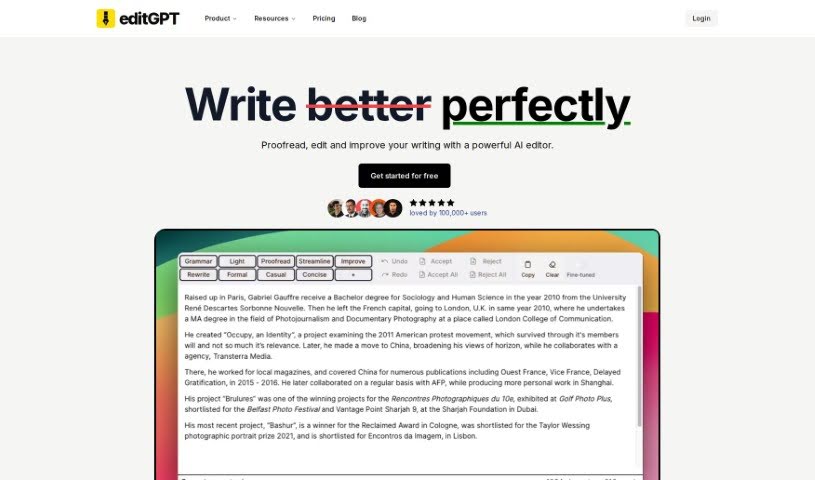
Screenshot of editGPT

editGPT

Discover editGPT, a free browser extension that enhances your editing and proofreading within ChatGPT. Learn about its features, how to use it effectively in 2025, and how it stacks up against other grammar checkers.

Screenshot

What is editGPT?

EditGPT is a handy browser extension designed to make editing and proofreading within ChatGPT much smoother. It is your AI writing assistant, right there in your chat window. It offers real-time grammar checks, helps you edit your content, and even tracks changes, which is super useful if you’re working on something like a Microsoft Word document and want to keep a clear history of your edits. It’s built to be easy for anyone to use, whether you’re just casually writing or you’re a power user who needs more advanced features. You can customize the tone and structure of your text to fit different audiences and purposes, and it even supports editing in multiple languages. Plus, they have flexible pricing options to suit different needs.

Who created editGPT?

EditGPT was started by a team of innovators who wanted to create a powerful AI editing tool for people all over the world. Their main goal is to make the user experience better by providing real-time grammar checks, content editing, and features you can really tailor to your specific needs and audience. With over 60,000 users globally, this tool really makes proofreading and editing more efficient and user-friendly, thanks to its flexible pricing and multi-language support.

What is editGPT used for?

  • Grammar correction: Fixes those pesky grammar mistakes automatically.
  • Writing enhancement: Helps make your writing clearer and just plain better.
  • Tone and Structure Modification: Lets you adjust the feel and organization of your text.
  • Custom Prompts and Tailoring: You can personalize edits for different audiences.
  • Multi-language Support and Microsoft Word Integration: Edit in various languages and easily manage your Word documents with track changes.

Who is editGPT for?

  • Proofreaders
  • Editors
  • Writers
  • Students
  • Researchers
  • Professionals across many different industries

How to use editGPT?

Ready to make your editing and proofreading more efficient with editGPT? Just follow these simple steps:

  1. Installation: First, add the editGPT browser extension to your preferred browser. It’s a quick process.
  2. Integration: The tool works seamlessly with ChatGPT. You can use it right within the chat interface for instant grammar checks, content editing, and tracking any changes you make.
  3. Top Features: Here’s a quick look at what it offers:
    • Grammar Correction: It automatically catches and corrects grammar errors.
    • Writing Enhancement: You can improve the clarity and overall quality of your writing.
    • Tone and Structure Modification: Easily adjust the tone and structure to suit your specific needs.
    • Custom Prompts and Tailoring: Personalize your edits for different audiences or purposes.
    • Multi-language Support and Word Integration: Edit your text in multiple languages and manage your Microsoft Word documents with the handy track changes feature.
  4. Usage for Different User Levels: They’ve got plans to fit everyone:
    • For occasional users: It’s $10 per month, and you get a limit of 10,000 words each month.
    • For users who need more capabilities: It’s also $10 per month, but with a much higher limit of 200,000 words per month.
    • For power users: If you need a lot of editing power, it’s $25 per month for up to 1,000,000 words per month.
  5. Additional Benefits: You also get:
    • Free Basic Editor: This offers fundamental editing tools for free.
    • Pro Editor Version: This version gives you access to advanced features and higher word limits.
    • Flexible Pricing: Plans are designed to fit different user needs and budgets.
  6. FAQs: Here are some common questions:
    • How editGPT Works: It functions as a browser extension that works directly alongside ChatGPT.
    • Difference Between Extension and Editor: The extension is for editing directly within ChatGPT, while the editor provides a more comprehensive workspace.
    • Personalized Prompts: You can absolutely customize prompts to get tailored editing results.
    • Language Support: Yes, it supports editing in various languages. Just make sure you set the correct prompt for the language you’re using.
  7. Custom Solutions: editGPT can also handle custom needs, like setting up a custom model or integrating with other systems you might be using.
  8. Start Editing: Ready to go? Just set your prompts in the language you want to use, and let the AI handle the rest seamlessly. It really makes the editing process much more convenient and efficient, offering a complete AI editing experience to boost your writing effectively.

Related AI Tools

Discover more tools in similar categories that might interest you

Academic Help Free Essay Generator

Education Academic Writing
Learn More

Stay Updated with AI Tools

Get weekly updates on the latest AI tools, trends, and insights delivered to your inbox

Join 25,000+ AI enthusiasts. No spam, unsubscribe anytime.