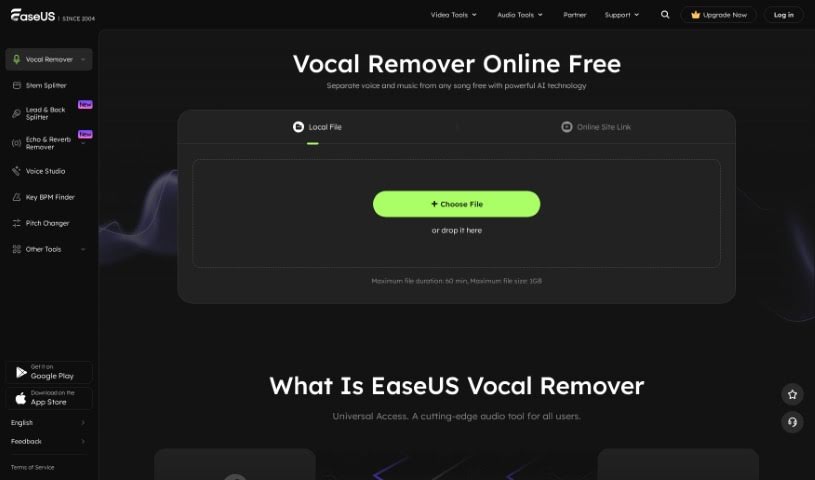
Screenshot of Easeus Vocal Remover

Easeus Vocal Remover

Discover what EaseUS Vocal Remover is and how to use it effectively in 2025. We'll explore its features and see how it stacks up against other audio tools.

Screenshot

What is EaseUS Vocal Remover?

EaseUS Vocal Remover is a smart tool that uses AI to help you get rid of vocals from any audio file. It’s perfect if you want to create your own karaoke tracks, background music, acapellas, or instrumentals without a lot of fuss. The software is designed to automatically find and pull out vocals from your audio, and it does this without any noticeable loss in quality. It’s pretty versatile, too, as it can separate vocals, music, drums, bass, piano, and even noise. You can use it to remove vocals from video or audio files if you’re looking to do some karaoke or remixing. Plus, it lets you grab vocals directly from URLs you share from places like YouTube or SoundCloud. To make things even easier, it has a built-in player so you can preview your work in real-time. This really helps speed things up for all sorts of music tasks, whether you’re restoring old audio, making karaoke tracks, producing new music, or just practicing.

Who created EaseUS Vocal Remover?

EaseUS was founded by an individual or group whose identity isn’t publicly detailed, with the company’s focus clearly on its product, EaseUS Vocal Remover. This AI-powered tool is designed to make removing vocals from audio files incredibly easy. It handles a variety of formats, including MP3, WAV, and MP4, among others. People often praise how efficient it is at separating vocals from the rest of the music, making it a really useful tool for anyone creating content, enjoying music, or working professionally with audio and looking to improve their projects.

What is EaseUS Vocal Remover used for?

  • Music Production: It’s a great tool for creating music.
  • Extracting Vocals: You can pull vocals out of songs specifically for music production.
  • Karaoke Creation: Make instrumental versions of songs for your karaoke sessions.
  • Remixing: Remove vocals from video or audio files to create your own remixes.
  • Video to Karaoke: Extract music from videos to create new karaoke versions.
  • YouTube Vocals: Easily separate vocals from YouTube videos.
  • Acapella & Instrumentals: Produce acapella tracks and instrumentals.
  • Creative Applications: Boost your creative projects in music production.
  • Improving Listening: Enhance your listening experience by removing vocals.
  • Format Support: Works with many different audio and video formats.
  • Real-time Preview: Get a feel for your changes as you make them with a built-in player.
  • Instrumental Versions: Create instrumental versions of songs.
  • Karaoke Tracks: Extract karaoke tracks.
  • Vocal Removal: Remove vocals from video or audio files.
  • Music Separation: Separate vocals from music.
  • Karaoke Experience: Make your karaoke sessions even better.
  • Song Covers: Create your own covers of favorite songs.
  • Remixing Songs: Remix songs.
  • Background Music: Produce background music.
  • Audio Restoration: Help restore audio quality.
  • Instrumentals for Production: Remove vocals from songs to create instrumental versions for music production.
  • Karaoke Extraction: Extract karaoke tracks from songs by removing vocals.
  • Acapella Projects: Create acapella versions of songs for creative projects.
  • Video Editing: Enhance video projects by removing vocals from their audio tracks.
  • Component Isolation: Isolate specific parts like vocals, instruments, and drums for remixing.
  • Background Music Production: Produce background music by extracting vocals from audio files.
  • Listening Enhancement: Improve your music listening experience by removing vocals from songs.
  • Online Vocal Removal: Easily remove vocals from online sources like YouTube videos.
  • Format Variety: Supports many audio formats like MP3, WAV, M4A, and more for vocal removal.
  • Preview Features: Offers real-time preview and playback for efficient audio processing.
  • Any Audio File: Extract vocals from any audio file.
  • Karaoke Instrumentals: Create instrumental versions of songs for karaoke.
  • Video Vocal Removal: Remove vocals from videos.
  • High-Quality Video Music: Extract music from videos in high quality.
  • Video/Audio Separation: Separate vocals from music in video/audio files.
  • Multiple Outputs: Produce acapellas, background music, and instrumentals.
  • Real-time Preview: Get a real-time preview for audio separation.
  • Broad Format Support: Supports various audio and video formats (e.g., MP3, WAV, MP4, MOV, FLAC).
  • AI Voice Removal: Uses AI for voice removal.
  • Efficient Component Extraction: Efficiently detect and extract vocals or music components from audio files.

Who is EaseUS Vocal Remover for?

  • Music Producers: If you make music, this is for you.
  • Singers: Great for practice or creating backing tracks.
  • DJs: Useful for remixing and creating sets.
  • Content Creators: Perfect for adding custom audio to videos or podcasts.

How to use EaseUS Vocal Remover?

Using EaseUS Vocal Remover is pretty straightforward. Just follow these simple steps:

  1. Upload Your Audio or Video File:
    • First, head over to the EaseUS Vocal Remover webpage and click the “Get Started” button.
    • Then, click “Choose File” to upload your audio or video. It supports a bunch of common formats like MP3, WAV, M4A, FLAC, and more.
  2. Remove the Vocals:
    • Once you upload, the AI will get to work automatically. It’ll recognize and separate the vocals from the music in just a few seconds.
  3. Download Your Extracted Files:
    • After the vocals are removed, you can listen to the result to make sure you like it.
    • Then, just download the instrumental sound, karaoke version, or background music you’ve created.

What else can it do?

  • EaseUS Vocal Remover can also separate drums, bass, piano, and noise, all without messing up the quality of the rest of the audio.
  • It’s really flexible because it supports so many different audio and video formats.
  • You’re not limited to just local files; you can also extract vocals from online sites by pasting URLs.
  • It comes with a free built-in player, which is super handy for previewing your audio in real-time to make sure you’re getting the results you want.
  • If you decide to upgrade to a membership, you’ll get access to even more features and faster file processing.

EaseUS Vocal Remover is a fantastic choice for music pros, creators, and anyone who loves karaoke. It’s really user-friendly, making it easy to create instrumental versions, remixes, or covers. It uses advanced AI to efficiently remove vocals while keeping the audio quality high, and it works with a wide range of formats, so you can use it for almost anything.

Related AI Tools

Discover more tools in similar categories that might interest you

Stay Updated with AI Tools

Get weekly updates on the latest AI tools, trends, and insights delivered to your inbox

Join 25,000+ AI enthusiasts. No spam, unsubscribe anytime.