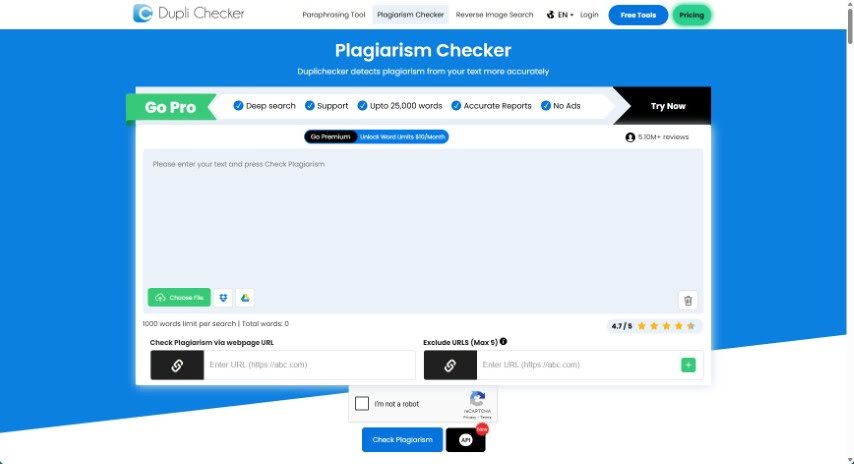
What is Duplichecker?
DupliChecker is a handy tool that helps you check if your writing is original. It scans the internet to see if any of your content has been copied elsewhere. What’s great about it is that it supports various file formats, gives you accurate results as a percentage, and promises to keep your information private. It even uses AI-powered technology to find plagiarism, so you can trust its findings. Plus, they assure you that your uploaded material is never saved and is trashed right after checking, keeping your work secure.
This plagiarism checker from DupliChecker.com is built to help everyone – writers, students, and professionals – avoid plagiarism. It’s designed to be fast and accurate, making it easy to spot copied content. You can use it for all sorts of things, not just text, but also images, music, and videos. The main goal? To promote honesty in academics and ensure originality in creative projects. This way, you can steer clear of serious trouble, like getting kicked out of search engine results or facing legal issues over copyright.
Who created Duplichecker?
Duplichecker Overview:
Duplichecker, a popular tool for spotting plagiarism, first came out on June 19, 2006. It was developed by a skilled team and is a successful product from DupliChecker.com. Since 2006, the company has delivered over 1,000,000 pages of high-quality content, drawing in a lot of website visitors. The tool is built to be 100% accurate and uses advanced AI technology to precisely detect copied content. It offers a thorough analysis of any text you scan, works with different file types, and includes features like privacy guarantees, a calculation for your content’s uniqueness percentage, and even an option to help you remove plagiarism.
What is Duplichecker used for?
- It keeps your information private and secure.
- It checks the internet for any duplicated content.
- It tells you where copied content might be found.
- It shows you the percentage of copied content.
- It can check plagiarism in many different file types.
- It uses AI technology for accurate plagiarism detection.
- It provides a percentage for your content’s unique ratio.
- It helps identify plagiarized sources.
- It has a ‘Make it Unique’ feature to help remove plagiarism.
- It’s really helpful for writers, teachers, students, bloggers, and webmasters.
- It helps you check if your content is original.
- It can detect copied content found anywhere online.
- It informs you about where that copied content is located.
- It provides a detailed breakdown of the text it scans.
- It supports checking plagiarism across various file formats.
- It ensures your privacy and keeps your data secure.
- It uses AI technology to accurately detect plagiarism.
- It offers a percentage for how unique your content is.
- It helps identify sources that have been plagiarized.
- It can remove instances of plagiarism using the “Make it Unique” feature.
- It’s great for checking the originality of academic assignments or articles.
- It helps detect and prevent plagiarism in anything you write.
- It finds instances of copied content on the internet.
- It helps ensure academic honesty for students.
- It protects you from being penalized by search engines for plagiarized content.
- It helps identify and remove plagiarism to boost your content’s originality.
- It scans for duplication to help you avoid serious academic consequences.
- It finds similarities and the sources of duplication in your writing.
- It uses AI technology for precise detection of plagiarized content.
- It supports a wide range of file formats for plagiarism detection.
Who is Duplichecker for?
- Writers
- Teachers
- Students
- Bloggers
- Webmasters
- Students
- Professional writers
- Professors
- Content creators
How to use Duplichecker?
Using DupliChecker is pretty straightforward! Here’s how you can do it:
- First, head over to the DupliChecker website.
- Then, just copy the text you want to check for plagiarism and paste it right into the tool’s box.
- Remember, it works with lots of file types, like .tex, .txt, .doc, .docx, .odt, .pdf, and .rtf.
- Once you’ve put your text in, the tool will analyze it and give you the results as a percentage.
- They really focus on user privacy, so they don’t store any of your uploaded material, keeping your data nice and secure.
- It uses AI-based technology, which means it’s really good at accurately detecting plagiarized content.
- You’ll get results that include your content’s unique ratio and pinpoint any sources that were plagiarized.
- If it finds any plagiarism, there’s a handy “Make it Unique” feature to help you fix it.
- All in all, DupliChecker’s Plagiarism Checker is a fantastic tool for writers, teachers, students, bloggers, and webmasters who need to make sure their content is original.
By following these simple steps, you can easily use DupliChecker’s Plagiarism Checker to confirm that your content is authentic and plagiarism-free.