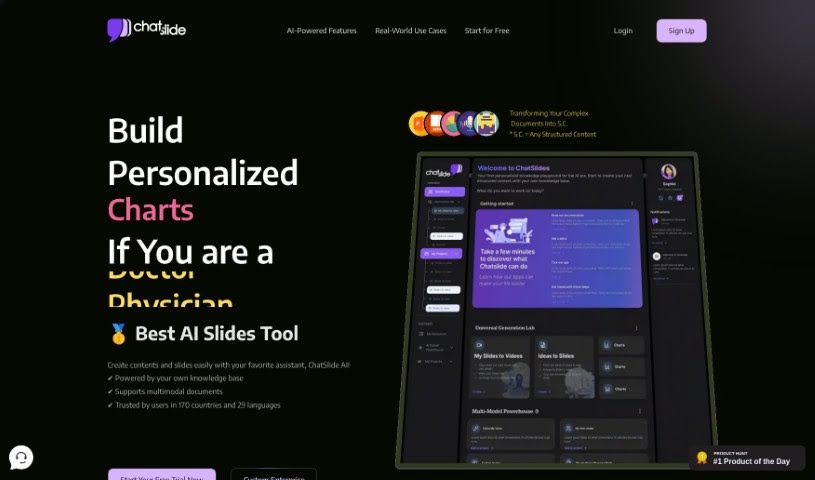
Screenshot of Drlambda

Drlambda

Discover what Drlambda is and how to use it effectively in 2025. We'll explore its features and see how it stacks up against other Teacher Tools.

Screenshot

What is Drlambda?

DrLambda is an AI tool built to help you create slides and presentations from all sorts of documents. Think PDFs, Google Docs, webpages, even YouTube videos. It really simplifies turning your content into polished presentations, making tasks easier for everyone – whether you’re a researcher, teacher, student, consultant, or just working in an office. Some of its standout features include generating scripts with just one click, pulling information from PDFs, webpages, and YouTube, and a neat engine that handles equations. This means clearer slides without all the tedious copy-pasting. DrLambda is super versatile; it helps creators transform content smoothly, students and researchers organize information easily, and teachers create better presentations and research materials. You can choose from different pricing plans, starting with a free option that has some limits, all the way up to a Pro plan with unlimited credits and top-notch customer support. They also offer enterprise solutions if you need something custom. Developed in San Francisco, DrLambda is all about empowering you to change how you learn and share information, making it more effective.

Who created Drlambda?

DrLambda, which launched on May 21, 2023, is an AI-powered tool developed by a team based in San Francisco. It’s designed to make slide creation a breeze, offering features like generating scripts with a single click. It can also pull content from PDFs, webpages, and YouTube videos, and it even has a special engine for handling equations, which really speeds up making your slides look good. This tool is a great help for researchers, teachers, students, consultants, and office workers alike, making it simple to transform content for presentations and research. They offer a few pricing options, including a free plan and a Pro plan that gives you unlimited credits and priority support. If your organization has specific needs, enterprise solutions are also available. Essentially, DrLambda aims to make your experience better by simplifying content transformation and boosting your productivity with its easy-to-use interface.

What is Drlambda used for?

  • Making content transformation easy for creators: If you create content, DrLambda helps you turn it into presentations seamlessly.
  • Organizing information for students and researchers: It’s great for converting and organizing all sorts of data.
  • Boosting presentations for teachers: Teachers can use it to enhance their teaching materials and research presentations.
  • Changing how you learn and share: It helps you rethink and improve your entire learning and sharing process.
  • Quick video scripts: You can generate video scripts with just one click.
  • Extracting info from anywhere: It reads and pulls information from PDFs, webpages, and YouTube videos.
  • Clearer slides with equations: The equation extraction and generation feature makes slides clearer without manual work.
  • Editing on the fly: You can edit outlines, slides, and scripts in real-time.
  • Works with many document types: It can handle PDFs, Google Docs, webpages, and YouTube content.
  • Versatile for many needs: DrLambda covers a wide range of uses to fit what you need.

Who is Drlambda for?

  • Researchers
  • Teachers
  • Students
  • Consultants
  • Office workers

How to use Drlambda?

DrLambda is a really useful AI tool that helps you create slides and presentations from different sources like PDFs, Google Docs, webpages, and YouTube videos. To get the most out of it, here’s a simple guide:

  1. Get Started: First, sign up for an account on the DrLambda platform. Pick the pricing plan that best suits what you need.
  2. Add Your Content: Once you’re logged in, you can upload your document or paste a URL to bring in content from webpages or YouTube.
  3. Generate Scripts Easily: Use the one-click script generation feature to quickly create video scripts for your presentations.
  4. Extract Information: Take advantage of the tool’s ability to read and pull out information from various sources, including PDFs and webpages.
  5. Handle Equations Smoothly: Use the equation extraction and generation engine to make your slides clearer without the hassle of manual formatting.
  6. Customize Your Work: You can easily tweak your outlines, slides, and scripts in real-time to match your preferences.
  7. Explore Features: Check out all the different features DrLambda offers for various uses, like transforming content for storytelling or organizing research data.
  8. Upgrade for More: If you need more advanced help or extra features, consider moving up to the Plus or Pro plan for more credits and capabilities.
  9. Enterprise Needs: For specific organizational requirements, you can always inquire about their tailored enterprise solutions.
  10. Boost Your Experience: Make the most of DrLambda’s user-friendly interface and productivity tools to really change how you learn and share information effectively.

By following these steps, you can really make DrLambda work for you and create great presentations without a lot of fuss.

Related AI Tools

Discover more tools in similar categories that might interest you

Academic Help Free Essay Generator

Education Academic Writing
Learn More

Stay Updated with AI Tools

Get weekly updates on the latest AI tools, trends, and insights delivered to your inbox

Join 25,000+ AI enthusiasts. No spam, unsubscribe anytime.