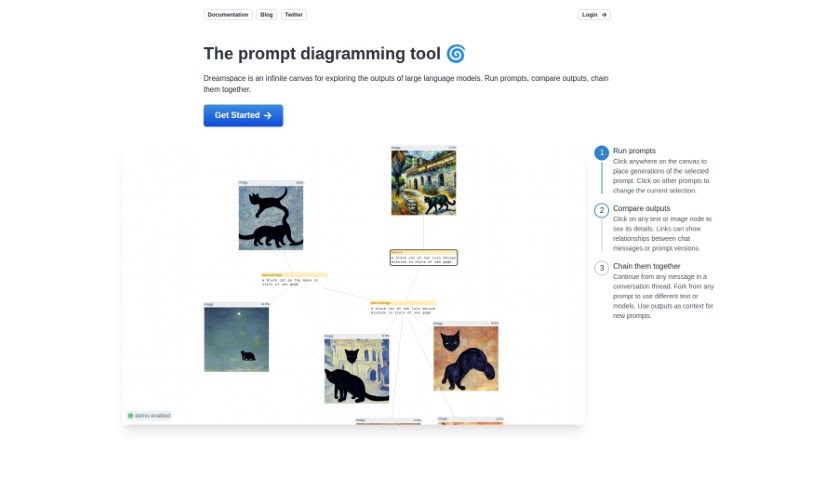
Discover what Dreamspace.art is all about and how to use it effectively in 2025. We'll walk through its features and see how it stacks up against other image generators.

DreamSpace.art is a really neat tool that lets you bring your ideas to life visually. It is a way to create and tweak images by building diagrams using nodes and edges. You can interact with it using keyboard shortcuts to select these nodes and edges, change how big your diagrams are, and even pick different modes like ‘Loosely Follow Prompt’ or ‘Exactly Follow Prompt’ to adjust how challenging the process is. There are also handy Start and Back buttons for specific actions. To use DreamSpace.art, you’ll need to be logged in. It also lets you undo your actions and move nodes around freely, which is super helpful. While they don’t go into super deep detail on every single guidance point, there are various diagram modes available to help you manage the difficulty. The whole idea is to make it easy to use, so you don’t need any special background knowledge to get started.
Dreamspace.art was developed as a tool for generating images, allowing users to create and then modify visual representations of their concepts. This platform first launched on May 10, 2024. It’s designed so you can build diagrams by working with nodes and edges, giving you control over diagram size and letting you choose from different modes. To really dive in and use the prompt editor, you’ll need to be logged into Dreamspace.art. The tool also includes helpful features like undoing actions, selecting specific nodes or edges, and offering guidance through modes such as ‘Loosely Follow Prompt’ and ‘Exactly Follow Prompt’.
Here’s a straightforward guide to using DreamSpace.art:
Get to Know DreamSpace.art: First off, DreamSpace.art is an image generation tool. It lets you create and change visuals by working with diagrams made up of nodes and edges.
Building Your Diagrams:
Modes and Functions:
How You Interact:
Other Handy Features:
Saving Your Work: The tool doesn’t explicitly mention if you can save your progress while you’re diagramming, so keep that in mind!
DreamSpace.art is designed to be really user-friendly. It gives you a lot of flexibility when creating diagrams, and you don’t need to have a lot of prior experience to get going. Dive in and explore all the features – it’s a great way to let your creativity flow on a canvas that’s perfect for visual ideas.
Discover more tools in similar categories that might interest you
Get weekly updates on the latest AI tools, trends, and insights delivered to your inbox
Join 25,000+ AI enthusiasts. No spam, unsubscribe anytime.