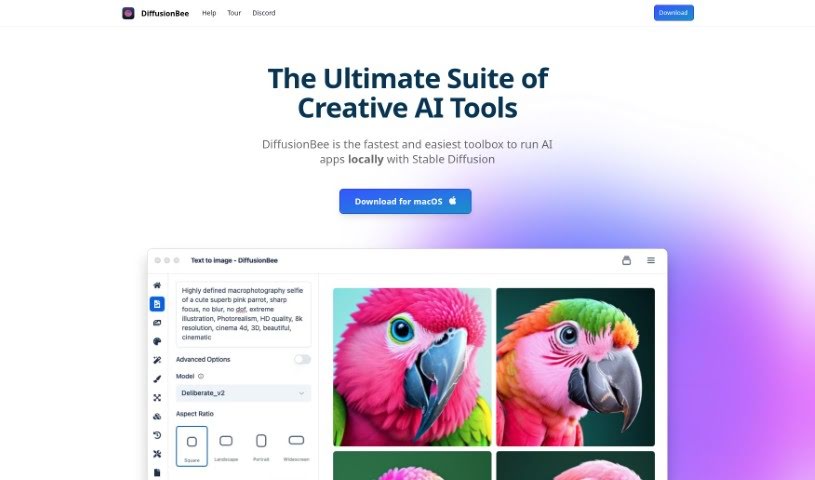
Screenshot of DiffusionBee

DiffusionBee

Discover DiffusionBee, a powerful AI art generator for macOS. Learn what it is, how to use its features like text-to-image and in-painting, and why it's a great free, offline option for artists and designers in 2025.

Screenshot

What is DiffusionBee?

DiffusionBee is a fantastic AI tool that lets you create really impressive images using Stable Diffusion technology, right on your own computer. It is your personal AI art studio! It’s packed with advanced features, making it super easy to generate AI art from simple text descriptions. You can also tweak existing images, add or remove elements, expand your pictures creatively, boost their resolution, and even use your own custom AI models. What’s really great about DiffusionBee is that it works entirely offline, meaning your creations and data stay private. Plus, it’s completely free for anyone using macOS, offering unlimited use.

Who created DiffusionBee?

DiffusionBee was originally developed by Albert Lan, as noted in the “diffusionbee.pdf” document. The Diffusionbee company itself focuses on creating AI tools that empower users to produce stunning art. They leverage advanced AI canvas and Stable Diffusion technology to make this possible. With DiffusionBee, you can easily generate AI art from text prompts, modify existing images, add or remove objects, upscale resolution, and much more. Because it runs offline, you get complete privacy and full ownership of all the content you create.

What can you do with DiffusionBee?

DiffusionBee offers a wide range of creative possibilities:

  • Text to Image: Simply describe what you want to see, and DiffusionBee will generate an image from your text prompt.
  • Image to Image: Take an existing image and transform it using new text prompts, giving it a fresh look.
  • In-painting: Need to add or remove something specific in an image? Just select a region and use a text prompt to make precise changes.
  • Out-painting: Want to extend an image beyond its original borders? DiffusionBee can help you expand it creatively using text prompts.
  • Upscaling: Automatically enhance the resolution of your generated images using AI, making them sharper and more detailed.

Who is DiffusionBee for?

DiffusionBee is a great tool for anyone interested in AI art creation, including:

  • Artists looking for new ways to express their vision.
  • Graphic designers needing quick and versatile image generation tools.
  • Art enthusiasts curious about exploring the world of AI-generated art.
  • Digital artists wanting a powerful, accessible tool for their projects.

How to use DiffusionBee?

Getting started with DiffusionBee and creating your own AI art is straightforward. Just follow these steps:

  1. Download and Install:
    • First, grab DiffusionBee for macOS from its official website.
    • Then, install the software onto your computer. It’s a simple process.
  2. Generate AI Art:
    • Dive into the “Text to Image” feature to bring your text ideas to life as visuals.
    • Use the “Image to Image” feature to reimagine existing pictures with new text prompts.
    • Need to make specific edits? The “In-painting” feature lets you add or remove objects in a chosen area using text.
    • Want to make your image bigger? “Out-painting” lets you expand it outwards with new, creative elements based on your prompts.
    • Give your images a crisp, clear look with the “Upscaling” feature, which automatically boosts their resolution using AI.
  3. Train Custom Models:
    • You can even train your own AI models! Just upload your own images.
    • With just a few clicks, you can build custom models to generate images that match specific styles or feature particular objects you’ve provided.
  4. Offline Usage:
    • DiffusionBee runs entirely locally on your Mac. This means your personal data, the AI models you use, and all the images you create stay completely private.
    • Enjoy the freedom of offline use without any limits or extra charges.
  5. Explore Creative Possibilities:
    • Don’t be afraid to experiment! Try out different prompts to really unlock the full potential of AI art creation.
    • Experience how seamlessly your own creativity can blend with advanced AI capabilities.

By following these simple steps, you can easily use DiffusionBee’s innovative features to generate amazing AI art and let your artistic imagination run wild.

Related AI Tools

Discover more tools in similar categories that might interest you

123RF AI Image Generator

Creative Image Generation
Learn More

Stay Updated with AI Tools

Get weekly updates on the latest AI tools, trends, and insights delivered to your inbox

Join 25,000+ AI enthusiasts. No spam, unsubscribe anytime.