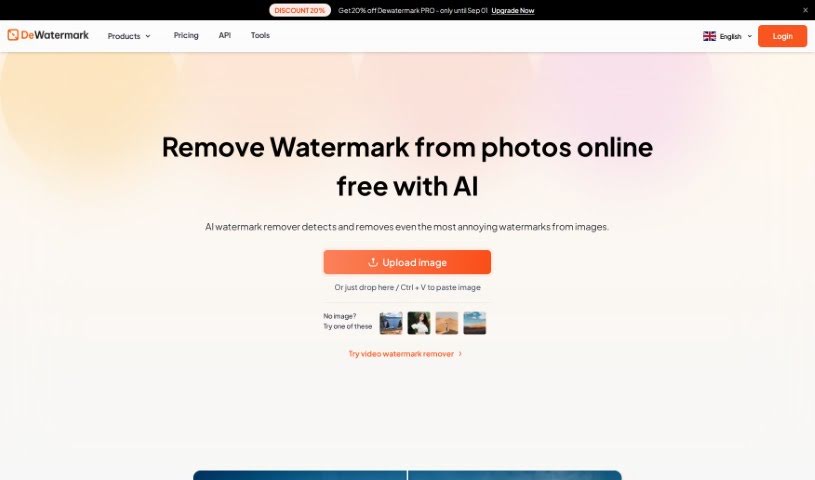
Screenshot of Dewatermark

Dewatermark

Discover what Dewatermark is and how to use it effectively in 2025. Explore its features, compare it with other photo editors, and learn how it handles watermarks.

Screenshot

What is Dewatermark?

Dewatermark.AI is a handy online tool, created by XTeam in Singapore back in 2022. Its main job is to help you get rid of watermarks from your photos, and it does it really efficiently. The tool uses AI technology, which means it can automatically find and remove all sorts of watermarks from your images. It’s pretty straightforward: you just upload your watermarked photos, let the AI work its magic to remove the marks, and if there are any stubborn bits left, you can use a manual brush tool for a more precise touch-up. Then, you can pick either the original or an improved version of your photo to download. What’s great about Dewatermark.AI is that it’s super easy to use, it’s free, it keeps your image quality intact, and it even supports multiple languages, making it a fantastic option for just about everyone. People have been really happy with how fast and accurate it is, not to mention how much time it saves compared to doing all that editing manually.

Who created Dewatermark?

Dewatermark.AI first appeared in 2022, thanks to XTeam. This group is made up of some really talented developers and AI enthusiasts based right there in Singapore. Their goal was to build a useful AI tool that makes removing watermarks from photos simple, using automated solutions. The team behind Dewatermark.AI really wants to make their web-based software easy for anyone to use, even if you don’t have advanced Photoshop skills. Through their consistent hard work and dedication, Dewatermark.AI has earned a reputation as a top-notch watermark remover that’s also affordable. They’re serving over 10,000 users every single day!

What is Dewatermark used for?

  • It’s really easy to use.
  • It supports many different languages.
  • You can remove watermarks from your photos.
  • It automatically finds and removes watermarks from images.
  • It keeps the original quality of your photos when it removes watermarks.
  • You have flexibility with editing using a manual brush for a really thorough watermark removal.
  • It can enhance your images, giving you different final looks.
  • You get quick processing and can easily download photos without watermarks.
  • It works smoothly on your phone, computer, and tablet.
  • It helps you tackle even tricky and complex watermarks.
  • You can remove watermarks from multiple images at once.
  • It handles even the most complicated watermarks very efficiently.
  • It removes watermarks from images quickly and effectively.
  • It uses AI technology to automatically detect and remove watermarks.
  • It offers flexibility in editing with a manual brush feature.
  • It keeps the original quality of images during the watermark removal process.
  • It prevents any loss of detail while removing watermarks.
  • It offers multiple final looks for enhanced images.
  • It supports multiple languages.
  • It’s compatible with all devices, including mobile, desktop, and tablet.
  • It’s completely free to use, with no hidden costs.
  • It’s accessible to users who don’t have professional photo editing experience.
  • It supports multiple languages for everyone’s convenience.
  • It effectively removes even the most sophisticated watermarks.
  • It uses AI for powerful watermark recognition.
  • It keeps image quality intact.
  • It offers flexible editing with a manual brush.
  • It automatically detects and removes watermarks.
  • The watermark removal process is speedy.
  • It has highly powerful watermark recognition capabilities.
  • It preserves image quality.
  • It automatically enhances image quality.
  • It uses AI technology to remove watermarks, automatically detecting and separating them from images.
  • It retains original image quality during watermark removal.
  • It provides a flexible editing option with a manual brush for thorough watermark removal.
  • It’s a free service for deleting watermarks from images.
  • It offers automatic image enhancement with several output options.
  • The editing process is fast and easy, helping with enhancing, retouching, and resizing photos.
  • It’s compatible with all devices, including iOS, Android, desktop, and tablet.
  • It uses powerful AI technology to recognize watermarks.
  • It creates multiple final looks for users to choose from after watermark removal.
  • It’s highly praised for how quickly it detects and removes watermarks.
  • It handles complex watermark removal.
  • It retains original image quality.
  • There’s no loss in details.
  • It has a manual brush feature for perfect results.
  • You can choose between the original and enhanced versions.
  • It has automatic functionality.
  • It uses color-blending for watermark removal.
  • It can remove layered watermarks.
  • Operation is fast and easy.
  • It efficiently removes complex watermarks from images.
  • It prevents detail loss during watermark removal.
  • It provides a manual brush feature for thorough watermark removal.
  • You can choose between the original and enhanced versions of images after watermark removal.
  • It uses AI technology for automatic detection and removal of watermarks.
  • It recognizes and separates watermark layers from background images.
  • It enhances images after watermark removal.
  • It automatically enhances images after watermark removal.
  • It retains image quality during watermark removal.
  • It saves you time on manual editing.
  • It works on all devices, including mobile, desktop, and tablet.
  • There’s no cost to use Dewatermark.AI.
  • It provides enhanced versions of images for download.

Who is Dewatermark for?

  • Photographers
  • Graphic designers
  • Artists
  • Researchers
  • Students
  • People who need images for study and research publications
  • Content creators
  • Academic Professionals
  • Marketing professionals
  • Social media managers
  • Marketers
  • Brand managers
  • Online sellers

How to use Dewatermark?

Using Dewatermark.AI to remove watermarks is really simple. Just follow these easy steps:

  1. Upload Image: You can either drag and drop your watermarked image right into the tool, or you can upload it from your device by simply tapping on the “Upload” button.
  2. AI Processing: The AI then automatically gets to work on your image. It runs its watermark detection algorithms to find and remove watermarks super fast.
  3. Manual Brush Editing: If, by chance, there are still a few traces of the watermark left, don’t worry! You can use the manual brush tool to carefully erase any remaining details.
  4. Download Clean Image: Once you’re happy with how it looks, you can choose to download either the original version or an HD version of your photo, now completely free of watermarks.

Dewatermark.AI is especially good at recognizing and removing tricky watermarks, keeping your image quality high, and giving you flexible editing options. It’s got a user-friendly interface, works on all your devices, and you don’t pay a thing to use it. People really love how fast and efficient it is, and that it can deliver great results without needing professional editing skills.

Related AI Tools

Discover more tools in similar categories that might interest you

123RF AI Image Generator

Creative Image Generation
Learn More

Stay Updated with AI Tools

Get weekly updates on the latest AI tools, trends, and insights delivered to your inbox

Join 25,000+ AI enthusiasts. No spam, unsubscribe anytime.