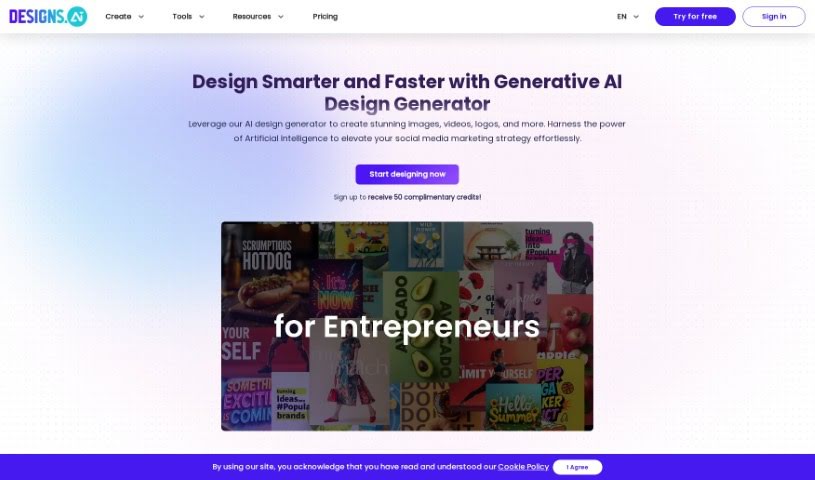
Screenshot of Designs AI

Designs AI

Discover what Designs AI is and how to use it effectively in 2025. We'll explore its features, compare it to other Image Generators, and show you how to get started.

Screenshot

What is Designs AI?

Designs AI is an online platform built to bring your imagination to life using artificial intelligence. It offers a collection of tools powered by its own AI technology, making design accessible to absolutely everyone. With Designs AI, you can whip up eye-catching graphics, engaging videos, custom logos, and smart mockups in under two minutes – seriously, no prior design experience needed! Plus, the platform makes it easy for teams to work together and keeps your brand assets handy, so creating across different projects feels super smooth.

Designs AI packs a punch with features like AI Design Tools that use dynamic templates, a Videomaker for instant video creation, an AI Writer to help with your text, and a Brand Kit Generator to keep your branding consistent. It also includes handy tools like ColorMatcher and Font Pairer to help you nail those design aesthetics. Essentially, it lets you ramp up your creative output without sacrificing quality, and you get access to over 20,000 templates for pretty much any design need you can think of.

Who created Designs AI?

Designs.ai was started by a team passionate about using artificial intelligence to help people unleash their creativity. The platform’s whole idea is to let users easily create professional-looking designs with AI, even if they’ve never designed anything before. You can generate impressive graphics, videos, logos, and mockups in just minutes. Designs.ai also makes it simple for teams to collaborate and manage their brand assets, ensuring everything stays consistent. Their main goal? To make design accessible to everyone, saving you time and money while still delivering top-notch results.

What is Designs AI used for?

  • Create stunning graphics that grab attention.
  • Generate engaging videos that tell your story.
  • Design personalized logos that represent your brand.
  • Produce compelling voiceovers for your projects.
  • Improve your overall design workflow, making it much smoother.
  • Enhance your content quality and boost your productivity.
  • Craft a cohesive brand presence that feels unified.
  • Achieve professional results without a steep learning curve.
  • Increase productivity by enabling team collaboration.
  • Apply consistent branding across all your creations, big or small.

Who is Designs AI for?

  • Individuals looking to create personal projects or side hustles.
  • Students needing to make presentations or assignments stand out.
  • Marketers aiming to produce high-quality campaign materials quickly.
  • Professionals who need efficient design solutions for their work.
  • Large teams that require a centralized and collaborative design platform.
  • Agencies looking to scale their creative output and client deliverables.

How to use Designs AI?

To really make the most of Designs.ai, here’s a simple step-by-step guide:

  1. Access the Platform: First things first, sign up on Designs.ai. This gives you access to a whole suite of AI-powered design tools.
  2. Select Tools: Figure out what you need to create. Do you need a logo? A video? Maybe a voiceover? Just pick the tool that fits your project, like Logomaker, Videomaker, or Speechmaker.
  3. Creation Process: Jump into the creation process. You can use their dynamic templates to build professional designs really quickly and without any fuss.
  4. Collaboration: If you’re working with others, invite your team members to collaborate on projects. It’s a great way to boost productivity and spark more creativity together.
  5. Branding Kit: Keep your brand looking consistent everywhere. Use the Brand Kit feature to easily apply your brand assets across all your creations.
  6. Explore Features: Don’t forget to check out the extra tools! Features like ColorMatcher and Font Pairer are there to help you perfect those design aesthetics.
  7. Download and Share: Once you’re happy with your creation, you can download unlimited assets. Plus, sharing them on social media is a breeze.
  8. Upgrade Options: If you find yourself needing more, think about upgrading. It unlocks even more features and premium resources tailored to your needs.

By following these steps, you can really tap into Designs.ai’s AI technology to create amazing visuals, videos, and more, all much more efficiently and effectively. It’s a fantastic way to unlock your creative potential and streamline your entire design process.

Related AI Tools

Discover more tools in similar categories that might interest you

123RF AI Image Generator

Creative Image Generation
Learn More

Stay Updated with AI Tools

Get weekly updates on the latest AI tools, trends, and insights delivered to your inbox

Join 25,000+ AI enthusiasts. No spam, unsubscribe anytime.