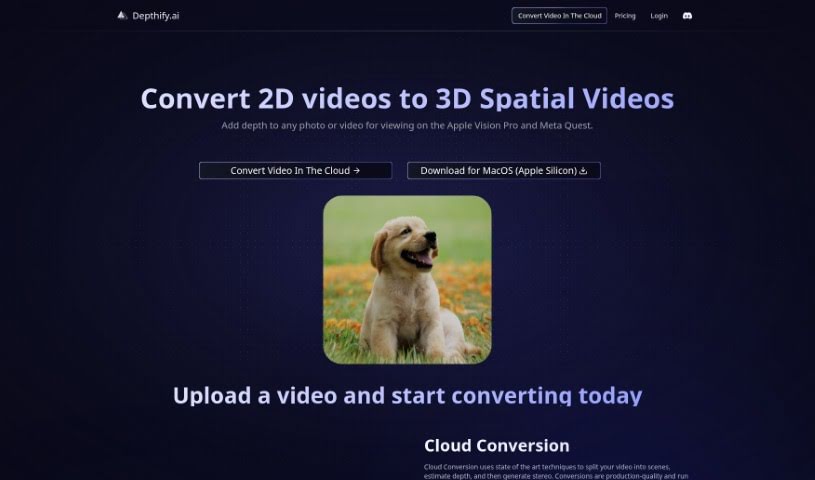
Screenshot of Depthify.ai

Depthify.ai

Dive into Depthify.ai in 2025! Discover what this tool does, how to use its features, and how it stacks up against other photo editors.

Screenshot

What is Depthify.ai?

Depthify.ai is a really neat platform that lets you turn your regular 2D photos and videos into 3D spatial ones. It is adding a whole new dimension to your content, making it viewable on devices like the Apple Vision Pro and Meta Quest. Depthify.ai offers two main ways to do this:

  1. Cloud Conversion:

    • This method uses some pretty advanced techniques. It breaks down your videos into different scenes, figures out the depth for each part, and then creates those cool stereo effects. The results are high-quality, like what you’d expect from professional production, and everything is processed securely on Depthify.ai’s servers.
  2. Desktop App:

    • If you prefer to keep everything local, Depthify.ai also has a Desktop app. You can run all the processing right on your own computer. It’s designed to be user-friendly, letting you convert your RGB photos and videos into depth maps, stereo images, and even 3D meshes.

How Depthify.ai Works, Step-by-Step:

  1. RGB to Depth Conversion: First off, the platform uses a special AI model, called a monocular depth network. This network is trained to predict how far away each pixel in your images is, essentially creating a depth map.
  2. Depth to Stereo Conversion: Once it has that depth information, it takes your original RGB image and the new depth map and transforms them. It essentially creates the separate images needed for your left and right eyes, making it look 3D.
  3. Spatial Encoding: Finally, it packages everything up. The results are encoded into formats like .HEIC images or MV-HEVC videos. These are the kinds of files that devices like the Apple Vision Pro and Meta Quest can understand and display as spatial content.

Depthify.ai has straightforward pricing. It’s based on how much you need to convert, with simple plans that just count the number of frames. You can get high-quality 1080p or 4K spatial videos whenever you need them. If you’re an enterprise user with more complex needs or require specialized pipelines, they also offer custom pricing.

Source: depthifyai.pdf

Who created Depthify.ai?

Depthify.ai was developed with the goal of transforming standard 2D videos into immersive 3D Spatial Videos. This allows people to add depth to their photos and videos, making them viewable on devices like the Apple Vision Pro and Meta Quest. The company provides cloud conversion services that use sophisticated techniques, and they also offer a desktop application for users who prefer to process their content locally. Depthify.ai handles the entire conversion process, from turning RGB images into depth maps, to creating stereo visuals, and finally encoding them for spatial viewing. Their pricing structure is designed around the quality and volume of video frames that are converted, with options ranging from 1080p and 4K resolutions to custom solutions tailored for businesses.

Who is Depthify.ai for?

  • Photographers looking to add a new dimension to their work.
  • Videographers wanting to create more immersive viewing experiences.
  • Content creators aiming to stand out with unique 3D visuals.
  • Digital artists exploring new mediums for their creations.
  • VR/AR Developers building interactive and spatial applications.

How to use Depthify.ai?

Ready to give Depthify.ai a try? Here’s a simple breakdown of how to get started:

  1. Upload Your Content: The first step is to upload the 2D videos or photos you want to convert to the Depthify.ai platform.

  2. Choose Your Conversion Method: You’ve got a couple of options here:

    • Cloud Conversion: If you go with the cloud service, Depthify.ai will handle splitting your video into scenes, estimating the depth for each part, and generating those cool stereo effects. It all happens on their secure servers.
    • Desktop App: Alternatively, you can use the desktop application. This lets you do all the processing right on your own computer. It’s great for converting your RGB content into depth, stereo, Spatial, and 3D meshes, and the interface gives you good control over the depth effect.
  3. The Conversion Process: Here’s what happens behind the scenes:

    • Convert RGB to Depth: First, the platform uses a specialized AI model (a monocular depth network) to figure out the distance of every single pixel in your images. This creates the depth map.
    • Convert Depth to Stereo: Next, it takes your original RGB image and the depth map it just created. It then transforms these into the separate images needed for your left and right eyes, resulting in a stereo image.
    • Spatial Encoding: Lastly, the system packages everything up. The final output is encoded into formats like .HEIC images or MV-HEVC videos, which are perfect for viewing on devices like the Apple Vision Pro or Meta Quest.
  4. Understanding Pricing:

    • The cost is generally based on how many frames you convert. You can choose between 1080p and 4K resolutions for your output. If you have specific business needs or require custom setups, they also offer enterprise solutions.

Depthify.ai really makes it easy to add that depth to your content, whether you prefer the convenience of cloud conversion or the hands-on control of the desktop app.

Related AI Tools

Discover more tools in similar categories that might interest you

123RF AI Image Generator

Creative Image Generation
Learn More

Stay Updated with AI Tools

Get weekly updates on the latest AI tools, trends, and insights delivered to your inbox

Join 25,000+ AI enthusiasts. No spam, unsubscribe anytime.