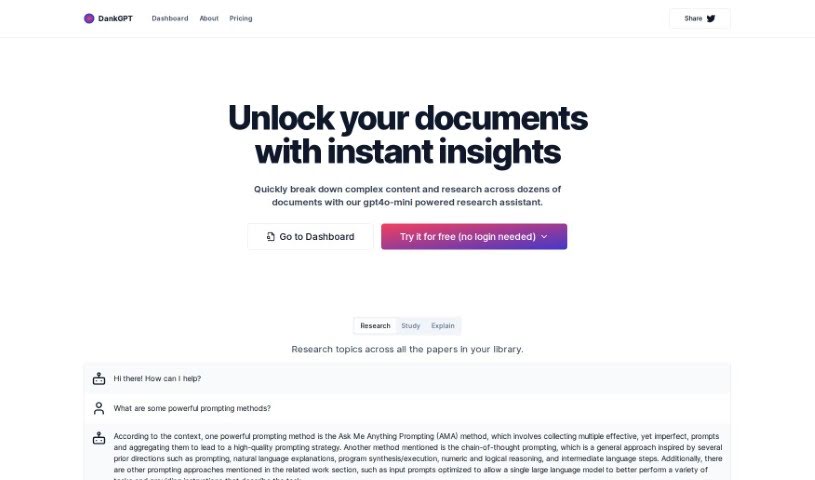
Screenshot of Dankgpt

Dankgpt

Discover what Dankgpt is and learn how to use it effectively in 2025. We'll explore its features and see how it stacks up against other student research tools.

Screenshot

What is Dankgpt?

DankGPT is a research tool built for students and academics, powered by GPT4 and GPT5 technology. It’s designed to help you dive into complex academic content found in all sorts of documents, giving you insights on a huge range of subjects. What’s cool is that DankGPT offers features like the Ask Me Anything (AMA) Prompting method, chain-of-thought prompting, specially optimized input prompts, and instructions tailored for specific tasks. Plus, it can handle multiple documents at once! You don’t even need to create an account to start using it, and you can easily share your findings on social media, like Twitter.

Who created Dankgpt?

DankGPT was developed by someone known as ‘rawsh,’ who really wanted to support the research process for students and academics. It first launched on May 15, 2023. The main goal behind DankGPT is to help with all sorts of academic and research tasks, offering valuable insights and thorough analyses across different documents.

What is Dankgpt used for?

  • Breaking down complex content: It helps make difficult material easier to understand.
  • Providing insights across a library of papers: You can get a good overview of information from many documents at once.
  • Streamlining research: It makes the research process much smoother.
  • Aiding in research across various topics: Whether your subject is broad or narrow, DankGPT can assist.
  • Assisting with a wide array of academic and research-oriented tasks: It’s a versatile tool for many academic needs.
  • Enhancing prompt strategy and aiding research: It helps you ask better questions to get better answers.
  • Improving a single large language model’s performance on different tasks: It can help make AI tools work better for specific jobs.
  • Supporting the research process for students and academics: It’s built with your needs in mind.
  • Handling multiple documents effectively: No more juggling tons of separate files.
  • Offering task-specific instructions: Get guidance tailored to what you need to do.
  • Ask Me Anything (AMA) Prompting method: A flexible way to ask questions.
  • Chain-of-thought prompting: Helps understand the reasoning behind answers.
  • Optimized input prompts: Designed to get the best results from AI.
  • Task-specific instructions: Clear guidance for specific jobs.
  • Insights across library: Get a broad understanding from your collected papers.
  • Breaks down complex content: Simplifies difficult material.
  • Quick comprehension: Helps you grasp information faster.
  • Task-oriented instructions: Direct guidance for specific actions.
  • Streamlining research process: Makes research more efficient.
  • Research assistance across various topics: Helps with any subject.
  • Break down complex content: Makes tough subjects digestible.
  • Provide insights across a library of papers: Get a big-picture view from your research.
  • Assist with a wide array of academic and research-oriented tasks: Covers many academic needs.
  • Streamline research across various topics: Speeds up your research.
  • Enhance the quality of prompt strategy: Improves how you interact with AI.
  • Aid in analysis of intricate content in multiple documents: Helps you understand complex information across many files.
  • Support research process for students and academics: Tailored for educational research.
  • Improve a single large language model’s performance on different tasks: Boosts AI effectiveness.
  • Enhance query results by compiling multiple prompts: Gets you better answers by combining different questions.
  • Utilize a GPT5-powered research assistant for comprehensive analysis: Get in-depth analysis from advanced AI.
  • Aid with a wide array of academic and research tasks: Supports many academic jobs.
  • Improve large language model’s performance on different tasks: Makes AI work better.
  • Offer task-specific instructions: Get clear directions for tasks.
  • Assist in quick comprehension: Helps you understand things fast.
  • Allow unlocking documents for examination: Lets you explore your files.
  • Aid in research across various topics: Helps with any subject matter.
  • Allow analysis of a wide variety of academic and research documents: Analyze many types of academic files.
  • Enhance prompt strategy with various methods like AMA Prompt and chain-of-thought prompting: Use different techniques to ask AI questions better.
  • No login needed for testing and easy accessibility: Jump right in without signing up.
  • Breaking down complex content and providing insights across a library of papers: Understand tough subjects and get an overview from your research papers.
  • Aiding in research across various topics by utilizing a GPT5-powered research assistant: Get help with any subject using advanced AI.
  • Specifically designed for research to streamline the research process: Built to make research easier.
  • Providing task-specific instructions to help large language models perform tasks effectively: Guides AI to do jobs well.
  • Enhancing the quality of prompt strategies through various prompting methods: Improve how you ask questions.
  • No login required for usage, increasing accessibility to potential users: Easy to access for everyone.
  • Can be used for free by individuals for trial purposes: Try it out without cost.
  • Supporting the sharing of content through platforms like Twitter: Share your findings easily.
  • Analyzing academic and research documents, from singular papers to entire libraries: Understand everything from one paper to a whole collection.
  • Offering various prompting methods such as Ask Me Anything (AMA) Prompting and chain-of-thought prompting: Use different ways to get answers from AI.
  • Improving a single large language model’s performance on different tasks through optimized input prompts and task-specific instructions: Make AI work better with smart prompts and clear directions.
  • Providing task-specific instructions: Get clear directions for tasks.
  • Free to use for individuals, especially students and academics: Great for students and researchers, and it’s free.
  • Streamlining the research process by providing instant insights and aiding in the breakdown and analysis of complex content found in multiple documents: Makes research faster by giving quick insights and helping you understand tough stuff in many files.
  • Enhancing research across a broad spectrum of topics with a GPT5-powered research assistant: Get better research results on any topic with advanced AI.

Who is Dankgpt for?

  • Students
  • Academics

How to use Dankgpt?

Using DankGPT is pretty straightforward. Just follow these simple steps:

  1. Head over to the DankGPT website and find the dashboard.
  2. Take a look at the special features it offers, like the AMA Prompt strategy and chain-of-thought prompting.
  3. Upload the academic or research documents you need analyzed.
  4. Try out the different prompting methods, such as Ask Me Anything (AMA) Prompting and optimized input prompts.
  5. Let the GPT5-powered research assistant do its thing, giving you insights and thorough analyses of complex content.
  6. If you want, you can share your findings on social media platforms like Twitter.
  7. The best part? You don’t need to log in to test DankGPT, making it super easy for everyone to access, especially students and academics.

DankGPT really helps speed up your research. It gives you valuable insights, helps you break down and understand content, and offers various prompting methods so you can research different topics more efficiently.

Related AI Tools

Discover more tools in similar categories that might interest you

Academic Help Free Essay Generator

Education Academic Writing
Learn More

Stay Updated with AI Tools

Get weekly updates on the latest AI tools, trends, and insights delivered to your inbox

Join 25,000+ AI enthusiasts. No spam, unsubscribe anytime.