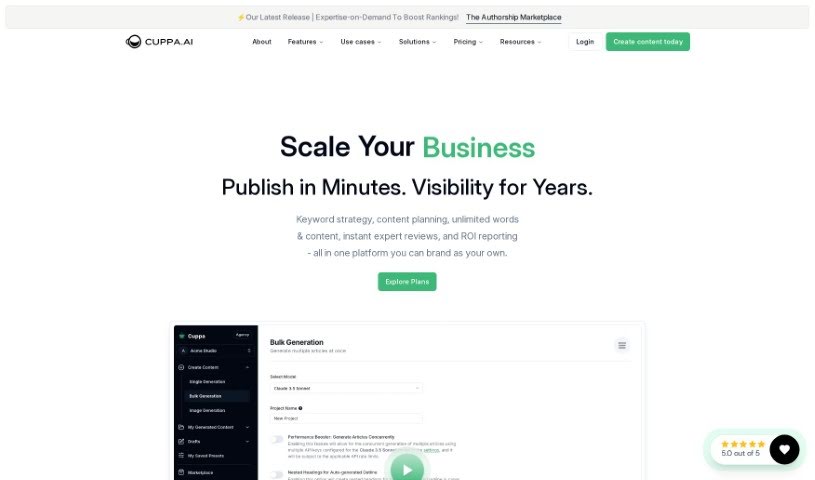
Screenshot of Cuppa.sh

Cuppa.sh

Discover what Cuppa.sh is and how to use it effectively in 2025. We'll dive into its features, compare it to other content writing tools, and show you how it can boost your website's traffic.

Screenshot

What is Cuppa.sh?

Cuppa.sh is a content platform that uses AI and other smart technologies to help you create content that’s really optimized for your website or brand. What’s great about it is that you can create content without feeling boxed in. It offers features like BYOK (Bring Your Own Keys), meaning you won’t get hit with unexpected charges or upsells on your token usage with OpenAI. Compared to other tools, Cuppa really shines because it gives you so much flexibility, lets you generate unlimited articles, and integrates smoothly with the OpenAI API for all your content needs.

Beyond the core product, you can upgrade to a Power Plan. This plan unlocks even more useful features, such as multiple AI images, access to live web data and top search engine results (SERPs), keyword data, and merchant data. It also includes a power editor designed for creating super-optimized content. You can try Cuppa out with a 4-day free trial, and you can cancel anytime during that period if it’s not the right fit.

Cuppa’s content generation tools are pretty comprehensive. You can write AI articles and blog posts, build detailed buyer’s guides, use a marketplace for various services, take advantage of power editing tools, get SEO SERP optimizations, and create custom outlines with research content.

When it comes to pricing, there’s a Cuppa License (Base Level) for $150 per year, and if you want more, there’s a Power User Upgrade for $50 per month. Both plans do require you to have your own OpenAI API keys. The platform supports 33 languages and offers a variety of tools tailored for different users, including bloggers, SEO specialists, writers, editors, niche site builders, and even students. Ultimately, Cuppa aims to make content creation much simpler by providing an easy-to-use interface and a range of features that boost productivity and help drive more traffic to your websites.

Who created Cuppa.sh?

Cuppa.sh was actually created by Ian Nuttall. He started out as a beta tester for the platform and eventually took over as the owner. Cuppa is designed as an AI content generator platform, and the goal is to offer a really simple and smooth experience for everyone who uses it. Ian Nuttall became the owner of Cuppa on May 24th, 2023, and since then, he’s been focused on making the platform even better and adding new features that really add value for customers.

What is Cuppa.sh used for?

  • Build optimized content for websites: Create content that’s specifically designed to perform well in search engines.
  • Drive traffic to websites: Get more visitors to your site with well-crafted content.
  • Programmatic SEO: Build content automatically for search engine optimization purposes.
  • Bulk content generation: Create large volumes of content efficiently.
  • Direct publishing to WordPress: Publish your content straight to your WordPress site without extra steps.
  • Edit and format content: Refine and style your content using powerful editing tools.
  • Utilize AI content generation: Leverage artificial intelligence to help write your content.
  • Community interaction for content builders: Connect with other users to share insights and tips.
  • Marketplace for web building resources: Find additional tools and services for your website projects.
  • Content collaboration: Work together with your team on content projects.
  • Rapid Content Generation: You can build optimized content in just minutes, helping you drive website traffic quickly.
  • No Limitations: Just input your own OpenAI API keys and enjoy unlimited articles with no token upsells.
  • Custom Presets and Prompts: Make your content truly unique by tailoring the generation process with your own custom prompts and presets.
  • Power Editing: Use the robust editor to fine-tune your content before you publish it.
  • Direct WordPress Publishing: Seamlessly publish your polished content straight from the editor to your WordPress site.
  • Generate Content in Bulk: If you need a lot of content, you can build it in bulk, especially useful for programmatic SEO.
  • Programmatic SEO: This platform is capable of building content programmatically, which is great for search engine optimization.
  • Content Creation for SEO: It’s perfect for creating AI content that’s specifically tailored for SEO.
  • Collaborative Editing: It allows you to work with a team on editing content, making collaboration easier.
  • AI Content Generation for Writers: This tool is specifically designed to help writers generate content using AI.

Who is Cuppa.sh for?

  • Bloggers
  • SEOs (Search Engine Optimization specialists)
  • Writers
  • Editors
  • Niche Site Builders
  • Programmatic SEO practitioners
  • Local SEO specialists
  • Parasite SEO practitioners
  • Students

How to use Cuppa.sh?

Using Cuppa.sh is pretty straightforward. Just follow these steps:

  1. Insert Your Open AI API Keys: First, you’ll need to add your OpenAI API keys into the platform. There are no upsells or limits on how many articles you can create this way. Getting your keys typically costs about $0.05 per article, so it’s quite cost-effective.
  2. Set Your Unique Presets: Make your content stand out by customizing it with OpenAI API presets and your own custom prompts. This helps ensure the content matches your specific brand voice.
  3. Generate Content: You have a few options here: build content in bulk, use programmatic generation, or create single pieces. In just a couple of minutes, you’ll have optimized content ready for you to review.
  4. Edit & Export: Use the platform’s powerful editor to refine and optimize your content before you publish it. You can either export the content to use elsewhere or publish it directly from the editor.
  5. Community & Marketplace: Jump into the Discord community to connect with other Cuppa users. You can share tips and tricks for getting the best output. Plus, check out the marketplace for extra web building resources.
  6. Optional Power User Features: If you need more advanced capabilities, consider upgrading to “Cuppa UNLEASHED.” This unlocks features like live web access, top SERPs data, keyword research, and much more.
  7. Subscription Plans: Cuppa offers a base license for $150 per year. This includes handy features like a multisite license, DALL·E 3 AI Featured Image generation, and a robust editor. There’s also a Power User Upgrade available for $50 per month if you need those extra tools.

By following these steps, you can really make the most of Cuppa.sh. It’s a great way to streamline your content creation, generate optimized content efficiently, and boost your online presence without a hitch.

Related AI Tools

Discover more tools in similar categories that might interest you

Stay Updated with AI Tools

Get weekly updates on the latest AI tools, trends, and insights delivered to your inbox

Join 25,000+ AI enthusiasts. No spam, unsubscribe anytime.