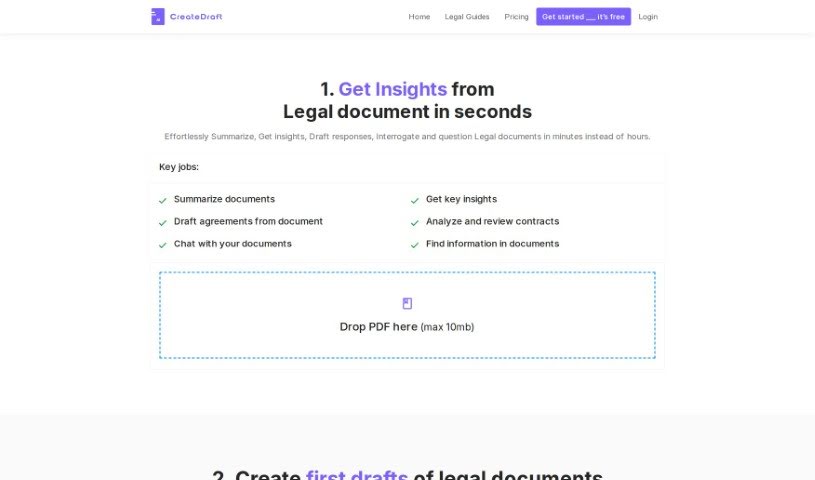
Screenshot of CreateDraft

CreateDraft

Discover what CreateDraft is and how to use it effectively in 2025. We'll explore its features and see how it stacks up against other legal tools.

Screenshot

What is CreateDraft?

CreateDraft is a smart AI platform designed to make managing and drafting legal documents much faster and easier. It’s packed with features that help legal professionals work more efficiently. You can use it to quickly summarize legal documents, pull out important information, draft responses, and even chat with your documents to really understand them. Basically, CreateDraft helps legal teams cut down on the time they spend reviewing documents by giving them fast summaries, key insights, and even draft agreements based on what’s in the documents. Plus, it offers over 340 templates to help automate legal drafting for common agreements like Non-Disclosure Agreements and Employment Agreements. The goal here is to boost productivity by making document creation smoother and taking away the headache of starting from a blank page.

Who created CreateDraft?

CreateDraft was started by someone with a vision to really change how legal documents are managed and drafted, using the power of AI. This platform lets you summarize legal documents, draft responses, and interact with legal content in a way that makes analysis efficient. You’ll find more than 340 templates ready to go for automating legal drafting. CreateDraft is built to help legal teams be more productive by speeding up document review from hours down to just minutes. It’s also really easy to use, and you don’t even need a credit card to try it out for free.

What is CreateDraft used for?

CreateDraft is incredibly versatile for legal work. Here’s a breakdown of what it can do:

  • Templates: Access a huge library of over 340 legal document templates.
  • Summarize documents: Get concise summaries of lengthy legal texts in no time.
  • Draft Agreements: Let AI help you draft full legal agreements quickly.
  • Insights and Analysis: Easily pull out critical information and review contracts.
  • Interactive Document Handling: Chat with your documents to extract specific details.
  • Create first drafts: Get high-quality initial versions of legal documents.
  • Common Contracts: Automate drafting for agreements like Non-Disclosure Agreements (NDAs), Employment Agreements, Partnership Agreements, and Operating Agreements.
  • Tailor drafting: Adjust legal document creation to fit your specific needs, making the whole process smoother.
  • Multi-language support: Draft documents accurately in over 25 languages.
  • Simplify contracts: Review and simplify complex contracts using its insights and analysis tools.

Who is CreateDraft for?

CreateDraft is designed for anyone working with legal documents, including:

  • Legal professionals
  • Lawyers
  • Non-lawyers who need to handle legal documents

How to use CreateDraft?

Using CreateDraft is straightforward. Just follow these simple steps:

  1. Upload Your Documents: Start by uploading your legal documents, typically in PDF format, onto the CreateDraft platform.
  2. Get AI Summaries: The platform’s AI will quickly process your documents, providing summaries and extracting key insights to speed up your review.
  3. Draft with AI Help: Use the tool to efficiently draft complete legal agreements. The AI will base these drafts on the content of the files you’ve uploaded.
  4. Pick from Templates: Choose from the extensive collection of over 340 legal document templates. This is great for automating the drafting of common contracts like Non-Disclosure Agreements and Employment Agreements.
  5. Interact with Documents: You can have a chat-like conversation with your legal documents directly within the platform. This makes it easy to extract specific details you need.
  6. Review and Refine: Generate high-quality first drafts using the provided templates. Then, you can edit, polish, and export them as required.
  7. Language Options: CreateDraft supports over 25 languages, which helps you tailor documents to specific jurisdictions and laws.
  8. Try it Free: You can begin using CreateDraft for free; no credit card is needed to access the service.
  9. Manage Your Subscription: If you decide to subscribe, you can cancel at any time. You’ll still have access to the paid features until your current billing period ends.

Overall, CreateDraft really simplifies and speeds up how legal documents are managed and drafted. It offers a full range of features and an easy-to-use interface, which is a big help for legal teams looking to boost their productivity and efficiency.

Related AI Tools

Discover more tools in similar categories that might interest you

Stay Updated with AI Tools

Get weekly updates on the latest AI tools, trends, and insights delivered to your inbox

Join 25,000+ AI enthusiasts. No spam, unsubscribe anytime.