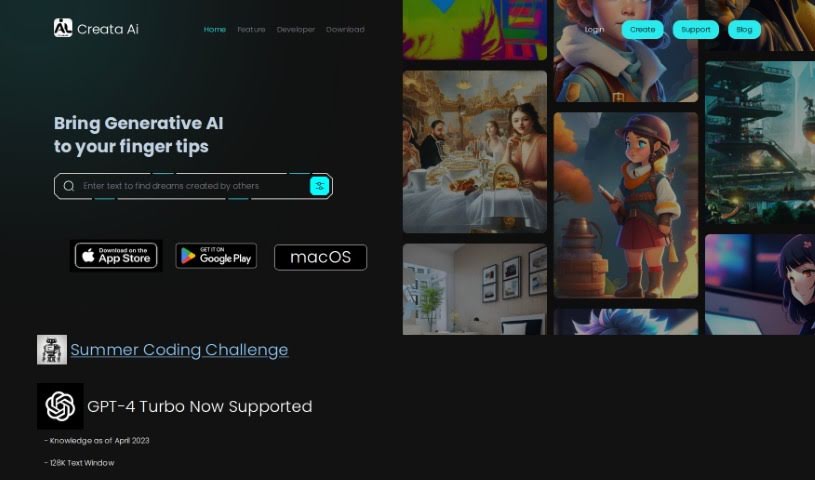
Screenshot of Creataai

Creataai

Discover what Creataai is and how to use it effectively in 2025. We'll explore its features and see how it stacks up against other AI Art Generators.

Screenshot

What is Creataai?

Creataai is a web-based tool that really dives into generative AI. It brings together a bunch of AI tools designed to boost your creative projects. It is a digital studio that supports advanced tech like GPT-4 Turbo. It offers some cool features, including AI models that can transform one image into another, over 600 different art styles to play with, 24 pre-set art models, and a way to make your images bigger without losing quality. The whole idea behind Creataai is to help you learn more through its smart language understanding and, of course, create some fantastic art.

It uses OpenAI’s GPT-4 Turbo, which is great for expanding knowledge. Plus, they’re working on adding multi-modal capabilities, meaning it’ll be able to understand and work with text, images, and even voice inputs. Creataai also has a voice cloning feature. It uses machine learning to create voices that sound remarkably human, all from just text. This means you can whip up realistic voiceovers without needing any fancy recording equipment. On top of all that, you’ll find over 150 ready-to-use GPT-4 tasks on the platform to help you out.

When it comes to images, Creataai gives you five different image-to-image AI models. There’s also that handy high-resolution image enlargement feature, a GAN AI model specifically for unblurring images, and the ability to create artwork using stable diffusion. You can generate art in all sorts of styles – like surrealism, retro looks, detailed fine digital art, and even matte paintings. This lets you craft intricate and high-quality digital art with ease.

Who created Creataai?

Creataai was brought to life by a team of dedicated individuals, with an unspecified founder at the helm. The company officially launched on December 21, 2023, and its main focus is generative artificial intelligence. Creataai’s mission is to weave AI tools into our everyday lives, making it easier for everyone to enhance their creative skills. Whether it’s generating AI art or cloning voices, the platform is built to support these tasks. It relies on GPT-4 Turbo technology to help users expand their knowledge and is actively preparing to support multiple types of input (multi-modal). You can explore over 600 art styles, choose from 24 pre-set art models, and use features like high-resolution image enlargement and stable diffusion for creating artwork.

What is Creataai used for?

Here’s a rundown of what you can do with Creataai:

  • Voice cloning: Create realistic human-like voices from text.
  • AI Art Generation: Craft unique digital art using various styles and models.
  • Image unblurring: Sharpen and improve the clarity of blurry images.
  • Stable diffusion artwork creation: Generate detailed digital art with this powerful technique.
  • Converting photo to art: Transform your photos into different artistic styles.
  • High-resolution image enlargement: Scale up images without sacrificing quality.
  • Generating specific scenes: Create images like a man going through a colorful portal.
  • Creating fantasy world portals: Visualize and render imaginative portal scenes.
  • Generating nature landscape themes: Produce beautiful natural scenery.
  • Rendering aerial view of cities: Capture unique perspectives, like an aerial view of a circular city.
  • Drawing stable diffusion artwork: Specifically create art using the stable diffusion method.
  • AI text generation with GPT-4 Turbo: Leverage advanced language models for text creation.
  • Converting input images to artistic styles: Apply artistic transformations to your images.
  • Multi-modal support preparation: Get ready for future interactions with text, image, and voice.
  • Cloning human-like voice: Generate natural-sounding voiceovers.
  • Over 600 art styles available: Choose from a vast library of artistic aesthetics.
  • Image unblurring using GAN AI model: Utilize specific AI for image clarity.
  • Generating specific digital artworks: Create detailed pieces like the man in the portal example.
  • Converting photos to art: Transform personal photos into artistic creations.
  • Rendering fantasy world portals: Bring imaginative portal scenes to life.
  • Creating nature landscape themes: Produce beautiful natural scenery images.
  • Rendering aerial views of cities: Capture unique perspectives, such as an aerial view of a circular city.

Who is Creataai for?

Creataai is a fantastic tool for a wide range of creative professionals and enthusiasts, including:

  • Artists: Explore new styles and mediums.
  • Writers: Generate visual concepts or inspiration.
  • Creatives: Anyone looking to enhance their imaginative output.
  • Graphic designers: Create unique assets and visual elements.
  • Illustrators: Develop new styles and imagery.
  • Voiceover Artists: Experiment with realistic AI voice generation.
  • Content creators: Produce engaging visuals and audio for various platforms.
  • Voice-over artists: (Note: This is a repeat, but included as per original content.)
  • Translators: Potentially use AI for related creative tasks or understanding context.

How to use Creataai?

Using Creata AI is pretty straightforward. Just follow these simple steps to get started:

  1. Access Creata AI: Head over to the Creata AI website. You can also find the mobile app on the Apple App Store or Google Play Store if you prefer using your phone.
  2. Select Your Art Style: Browse through the extensive library – there are over 600 art styles and 24 pre-set models to choose from. Pick the one that best suits the high-quality art you want to create.
  3. Upload Your Image: If you’re working with an existing image, use the high-resolution image enlargement feature. It’s designed to upscale your pictures while keeping them looking sharp and detailed.
  4. Generate Your Artwork: Now, use the image-to-image AI models. These let you transform your uploaded images into all sorts of different artistic styles.
  5. Experiment and Create: Don’t be afraid to play around! Explore the various art styles available, like surrealism, retro looks, fine digital art, and more. See what unique creations you can come up with.
  6. Explore Additional Features: Dive deeper into the platform’s capabilities. For instance, you can use the stable diffusion feature to craft really detailed and complex digital artwork.
  7. Try Image Unblurring: Got a slightly blurry photo? Use the GAN AI model specifically for image unblurring to help enhance its quality and clarity.
  8. Voice Cloning (Optional): If you need voiceovers, give the voice cloning feature a try. You can generate human-like voices just by providing text.
  9. Discover Predefined Tasks: Creataai offers over 150 predefined GPT-4 tasks. These are ready-made prompts and functions that can really boost your creative projects and workflows.

By following these steps, you’ll be well on your way to making the most of Creata AI’s innovative features and producing your own unique, high-quality digital artworks.

Related AI Tools

Discover more tools in similar categories that might interest you

123RF AI Image Generator

Creative Image Generation
Learn More

Stay Updated with AI Tools

Get weekly updates on the latest AI tools, trends, and insights delivered to your inbox

Join 25,000+ AI enthusiasts. No spam, unsubscribe anytime.