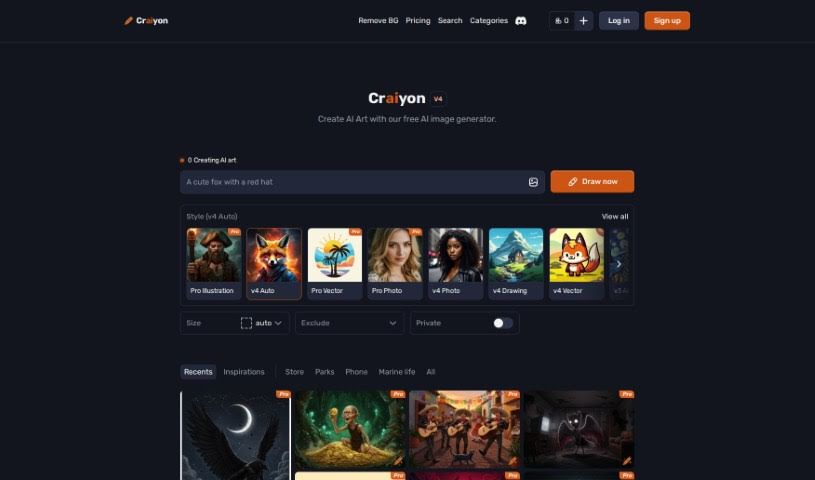
Screenshot of Craiyon

Craiyon

Discover what Craiyon is and how to use it effectively in 2025. We'll explore its features and see how it stacks up against other AI image generators.

Screenshot

What is Craiyon?

Craiyon is a really neat AI model that lets you create images just by typing in what you want to see. It’s all done through a super easy-to-use online platform. Basically, it uses the Generative Pre-trained Transformer 3 (GPT-3) model. This means you can type in a text prompt – think of it like a description – and Craiyon will whip up corresponding images in all sorts of styles. You can get cartoonish looks, realistic photos, or even abstract art. Whether you’re looking for a simple drawing or something more detailed, Craiyon can handle it. Plus, you can even print your creations on a t-shirt or share them with others on their forum. They’re also serious about keeping your information private, giving you control over how your data is used.

Who created Craiyon?

An individual, whose identity isn’t publicly known, created Craiyon. It first launched on June 19, 2022. The AI model itself runs on Generative Pre-trained Transformer 3 (GPT-3), which is what allows users to generate images from text prompts on its user-friendly platform.

What is Craiyon used for?

Craiyon is a versatile tool for a variety of creative needs:

  • Image Generation: It’s primarily used for creating images directly from text prompts.
  • Artistic Styles: It can generate images in a wide array of styles, including cartoon, photographic, and abstract looks.
  • Creative Output: You can create everything from simple drawings to more complex, intricate works of art.
  • Larger Images: While it might take a bit longer, Craiyon can produce larger images.
  • Personalization: You can print your generated images directly onto t-shirts.
  • Community Sharing: The platform offers a user forum where you can share your creations.
  • Privacy Control: Users have control over how their data is used, ensuring privacy.
  • Versatile Applications: It’s great for personal projects, academic use, commercial purposes, and designing t-shirts.
  • User-Friendly Platform: It provides a straightforward online experience for generating images.

It’s important to note that Craiyon is strictly an online tool; there’s no offline use available. Sometimes, faces in the generated images might look a little unusual, but overall, it’s a fantastic way to bring your ideas to visual life. You can also support Craiyon’s development through your usage.

Who is Craiyon for?

Craiyon is a fantastic tool for anyone looking to bring visual ideas to life. It’s particularly useful for:

  • Graphic designers
  • Artists
  • Content creators
  • Marketers and advertisers
  • T-shirt designers
  • Branding experts
  • Fashion designers
  • Illustrators
  • Photographers
  • Web designers
  • And really, any creator!

How to use Craiyon?

Using Craiyon is pretty straightforward. Here’s how you can get started:

  1. Get to Craiyon: First, head over to the Craiyon website at www.craiyon.com. Make sure you’re using an up-to-date web browser for the best experience.
  2. Create Your Images:
    • Simply type in a text prompt that describes the image you want. Be as descriptive as you like!
    • Craiyon uses the GPT-3 model to understand your text and generate images that match your description.
  3. Explore Styles and Types:
    • You’ll find that Craiyon can create images in a variety of styles – think cartoon, photographic, or abstract. It’s quite versatile!
    • It’s capable of producing a wide range of images, from very simple drawings to more complex pieces of art.
  4. Image Size and Printing Options:
    • Craiyon can generate larger images, though it might take a little extra time compared to smaller ones.
    • If you love what you create, you can even print your generated images on items like t-shirts.
  5. Your Privacy Matters:
    • Craiyon is committed to protecting your privacy.
    • You have control over how your data is used on the platform, so you can feel secure.
  6. Sharing and Getting Support:
    • Feel free to share your creations with the community on the platform’s forum.
    • While specific details aren’t listed, support is available if you need it.

Just a quick note: Craiyon, which used to be called DALL-E mini, works entirely online. There isn’t an offline version or a dedicated app. Its main focus is generating images from your text prompts, and it even offers printing options for your creations. They also make sure to protect your privacy by letting you control your data. However, it doesn’t offer things like API integration, direct access to raw data, or the ability to process images in batches.

Related AI Tools

Discover more tools in similar categories that might interest you

123RF AI Image Generator

Creative Image Generation
Learn More

Stay Updated with AI Tools

Get weekly updates on the latest AI tools, trends, and insights delivered to your inbox

Join 25,000+ AI enthusiasts. No spam, unsubscribe anytime.