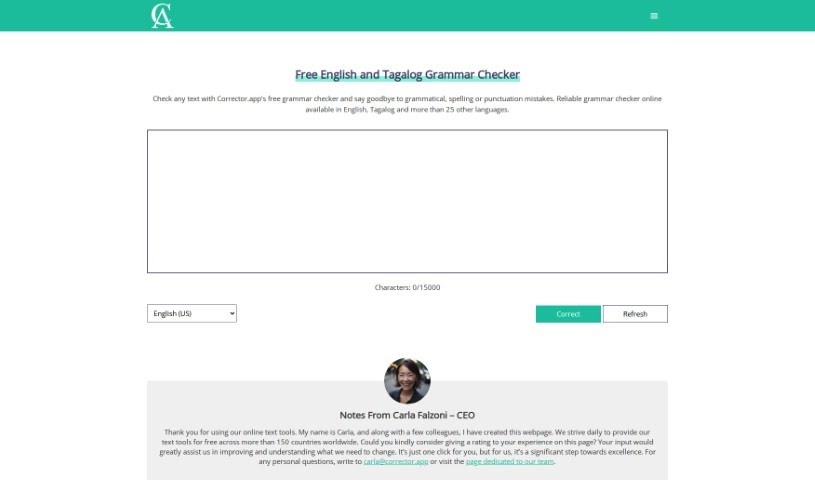
Screenshot of Corrector App

Corrector App

Discover what Corrector App is and how to use it effectively in 2025. We'll explore its features and see how it stacks up against other grammar checkers.

Screenshot

What is Corrector App?

Corrector App.app is a handy tool designed to help you catch and fix those pesky grammatical errors that often pop up in text written by AI programs, like GPT Chat. It even offers a free AI Content Detector, so you can spot and correct mistakes in AI-generated content without needing a human editor. The main goal here is to make sure your writing is error-free before you publish it, which really helps build trust and credibility. It’s super simple to use: just copy your AI-written text into the tool, and it’ll scan it for any issues with grammar, punctuation, or spelling. Plus, Corrector App.app works in over 27 languages, offering grammar and spelling tools that feel pretty familiar, much like Grammarly, making it a great option for writers working in different languages.

Who created Corrector App?

Carla Falzoni is the mind behind Corrector, and she also serves as the CEO. Working with her team, Carla built the Corrector webpage to offer free text tools that are accessible in over 150 countries around the world. If you have any personal questions or want to share some feedback, you can always reach out to Carla directly via email at [email protected]. The Corrector app provides grammar checking services across many languages, aiming to help users polish their writing by finding and fixing spelling and grammar mistakes.

What is Corrector App used for?

  • Catching and fixing errors in content generated by GPT Chat and other AI.
  • Spotting fake or AI-written content without needing a human touch.
  • Checking for mistakes in spelling, grammar, and punctuation.
  • Helping you produce high-quality, professional-sounding text quickly.
  • Analyzing thousands of words in mere milliseconds.
  • Providing grammar checks in more than 27 languages.
  • Correcting spelling mistakes.
  • Fixing those little grammar slip-ups.
  • Sorting out punctuation that’s a bit off.
  • Offering word suggestions to make your sentences flow better.
  • Identifying and correcting grammatical errors in content generated by GPT Chat and artificial intelligence.
  • Detecting fake or AI-generated content.
  • Proofreading your written text for grammar, punctuation, and spelling errors.
  • Checking thousands of words for errors in just milliseconds.
  • Providing word suggestions to improve sentence flow.
  • Spotting AI-generated typos.
  • Analyzing grammar, including tense, word order, and stylistic issues.
  • Checking punctuation for consistency and correctness.
  • Supporting spelling and grammar checks in over 27 languages.
  • Offering a free and easy-to-use service for grammar and punctuation checking.

Who is Corrector App for?

  • Writers working in German
  • Linguists specializing in Chinese
  • Polish speakers
  • Romanian writers
  • Tagalog speakers
  • Swedish writers
  • Dutch writers
  • Linguists working with Greek

How to use Corrector App?

Want to use Corrector App to proofread and fix grammar errors in your writing? It’s really straightforward:

  1. First, finish writing your text or open up the document you want to check.
  2. Then, select all the text you need to check – you can use CTRL + C for this.
  3. Now, paste that text right into the Corrector App using CTRL + V.
  4. Just hit the ‘Check Text’ button, and the tool will start analyzing.
  5. Any mistakes it finds will be highlighted in red. Click on them to see suggested corrections.
  6. You’ll see punctuation and smaller errors highlighted in yellow.
  7. Once you’ve made the necessary fixes, you can save your corrected text.

Since Corrector App is a free tool, you don’t even need to sign up for an account. It supports over 27 languages and uses modern technologies like HTML, PHP, and JavaScript, making it super convenient for both personal and professional use. It doesn’t just correct grammar; it also offers great suggestions for better word choices and helps you nail proper punctuation. You can access Corrector App anytime at corrector.app.

Related AI Tools

Discover more tools in similar categories that might interest you

Academic Help Free Essay Generator

Education Academic Writing
Learn More

Stay Updated with AI Tools

Get weekly updates on the latest AI tools, trends, and insights delivered to your inbox

Join 25,000+ AI enthusiasts. No spam, unsubscribe anytime.