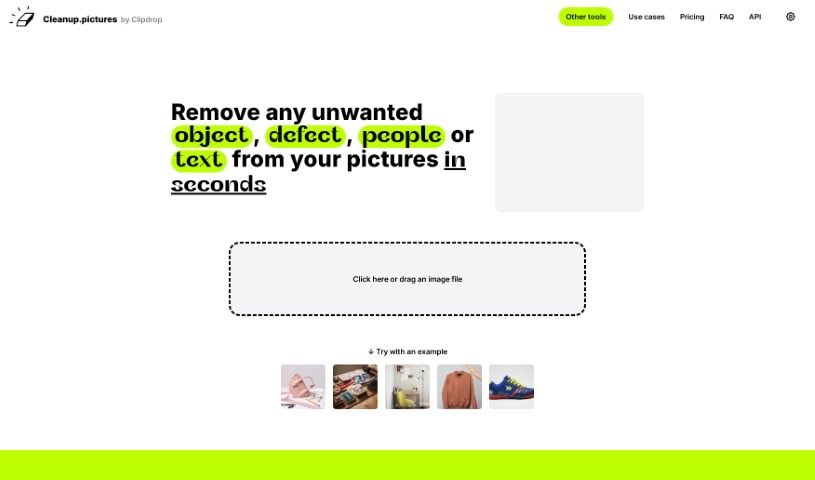
Screenshot of Cleanup Pictures

Cleanup Pictures

Discover what Cleanup Pictures is and how to use it effectively in 2025. Explore its features, compare it with other photo editors, and learn how it can help you create stunning visuals.

Screenshot

What is Cleanup Pictures?

Cleanup.Pictures is an online platform that uses advanced AI algorithms to remove unwanted objects, people, text, and defects from your photos. It’s designed to make photo retouching super easy – you just draw over the things you want gone, and the tool cleans them up seamlessly. No need for complicated software here! Cleanup.Pictures delivers high-quality results and is really user-friendly, so you can access it from pretty much any device. Plus, they’re serious about keeping your photos private and your data secure while they work their magic.

Who created Cleanup Pictures?

Dawn Veltri, who’s the Director of Marketing at Raek, created Cleanup Pictures. This advanced AI editing tool is all about helping users create stunning visuals by quickly editing photos without any messy smears or lines. It lets you effortlessly remove unwanted objects, people, text, logos, or watermarks from your images. Cleanup Pictures also offers a free version, with an option to upgrade for even better quality and processing of high-resolution images. You can get it for $5 a month or $36 a year, which covers processing images of any size.

What is Cleanup Pictures used for?

Cleanup Pictures is incredibly versatile and useful for:

  • E-Commerce: Making product images shine.
  • Real Estate: Cleaning up property photos by removing unwanted items or depersonalizing spaces.
  • Photographers: Perfecting shots by removing timestamps, tourists, or blemishes, and for high-quality background removal.
  • Creative Agencies: Quickly editing portraits, creating perfect profile pictures, and generally speeding up photo manipulation.
  • Developers: Integrating its powerful AI for image element removal into their own products, whether it’s for Node.js, SwiftUI, Kotlin, or other environments.

Essentially, you can use it to:

  • Remove people, objects, text, logos, date stamps, or watermarks from photos with professional results in just a few clicks.
  • Depersonalize and clean up photos of rooms, flats, houses, or apartments.
  • Remove blemishes or wrinkles from profile pictures to make them look their best.
  • Remix existing photos by replacing parts with your own content.
  • Create stunning visuals quickly and stay in your creative flow.
  • Manage your subscriptions easily.

It’s a fantastic tool for anyone looking to enhance their images efficiently.

Who is Cleanup Pictures for?

  • Photographers
  • Creative agencies
  • Real estate professionals
  • E-Commerce businesses
  • Developers looking to integrate powerful AI editing capabilities
  • Anyone who needs to quickly and easily clean up photos!

How to use Cleanup Pictures?

Using Cleanup Pictures is pretty straightforward. Here’s how you can get the most out of it:

  1. Removing People from a Photo:

    • First, head over to cleanup.pictures and upload the photo you want to edit.
    • Grab the brush tool – you might want to use a bigger brush to cover the entire area you want to remove, including any shadows the person might be casting.
    • The AI works its magic to create professional-looking results in just seconds.
  2. Removing Unwanted Objects:

    • Load your image onto cleanup.pictures.
    • Simply cover the unwanted objects you want to remove.
    • The AI algorithm is designed to reconstruct the background behind the removed objects with a single click, making it look like they were never there.
  3. Erasing Text, Logos, or Watermarks:

    • Just draw directly over the text or watermark on your image.
    • For the best results, make sure you draw over an area that’s slightly larger than the text or watermark itself.
  4. Removing Blemishes or Wrinkles:

    • Use the CleanUp brush to carefully remove blemishes or wrinkles.
    • Simply overflow the brush over the specific area, and then you can download your edited photo.
  5. Background Removal:

    • If you’re looking for the absolute best quality background removal, it’s recommended to use ClipDrop.
    • You can enjoy free background removal with impressive accuracy and high resolutions.
  6. Additional Tips for Great Results:

    • Don’t be afraid to let the brush overflow a bit – covering more than you think you need can actually lead to better results.
    • When removing watermarks, always be mindful of copyright restrictions.

By following these steps and tips, you’ll be able to efficiently use Cleanup Pictures to retouch and enhance your images, achieving professional results with real ease.

Related AI Tools

Discover more tools in similar categories that might interest you

123RF AI Image Generator

Creative Image Generation
Learn More

Stay Updated with AI Tools

Get weekly updates on the latest AI tools, trends, and insights delivered to your inbox

Join 25,000+ AI enthusiasts. No spam, unsubscribe anytime.