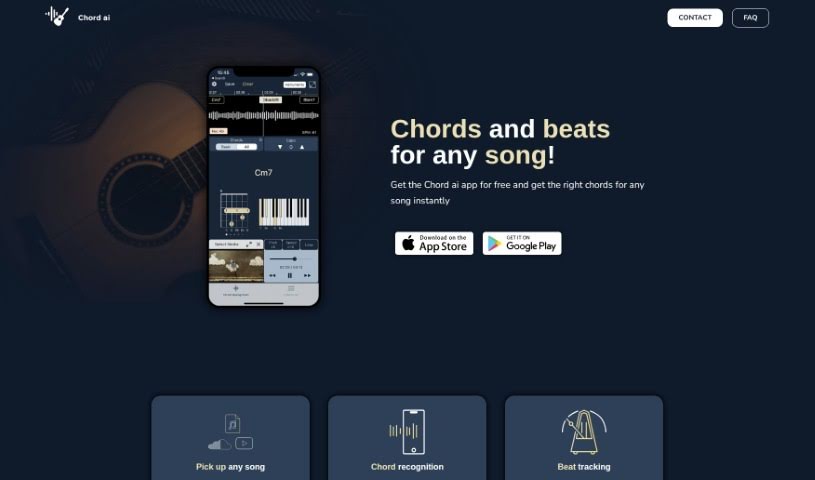
Screenshot of Chord AI

Chord AI

Discover Chord AI, a music companion app from Nomad AI and Bellec Research. Learn how to use its features like instant chord recognition, beat tracking, and instrument separation to enhance your music learning and playing experience.

Screenshot

What is Chord AI?

Chord AI is a really neat music companion app, brought to you by Nomad AI and Bellec Research. It is your personal music assistant! It uses some pretty advanced deep learning algorithms to instantly figure out the chords for any song you throw at it. Whether you’re listening on YouTube or SoundCloud, or even playing a song live through your device’s microphone, Chord AI can keep up. Beyond just chords and beats, it also tells you the song’s key, has a handy chord dictionary for instruments like guitar, piano, and ukulele, and can even separate audio files into individual instrument tracks. Plus, it can turn audio into MIDI using research from Spotify, and it offers top-notch speech and lyrics transcription thanks to OpenAI’s Whisper model. Basically, Chord AI is built to help musicians, no matter their skill level, learn, play, and just generally enjoy music more easily.

Who created Chord AI?

Chord AI was developed by Nomad AI and Bellec Research. You can check out Nomad AI’s work at https://www.nomadai.org/, and Guillaume Bellec’s personal site is at http://guillaume.bellec.eu/. This app is packed with features, including chord recognition, beat tracking, key recognition, a chord dictionary, instrument separation, and even audio-to-MIDI conversion. People who use the app really seem to love it, often mentioning how accurate and fast it is, and how easy the interface is to navigate. This positive feedback is reflected in its high ratings on both the Apple Store and Google Play Store.

What is Chord AI used for?

Chord AI is incredibly versatile for musicians. Here’s a breakdown of what you can do with it:

  • Chord Recognition: Instantly get the chords for any song you’re listening to.
  • Beat Tracking: Understand a song’s structure and tempo by tracking its beats.
  • Key Recognition: Figure out the song’s key based on the chords it detects.
  • Chord Dictionary: Access helpful chord diagrams for popular instruments like the guitar, piano, and ukulele.
  • Instrument Separation: Break down audio files into separate stems – think bass, vocals, drums, and other instruments.
  • Audio to MIDI Conversion: Transform your audio into MIDI files.
  • Lyrics Recognition: Get high-quality transcriptions of song lyrics using the powerful OpenAI’s Whisper model.
  • Real-Time Chord Recognition: See chords appear as the music plays.
  • Comprehensive Song Analysis: Get chords, beats, and lyrics for virtually any song.
  • Multitracks Separation: Isolate different parts of a song.

Who is Chord AI for?

Chord AI is a fantastic tool for anyone involved with music:

  • Musicians: Whether you’re a beginner or experienced, it helps with learning songs and understanding music theory.
  • Music Teachers: It’s a great resource for demonstrating concepts and helping students learn new pieces.
  • Music Students: Makes learning new songs and practicing much more accessible and engaging.

How to use Chord AI?

Getting started with Chord AI is pretty straightforward. Just follow these simple steps:

  1. First, download the Chord AI app. It’s available for free on both the Apple Store and Google Play Store.
  2. Next, you’ll need to load a song. You can pick one from YouTube, SoundCloud, or your own audio files. Alternatively, you can use your device’s microphone to play a song live.
  3. Chord AI then gets to work, using its advanced deep learning algorithms to accurately recognize the chords in the music.
  4. It also tracks the beats and downbeats, which helps it figure out the song’s tempo and break it down into manageable bars.
  5. The app is smart enough to identify the song’s key and can even show you chord diagrams for guitar, piano, and ukulele, making it super easy to play along.
  6. If you want to isolate specific parts of a song, the instrument separation feature lets you split the audio into stems like bass, vocals, drums, and other instruments.
  7. Want to turn audio into MIDI? Chord AI can do that too, based on research from Spotify.
  8. And for lyrics, you can enjoy high-quality transcriptions thanks to the OpenAI’s Whisper model.
  9. Finally, don’t hesitate to reach out! Users can contact the developers with feedback, report any bugs they find, or even suggest new features they’d like to see.

People really appreciate Chord AI for how accurate and fast it is, not to mention its user-friendly interface. It’s truly a valuable tool for musicians at every stage of their journey.

Related AI Tools

Discover more tools in similar categories that might interest you

Stay Updated with AI Tools

Get weekly updates on the latest AI tools, trends, and insights delivered to your inbox

Join 25,000+ AI enthusiasts. No spam, unsubscribe anytime.