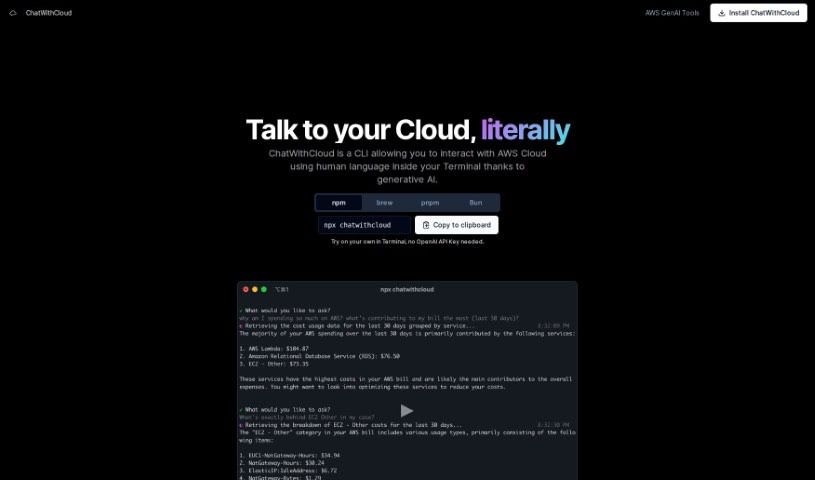
Screenshot of ChatWithCloud

ChatWithCloud

Discover what ChatWithCloud is and how to use it effectively in 2025. We'll explore its features and see how it stacks up against other IT professional tools.

Screenshot

What Exactly is ChatWithCloud?

ChatWithCloud is a handy Command-Line Interface (CLI) tool that uses generative AI. It is your personal assistant for Amazon Web Services (AWS) Cloud, letting you talk to it using everyday language. It’s pretty smart, understanding what you mean so you can do things like analyze costs, check security, figure out problems, and even fix infrastructure issues in your AWS setup. It can help you understand your AWS spending, boost your security, and suggest ways to save money. You can pay for it with a one-time lifetime license or a managed subscription.

Who’s Behind ChatWithCloud?

ChatWithCloud, the CLI tool that lets you chat with AWS using plain language, was developed by an individual or team who prefers to remain anonymous. It first appeared on January 15, 2024. This tool makes it possible to analyze costs, review security, troubleshoot issues, and fix problems within your AWS environment just by talking to it. You can get it with a one-time lifetime license or a managed subscription. It’s great for spotting spending trends, improving your security, and finding ways to optimize your AWS costs.

What Can You Do with ChatWithCloud?

Here’s a look at what ChatWithCloud is used for:

  • Cost Analysis: Understand where your AWS money is going.
  • Security Analysis: Check and improve your AWS security.
  • Troubleshooting: Figure out what’s wrong when things break.
  • Fixing Stuff: Directly address and resolve issues you find.
  • Lifetime License: Pay once and use it forever.
  • Managed Subscription: A flexible option for ongoing use.
  • No OpenAI Key Needed: We cover all the costs, so you don’t need your own OpenAI key.
  • Smarter Model & Better Responses: It uses an improved AI model for more accurate and helpful answers.
  • Identifies Spending Patterns: Helps you see trends in your AWS spending.
  • AWS Optimization Suggestions: Offers advice on how to make your AWS costs more efficient.
  • Bring Your Own OpenAI Key: If you prefer, you can connect your own OpenAI key.
  • Free Usage Trial: Try it out before you commit.
  • Data Modification: Not only can it read data, but it can also make changes.
  • Enhancing Security Posture: Actively works to make your AWS environment more secure.
  • Identifying Spending Patterns: Pinpoints where your money is being spent.
  • Analyzing IAM Policies: Reviews your AWS Identity and Access Management settings.
  • Generating Solutions for Infrastructure Issues: Provides answers and fixes for problems with your AWS setup.

Who Should Use ChatWithCloud?

This tool is a great fit for a variety of professionals:

  • Cloud Engineers
  • Data Analysts
  • IT Professionals
  • Infrastructure Managers
  • Anyone using AWS
  • AWS Cloud Professionals
  • Security Professionals
  • Beginners, regardless of their technical background
  • General AWS Professionals
  • Security Analysts
  • People who troubleshoot infrastructure

How Do You Use ChatWithCloud?

Getting started with ChatWithCloud is straightforward. Just follow these steps:

  1. Understanding ChatWithCloud: First off, ChatWithCloud is a Command-Line Interface (CLI) tool. It uses generative AI to let you talk to your Amazon Web Services (AWS) Cloud in plain English.
  2. Talking to AWS: You can interact directly with AWS from your terminal. This means you can easily do things like analyze costs, check security, troubleshoot problems, and fix infrastructure issues.
  3. What It Offers: The tool provides specific features for AWS cost analysis, security analysis, and troubleshooting. It’s designed to help you identify and fix all sorts of problems within your AWS setup.
  4. Easy for Everyone: ChatWithCloud is built to be user-friendly. Even if you’re new to AWS or don’t have deep technical knowledge, you can use it effectively.
  5. Making Changes: It’s not just for looking at data; ChatWithCloud can also modify it. This allows you to directly fix any issues you find in your AWS environment.
  6. Payment Options: You have two main ways to pay: a one-time fee for a lifetime license, or a managed subscription for unlimited use. Plus, there’s a free trial so you can test it out first.
  7. Special Perks: What makes ChatWithCloud stand out is its ability to use human language for AWS interactions. It also helps improve your security, spot spending trends, and suggests ways to fix infrastructure problems.
  8. Where to Get It: You can download ChatWithCloud from the npm website. It works with any terminal you use.

By following these simple steps, you can use ChatWithCloud to make interacting with AWS much easier. It’ll help you improve security, manage costs better, and fix infrastructure problems without a hitch.

Related AI Tools

Discover more tools in similar categories that might interest you

Stay Updated with AI Tools

Get weekly updates on the latest AI tools, trends, and insights delivered to your inbox

Join 25,000+ AI enthusiasts. No spam, unsubscribe anytime.