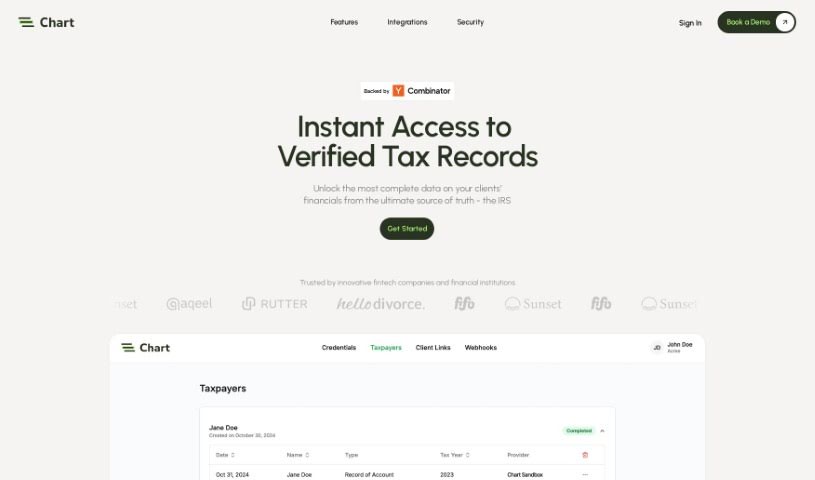
Screenshot of Chart

Chart

Discover what Chart is and how to use it effectively in 2025. Explore its features, compare it to other finance tools, and learn how it automates tax document collection for tech companies.

Screenshot

What is Chart?

So, what exactly is “Chart” in this context? Think of it as a specialized API service, built for tech companies. Its main job is to help you automate the process of collecting tax documents from your customers. It’s designed to give you real-time access to tax records by connecting directly with the IRS, various state tax agencies, and even major tax preparation software. Chart actually pulls tax returns straight from official government databases and these tax prep tools, which means you can be sure they’re authentic. Once it has the documents, Chart processes them and gives you the information back in a structured JSON format. Plus, for developers, Chart is pretty user-friendly. They offer SDKs for popular programming languages, sandbox environments to test things out, and really thorough documentation.

When it comes to how users submit their records, Chart gives you a few options: they can connect their online tax accounts (like with the IRS or state agencies), link up their tax preparation software, or simply upload PDF files. Security is a big deal for Chart, especially for businesses. They don’t store users’ login details, which is great for privacy. They also support major compliance frameworks and let users decide exactly which documents they want to share, giving you control over access.

Who created Chart?

While the specific individuals behind Chart aren’t named in the information provided, we know the company itself is focused on offering this API for real-time tax record access. They’ve tailored their services for tech-oriented businesses that need to automate collecting tax documents from their customers. As mentioned, Chart integrates with the IRS, state tax agencies, and popular tax preparation software to ensure the documents you get are authentic. They use OCR to process the returns, output them in structured JSON, and have strong enterprise-grade security measures, including not storing user credentials. The API is also built with compliance in mind and gives users fine-grained control over what information they share.

What is Chart used for?

Chart is really handy for a few key things:

  • Automating Tax Document Collection: It makes gathering tax documents from your customers much simpler.
  • Real-Time Tax Record Access: You can get up-to-date tax records directly from the IRS, state tax agencies, and tax preparation software.
  • Authentic Document Retrieval: It pulls tax returns straight from official government databases and tax prep tools, so you know they’re legitimate.
  • Easy Data Processing: Tax returns are processed automatically using OCR and then neatly organized into well-formed JSON objects.
  • Developer-Friendly Features: Chart provides SDKs in major programming languages, sandbox environments for testing, and detailed documentation.
  • Flexible Submission Options: Users can submit their records by connecting online tax accounts (IRS, state), linking tax prep software, or uploading PDF files.
  • Top-Notch Security: It offers enterprise-grade security, meaning user credentials aren’t stored. Plus, it complies with major security frameworks.
  • User Control Over Data: Users have granular access control, allowing them to choose exactly which documents they want to share.
  • PII Reduction: If needed, Chart can also obfuscate and anonymize Personally Identifiable Information (PII) data.

Essentially, it streamlines the entire process of getting and managing tax documents for your business.

Who is Chart for?

Chart is primarily designed for:

  • Tech-oriented companies looking to streamline their operations.
  • Developers who need reliable tools for integrating tax data.

How to use Chart?

Getting started with Chart is pretty straightforward. Here’s a quick rundown of the steps:

  1. Check Out the API Docs: First, head over to the Chart API documentation at https://developer.trychartapi.com/. This is your go-to resource for integrating tax record automation into your tech company.
  2. Get Real-Time Access: Chart connects directly with the IRS, state tax agencies, and major tax preparation software, giving you real-time access to tax records.
  3. Ensure Verified Documents: Chart retrieves tax returns straight from official government databases and tax prep tools, so you can trust their authenticity.
  4. Work with Structured JSON: Once retrieved, tax returns are automatically processed using OCR and then converted into clean JSON objects, making them easy to work with.
  5. Benefit from Developer-Friendly Tools: Chart offers a modern REST API, along with SDKs for popular languages, sandbox environments for testing, and comprehensive documentation.
  6. Choose Submission Methods: Users have several ways to submit their records: they can link their IRS and state online tax accounts, connect their tax preparation software, or simply upload PDF files.
  7. Rely on Enterprise-Grade Security: Chart keeps your users’ credentials non-persistent, meaning each session requires a fresh login. It also supports major compliance frameworks, and you can request reports on this.
  8. Manage Granular Access: Users can easily select which specific documents they want to share through a consent process managed by Chart.
  9. Reduce PII: If you need to, Chart can also obfuscate and anonymize personally identifiable information (PII) data upon request.

By following these steps, you’ll be able to effectively use Chart to automate how your company collects and manages tax documents.

Related AI Tools

Discover more tools in similar categories that might interest you

Stay Updated with AI Tools

Get weekly updates on the latest AI tools, trends, and insights delivered to your inbox

Join 25,000+ AI enthusiasts. No spam, unsubscribe anytime.