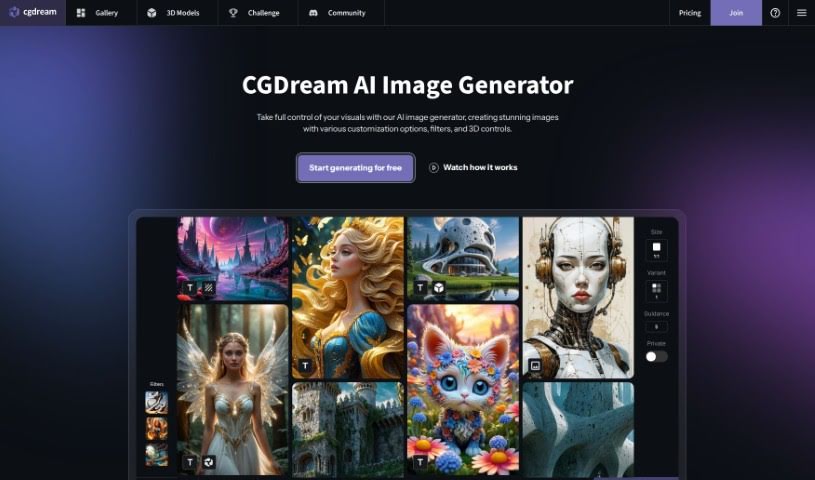
Screenshot of CGDream

CGDream

Discover CGDream in 2025! Learn what it is, how to use its features like filters and 3D models, and how it stacks up against other AI image generators.

Screenshot

What is CGDream?

CGDream is a really neat tool that lets you create images using text prompts, existing pictures, or even 3D models. It cleverly combines AI with 3D models, making it easier for you to bring your creative visions to life visually. You’ll find a bunch of handy features here, like filters to tweak your images, the ability to work with 3D models, tools to upscale your pictures for better quality, image-to-image transformations, and style transfer options. Plus, there’s DreamUp, which helps you quickly refine your prompts to generate really eye-catching images. CGDream is designed for everyone, whether you’re just starting out or you’re a seasoned pro, offering lots of ways to customize your creations and premium features for top-notch image quality.

Who created CGDream?

CGDream was actually developed by a team, headed up by someone named Anthony. Their company focuses on providing a free tool that helps people generate images from text, existing photos, and 3D models. Essentially, CGDream’s goal is to help you visualize your ideas by creating images for all sorts of creative projects – think art, social media content, or even advertising. The tool comes packed with features like filters, the ability to integrate 3D models, image upscaling, image-to-image transformations, and style transfers, all designed to make the creative process smoother for users at any skill level.

What is CGDream used for?

CGDream is super versatile and can be used for a whole range of things:

  • Advertising: Creating visuals for ads.
  • Upscaling image quality: Making your images sharper and more detailed.
  • Social media content: Generating posts and visuals for platforms.
  • Social media content creation: Streamlining the process of making social media assets.
  • Style Transfer: Applying the artistic style of one image to another.
  • Art creation: Helping artists bring their concepts to life.
  • Text to Image Transformation: Turning written descriptions into pictures.
  • Upscaling images: Improving the resolution and clarity of your photos.
  • Image to image conversion: Transforming existing images into new ones.
  • Creative visualization: Helping you see your ideas before they’re fully realized.
  • 3D model to image rendering: Creating images directly from 3D models.
  • Image filtering using AI: Applying AI-powered filters for unique looks.
  • Private image creation: Generating images for personal use.
  • Advertising visuals creation: Crafting specific visuals for advertising campaigns.
  • Marketing visuals creation: Developing images for marketing materials.
  • Image-to-image transformations: Modifying existing images.
  • 3D model integration for image creation: Using 3D models as a base for your images.
  • Style transfer capabilities for images: Applying artistic styles to your photos.
  • Creating visuals from text prompts: Turning your words into images.
  • Enhancing images with filters and upscaled versions: Improving images with various tools.
  • Art challenges and competitions: Creating entries for creative contests.
  • Style transfer capabilities: Using this feature to experiment with artistic styles.
  • Advertising design: Assisting with the design of advertising materials.
  • Visual project creation: Helping to build visuals for any kind of project.
  • Transforming text into images: A core function for creative output.
  • Image enhancement with filters: Using filters to improve image appearance.
  • Image-to-image transformation: A key feature for image manipulation.
  • Transforming text to images: The fundamental text-to-image capability.
  • Transforming 3D models to images: A unique way to generate visuals.
  • Upscaling images with added clarity and detail: Getting the best possible quality from your images.

Who is CGDream for?

CGDream is a great tool for a variety of creative individuals and professionals:

  • Artists looking for new ways to visualize their work.
  • Social media content creators needing engaging visuals.
  • Advertisers wanting to produce eye-catching campaigns.
  • Social media managers managing brand presence online.
  • Creative professionals across different industries.
  • Graphic designers seeking efficient image generation tools.
  • Designers of all types needing visual assets.
  • Marketers aiming to create compelling promotional materials.
  • Content creators in general, for any visual needs.
  • Advertising professionals working on campaigns.

How to use CGDream?

Getting started with CGDream is pretty straightforward. Here’s a quick rundown of the steps:

  1. Starting the Creation Process:
    • First, you’ll want to pick a 3D model from the available options or upload one of your own.
    • Then, you can adjust the scene and give the tool some guidance on exactly what you’re hoping to create.
  2. Filters:
    • Once you’re working on an image, you can easily apply filters to give it a specific look or enhance its appearance.
  3. Upscale:
    • If you need your image to be clearer and have more detail, there’s an upscaling option you can use with just a click.
  4. Image-to-Image and Style Transfer:
    • CGDream offers powerful features that let you transform existing images or apply the style of one image to another.
  5. DreamUp:
    • For faster image creation, you can use DreamUp, which helps refine your prompts to get better results more quickly.
  6. Premium Quality:
    • If you opt for premium access, you’ll get to enjoy higher-quality image generation.
  7. Troubleshooting (if you get stuck):
    • Sometimes things don’t work as expected. If you’re having trouble, try refreshing the page.
    • You can also try canceling your current action and retrying it.
    • Clearing your browser’s cache can often resolve issues.
    • Sometimes, simply trying a different web browser can help.
    • If problems continue, don’t hesitate to contact customer support.
  8. Image Deletion:
    • To remove an image you’ve created, just log in, find the image you want to delete, and click the “Delete” button.
  9. FAQs:
    • If you have questions, the FAQ section is a great place to learn more about CGDream, its various uses, the advantages of premium features, how to customize your creations, and common troubleshooting tips.
  10. Top Features:
    • You can explore all the great things CGDream offers, like its user-friendly interface, the handy filters, 3D model integration, image upscaling capabilities, and much more.

Overall, CGDream is a really flexible tool for making images with AI, 3D models, filters, and lots of customization. It’s designed to be easy for both beginners and professionals, helping you really let your creativity flow and bring your ideas to life without a hassle.

Related AI Tools

Discover more tools in similar categories that might interest you

123RF AI Image Generator

Creative Image Generation
Learn More

Stay Updated with AI Tools

Get weekly updates on the latest AI tools, trends, and insights delivered to your inbox

Join 25,000+ AI enthusiasts. No spam, unsubscribe anytime.