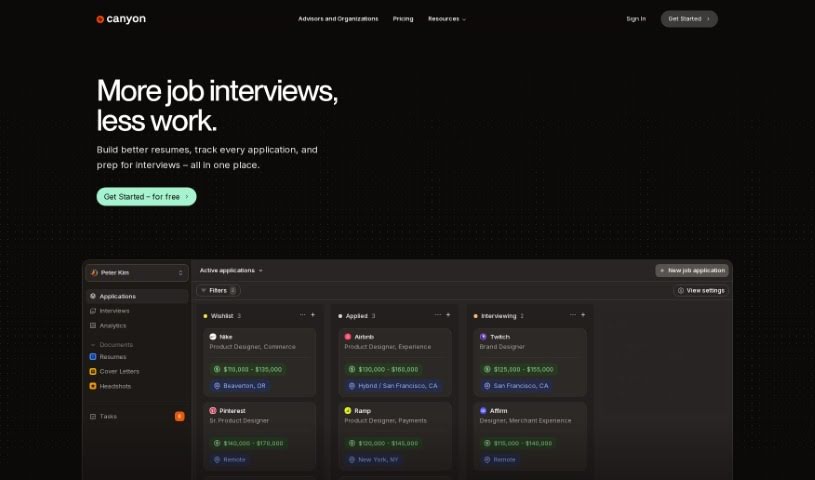
Screenshot of Canyon

Canyon

Discover what Canyon is and how to use it effectively in 2025. Explore its features, compare it to other resume builders, and learn how it can boost your job search.

Screenshot

What is Canyon?

Canyon is your all-in-one toolkit designed specifically for job seekers. It helps you manage your job applications, build great resumes, practice your interview skills, and so much more. It is your personal career assistant!

Key features include:

  • Resume Builder: Easily create and fine-tune your resumes to make them shine.
  • Job Application Tracker: Keep all your applications neatly organized in one place.
  • Practice Interview Section: Get ready for both technical and behavioral interviews with tailored practice.

But that’s not all! Canyon also offers:

  • Resume Score™: Get instant feedback on your resume to improve it on the spot.
  • Cover Letter Generator: Quickly create cover letters that match your job applications.
  • ATS Optimizer: Make sure your resume gets past the initial screening by Applicant Tracking Systems.
  • Mock Interviews: Practice interviews that are customized to the specific job descriptions and your own background.

The platform uses AI and Large Language Models to really boost your job search, giving you a better shot at landing the roles you want. Canyon is all about helping you succeed by building smart tools for job seekers. They offer different plans, like the Starter plan with basic tracking, and the Pro plan which gives you unlimited resume tweaks, application tracking, mock interviews, and soon, insights and analytics. You can cancel your plan whenever you need to, and your payments are super secure thanks to Stripe.

Who created Canyon?

Canyon was started by a team who wanted to build the next generation of tools for people looking for jobs. They’ve integrated advanced tech like Large Language Models and AI to make the whole application process smoother. Canyon helps you with things like optimizing your resume, keeping track of applications, practicing interviews, and writing cover letters. Their goal is to help you land your dream job, efficiently and effectively.

What is Canyon used for?

Canyon is your go-to for:

  • Building resumes without the hassle.
  • Tracking all your job applications in one spot.
  • Practicing interviews for any kind of role.
  • Tailoring your resumes perfectly to specific job descriptions.
  • Applying to more jobs faster using their handy Chrome extension.
  • Generating cover letters that are spot-on for each job.
  • Getting your resumes past Applicant Tracking Systems (ATS) with their optimization tools.
  • Preparing for interviews with practice questions made just for you.
  • Getting detailed analytics and helpful suggestions to guide your search.
  • Managing and tracking all your applications easily.

How to use Canyon?

Here’s a simple guide to get the most out of Canyon:

  1. Sign Up for Free: First, create your account on the Canyon platform. This gives you access to everything, like the Resume Builder, Job Application Tracking, and Mock Interviews.
  2. Build Your Resume: Use the Resume Builder tool. It makes creating and optimizing your resume super easy, following all the industry standards.
  3. Track Job Applications: Keep all your job applications organized in one place with the tracking feature. It really helps with managing everything.
  4. Practice Interviews: Get ready for your interviews! Use Canyon’s Practice Interviews tool, which is tailored for different kinds of roles, covering both technical and behavioral questions.
  5. Optimize with Canyon Score™: Want to know how good your resume is? Use the Canyon Score for real-time feedback based on industry best practices.
  6. Customize for Job Descriptions: Make your resumes perfect for each specific job. The optimization feature lets you tailor them effortlessly.
  7. Apply Efficiently: Speed up your job applications! The Chrome extension’s Auto-fill feature lets you apply to many jobs quickly across different job boards.
  8. Use Embedded Intelligence: Take advantage of the built-in AI. It’s designed to really boost your chances of landing that job you’ve been wanting.
  9. Generate Cover Letters: Need a cover letter? Canyon can generate personalized ones that match job descriptions and your background, helping you stand out.
  10. ATS Optimization: Make sure your resume gets seen. Optimize it with Canyon to ensure it passes through Applicant Tracking Systems (ATS).
  11. Prepare for Interviews: Get interview-ready with practice questions customized to the job descriptions and your own profile.
  12. Analytics and Suggestions: Make smarter decisions. You’ll get detailed analytics and practical advice to guide your entire job search.
  13. Choose a Plan: Pick the plan that fits you best. The Starter plan is great for limited use, while the Pro plan offers unlimited access and extra insights.
  14. Payment and Support: You can pay securely with a credit card through Stripe. If you’re a student, you can ask about discounts by contacting support with your .edu email address.

By following these steps, you can really make Canyon work for you, streamlining your job search and improving your chances of landing that dream job!

Related AI Tools

Discover more tools in similar categories that might interest you

Adaface AI Resume Parser

Human Resource Recruitment
Learn More

Stay Updated with AI Tools

Get weekly updates on the latest AI tools, trends, and insights delivered to your inbox

Join 25,000+ AI enthusiasts. No spam, unsubscribe anytime.