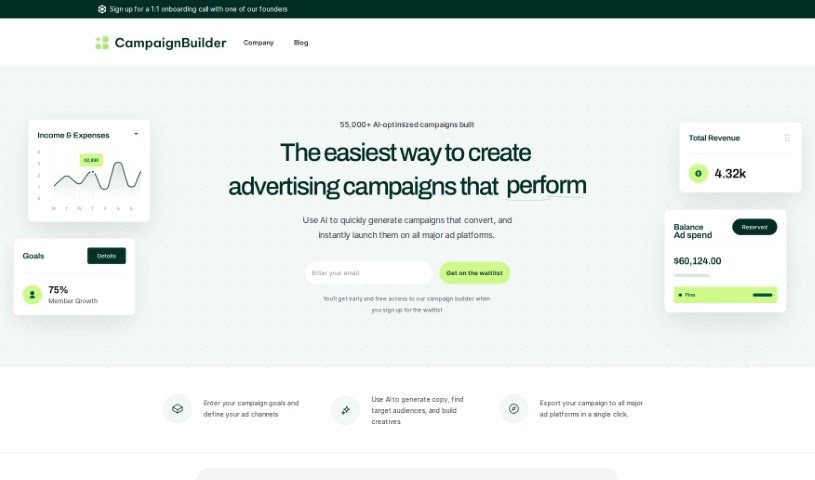
Screenshot of Campaignbuilder

Campaignbuilder

Discover what Campaignbuilder is and how to use it effectively in 2025. Explore its features and see how it stacks up against other Digital Marketing Tools.

Screenshot

What is Campaignbuilder?

CampaignBuilder.AI is a smart tool that uses AI to help you build really effective ad campaigns, fast. It’s super easy to use, even if you’re new to digital marketing. The platform helps you whip up ad copy, figure out who to target, and even create visuals. What’s really neat is that you can export your finished campaigns to major ad platforms with just one click, and it automatically adjusts everything to fit each platform. Plus, it handles the whole customer journey – from grabbing attention to getting people to buy. You can create full-funnel PPC campaigns, and you’re in control of all the settings, your budget, and who you’re trying to reach. It works with Google, YouTube, Meta, TikTok, Twitter, and LinkedIn. People seem to really like how efficient and time-saving it is, calling it a great all-around AI tool for making high-performing ad campaigns.

Who created Campaignbuilder?

CampaignBuilder was actually created by a company called MAND! technologies B.V. They launched CampaignBuilder.AI on September 16, 2023. It’s their AI-powered tool built to help people create super-optimized ad campaigns efficiently. The idea is that you can easily create lots of campaigns at once, launch them on the big ad platforms, and take advantage of its handy export features. CampaignBuilder.AI is designed to be straightforward and works well for marketers at any experience level.

What is Campaignbuilder used for?

CampaignBuilder is your go-to for:

  • Building Ad Campaigns Quickly: Get highly optimized ad campaigns up and running efficiently.
  • Bulk Campaign Creation & Launch: Create multiple campaigns at once and launch them across major ad platforms.
  • AI-Powered Content: Use AI to generate ad copy, pinpoint your target audiences, and create visuals.
  • One-Click Export: Send your campaigns to any major ad platform with a single click, with settings automatically adjusted.
  • Full-Funnel Strategy: Manage your campaigns across the entire customer journey, from initial awareness to final conversion.
  • Capturing Attention: Grab your audience’s interest right from the start.
  • Engaging Audiences: Connect with specific target groups effectively.
  • Nurturing Leads: Guide potential customers through the funnel with personalized messages.
  • Driving Conversions: Encourage customers to complete their purchases.
  • Retargeting: Bring back customers who might have left before buying.
  • User-Friendly Design: It’s made to be easy for marketers of all skill levels.
  • Boosting Performance: Create ad campaigns that really perform well across different platforms.

Essentially, it helps you generate campaigns in bulk, launch them everywhere, use AI for creative elements, and manage the whole customer journey from start to finish. This includes capturing attention, engaging audiences, nurturing leads, and driving those final conversions through personalized messaging and retargeting. It’s all about making sure you connect with people at every stage, from the top of the funnel all the way down to the bottom.

Who is Campaignbuilder for?

This tool is perfect for:

  • Marketers
  • Advertisers
  • Campaign managers
  • Business owners
  • Marketing specialists
  • And really, any marketer, no matter their experience level!

How to use Campaignbuilder?

Here’s a straightforward way to get the most out of CampaignBuilder:

  1. Log In: First, just head over to the CampaignBuilder platform and log in with your details.
  2. Pick Your Campaign: Decide what kind of campaign you want to build. Maybe it’s PPC advertising, or perhaps another option the tool offers.
  3. Set It Up: Next, define your campaign’s specifics. This includes your budget, who you want to reach (your target audience), and which advertising channels you’ll use – think Google, YouTube, Meta, TikTok, Twitter, and LinkedIn.
  4. Create Your Ads: Now, let the AI do its magic! Use the built-in features to craft engaging ad copy, eye-catching visuals, and precise target audience segments. You can base this on interests, keywords, your brand, or product info.
  5. Export with Ease: Once your campaign looks good, export it to your chosen ad platform. It’s a one-click process, and the tool automatically handles the platform-specific settings for you.
  6. Full-Funnel Strategy: Make sure to use the full-funnel features. This helps you connect with people at every stage of their journey, from getting their attention to encouraging them to convert and even retargeting them if they didn’t finish.
  7. Watch and Adjust: Keep an eye on how your campaigns are performing right within CampaignBuilder. Make tweaks as needed to get even better results.

People often mention how efficient and easy to use CampaignBuilder.AI is, making it a great choice for creating successful ad campaigns across many different platforms, regardless of your marketing background.

Related AI Tools

Discover more tools in similar categories that might interest you

Stay Updated with AI Tools

Get weekly updates on the latest AI tools, trends, and insights delivered to your inbox

Join 25,000+ AI enthusiasts. No spam, unsubscribe anytime.