04-X
Text Generation Chatbots
Learn more
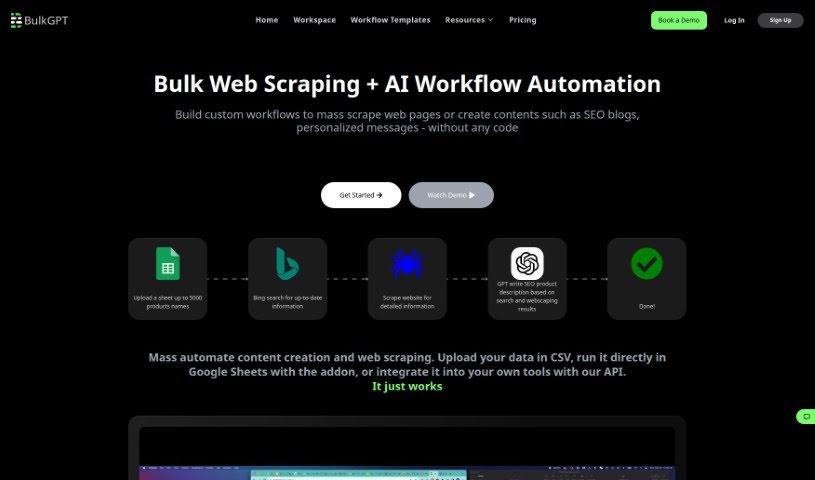
Discover what BulkGPT is and how it automates bulk ChatGPT requests, custom AI workflows, and large-scale content creation and data analysis.
BulkGPT is a tool for handling large volumes of AI-generated content. Instead of sending requests to ChatGPT one at a time, it lets you create and process multiple items simultaneously, with its AI Workflow Builder managing up to 5,000 tasks at once. Data can be imported via CSV or JSON files, and results exported in the same formats. It suits use cases such as e-commerce product descriptions and research projects involving extensive data analysis.
BulkGPT was developed by a company called BulkGPT, which builds no-code solutions for data scraping and AI workflow automation. The platform focuses on generating SEO-optimized content and product descriptions and analyzing large datasets. Core features include the AI Workflow Builder, bulk task processing, parallel processing, and support for multiple file types.
Typical uses include:
Upload your ChatGPT inputs as a CSV or JSON file, or enter them manually through the input task splitter. Then create a ChatGPT job, select your inputs, and BulkGPT processes the batch requests concurrently. Completed data can be downloaded in the format you need and put to use right away.
You can also build custom AI Workflows that chain tasks together, such as ChatGPT calls, Bing Search lookups, and website scraping. Up to 5,000 tasks can be submitted in a single bulk request. With parallel processing supporting up to 10 threads, BulkGPT can process roughly 1,000 tasks in about 50 minutes. Processing is asynchronous: once tasks are submitted, you can monitor their progress from the cloud while working on other things. Results can be exported in CSV, JSON, HTML, Markdown, and TXT formats for easy integration with existing workflows.
Related
Discover more tools in similar categories
Weekly picks of the best AI tools we've researched and added — no spam, unsubscribe anytime.
Join 25,000+ AI enthusiasts. No spam, unsubscribe anytime.